EasyManua.ls Logo

NETGEAR GS348PP - User Manual

NETGEAR GS348PP
2 pages
Print Icon
To Next Page IconTo Next Page
Loading...
NETGEAR, Inc.
350 East Plumeria Drive
San Jose, CA 95134, USA
NETGEAR INTERNATIONAL LTD
Floor 1, Building 3,
University Technology Centre
Curraheen Road, Cork,
T12EF21, Ireland
Installation Guide
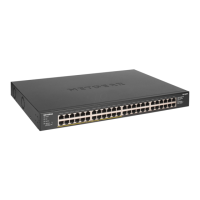
48-Port Gigabit Ethernet Unmanaged
PoE+ Switch with 24-Port PoE+ (380W)
Model GS348PP
Package contents
Switch model GS348PP
Power cord (varies by region)
Rack-mount kit with four rubber feet
Installation guide
Note: We recommend that you use Category 5e (Cat 5e) cable or higher for
Gigabit Ethernet connections.
1. Register with the NETGEAR Insight app
1. Search for NETGEAR Insight and download the latest app.
2. Set up a NETGEAR account if you do not have one.
3. Tap the menu in the upper-left corner.
4. Tap REGISTER ANY NETGEAR DEVICE.
5. Enter the serial number located on the bottom of the switch, or use the
camera on your mobile device to scan the serial number bar code.
6. Tap GO.
The switch is registered and added to your account. You can now view the
switch in the NETGEAR Insight app.
Note: Because this is an unmanaged switch, you cannot congure or manage it
in NETGEAR Insight.
2. Connect the switch
VoIP phone
Internet
GS348PP switch
Sample connections
Security cameras
Access point
Router
3. Check the LEDs
When you connect the power cord to the switch and plug it into an electrical
outlet, the LEDs indicate the status.
The GS348PP provides PoE+ or PoE power on ports 1–24 up to 30W to each port,
with a PoE power budget of 380W across all active PoE ports.
LED
Description
Power
On. The switch is receiving power.
Off The switch is not receiving power.
Ethernet
(RJ Port in
Link/ACT
Mode)
Green.1000 Mbps link on this port.
Blinking. 1000 Mbps activity on this port.
Yellow. 100 Mbps or 10 Mbps link on this port.
Blinking. 100 Mbps or 10 Mbps activity on this port.
Off. No link is detected on this port.
PoE+
(RJ Port in
PoE Mode)
Green. PoE+ is in use.
Yellow. PoE+ halted.
Off. PoE+ is not in use on this port.
Fan
On. There is a fan error.
Off. The fan is working correctly.
PoE Max
Indicates the status of the switch’s PoE budget:
Off. Sufcient. More than 7W of PoE power is available.
On. Less than 7W of PoE power is available.
Blinking. At least once during the previous two minutes,
less than 7W of PoE power was available.
LED Mode
Green. Port is in Link/Act Mode.
Yellow. Port is in PoE Mode.
Computer
Internet
PoE+
Ethernet

Question and Answer IconNeed help?

Do you have a question about the NETGEAR GS348PP and is the answer not in the manual?

Overview

This document describes the NETGEAR GS348PP, a 48-Port Gigabit Ethernet Unmanaged PoE+ Switch with 24-Port PoE+ (380W).

Function Description:

The NETGEAR GS348PP is an unmanaged network switch designed to provide Gigabit Ethernet connectivity and Power over Ethernet Plus (PoE+) capabilities. It features 48 RJ-45 Gigabit Ethernet ports, with 24 of these ports supporting PoE and PoE+. The switch is ideal for small to medium-sized businesses that need to power devices such as VoIP phones, wireless access points, and security cameras directly through the network cable, eliminating the need for separate power outlets for these devices. As an unmanaged switch, it offers plug-and-play simplicity without requiring complex configuration, though it can be registered with the NETGEAR Insight app for basic monitoring.

Important Technical Specifications:

  • Model: GS348PP
  • Network Interfaces: 48 Gigabit Ethernet RJ-45 ports (supporting 1G, 100M, and 10M), with 24 PoE/PoE+ ports.
  • PoE+ Capability: Provides PoE+ or PoE power on ports 1-24, delivering up to 30W to each port.
  • Max PoE Budget: 380W across all active PoE ports.
  • Power Input: 100-240VAC, 8A max.
  • Dimensions (W x D x H): 17.3 x 12.2 x 1.7 in. (440 x 310 x 43 mm).
  • Weight: 10.1 lb (4.56 kg).
  • Operating Temperature: 32-113°F (0-45°C).
  • Operating Humidity: 10%-90% relative humidity, noncondensing.
  • Compliance: FCC class A, CB, CE class A, VCCI class A, RCM class A, KC, BSMI.
  • Cable Recommendation: Category 5e (Cat 5e) or higher for Gigabit Ethernet connections.

Usage Features:

  • Plug-and-Play Operation: As an unmanaged switch, the GS348PP requires no software configuration, making it easy to deploy.
  • PoE+ Prioritization: PoE and PoE+ power is prioritized in ascending port order (Ports 1-24). If the total power requirements of attached Powered Devices (PDs) exceed the 380W budget, PDs on higher-numbered ports will be disabled first to ensure power to lower-numbered, higher-priority ports.
  • Flexible Power Delivery: The switch supports various PoE power classes, from very low power (0.44W-3.84W) to high power (12.95W-25.5W), allowing for efficient power distribution based on device needs.
  • LED Indicators: Comprehensive LED indicators provide real-time status updates:
    • Power LED: On (receiving power), Off (not receiving power).
    • Ethernet (Link/ACT) LEDs (Green/Yellow): Green (1000 Mbps link), Blinking Green (1000 Mbps activity), Yellow (100 Mbps or 10 Mbps link), Blinking Yellow (100 Mbps or 10 Mbps activity), Off (no link).
    • PoE+ (PoE Mode) LEDs (Green/Yellow): Green (PoE+ in use), Yellow (PoE+ halted), Off (PoE+ not in use).
    • Fan LED: On (fan error), Off (fan working correctly).
    • PoE Max LED: Indicates the PoE budget status: Off (sufficient, >7W available), On (less than 7W available), Blinking (at least once in previous 2 minutes, less than 7W available).
    • LED Mode: Green (Link/Act Mode), Yellow (PoE Mode).
  • NETGEAR Insight App Integration: Users can register the switch with the NETGEAR Insight app to view its status, although configuration and management are not supported for this unmanaged model. This provides a convenient way to monitor the switch from a mobile device.
  • Rack-Mountable: The switch comes with a rack-mount kit, allowing for secure installation in a standard equipment rack. The installation process involves attaching mounting brackets to the switch and then securing the switch to the rack using pan-head screws.

Maintenance Features:

  • Troubleshooting LEDs: The detailed LED indicators are crucial for diagnosing network and PoE issues. For instance, a solid yellow PoE Max LED suggests PoE oversubscription, prompting the user to disconnect one or more PoE devices. A solid yellow PoE+ LED on a specific port indicates a PoE fault, which could be due to a short circuit, excessive power demand, current exceeding classification limit, or out-of-range voltage.
  • Cable Management: If a device receives insufficient PoE power, using a shorter Category 5e or higher cable is recommended, as cable length can affect power delivery.
  • Fault Resolution: For PoE faults, the recommended solutions include checking the attached Powered Device (PD), restarting the PD by disconnecting and reconnecting it, or restarting the switch itself to resolve the condition.
  • Fan Monitoring: The Fan LED provides a direct indication of fan health, alerting users to potential cooling issues.

The GS348PP is designed for reliability and ease of use, making it a practical choice for expanding network capabilities with integrated power delivery.

NETGEAR GS348PP Specifications

General IconGeneral
BrandNETGEAR
ModelGS348PP
CategorySwitch
LanguageEnglish

Related product manuals