Management Port
Your UX comes equipped with a single Management Port which is located adjacent to the bottom set of four Gigabit Ethernet (E1 - E4) ports.
UX USB Ports
Survivable Branch Appliance (SBA) USB Ports
The two SBA USB ports located on the right-hand side of the front panel .....
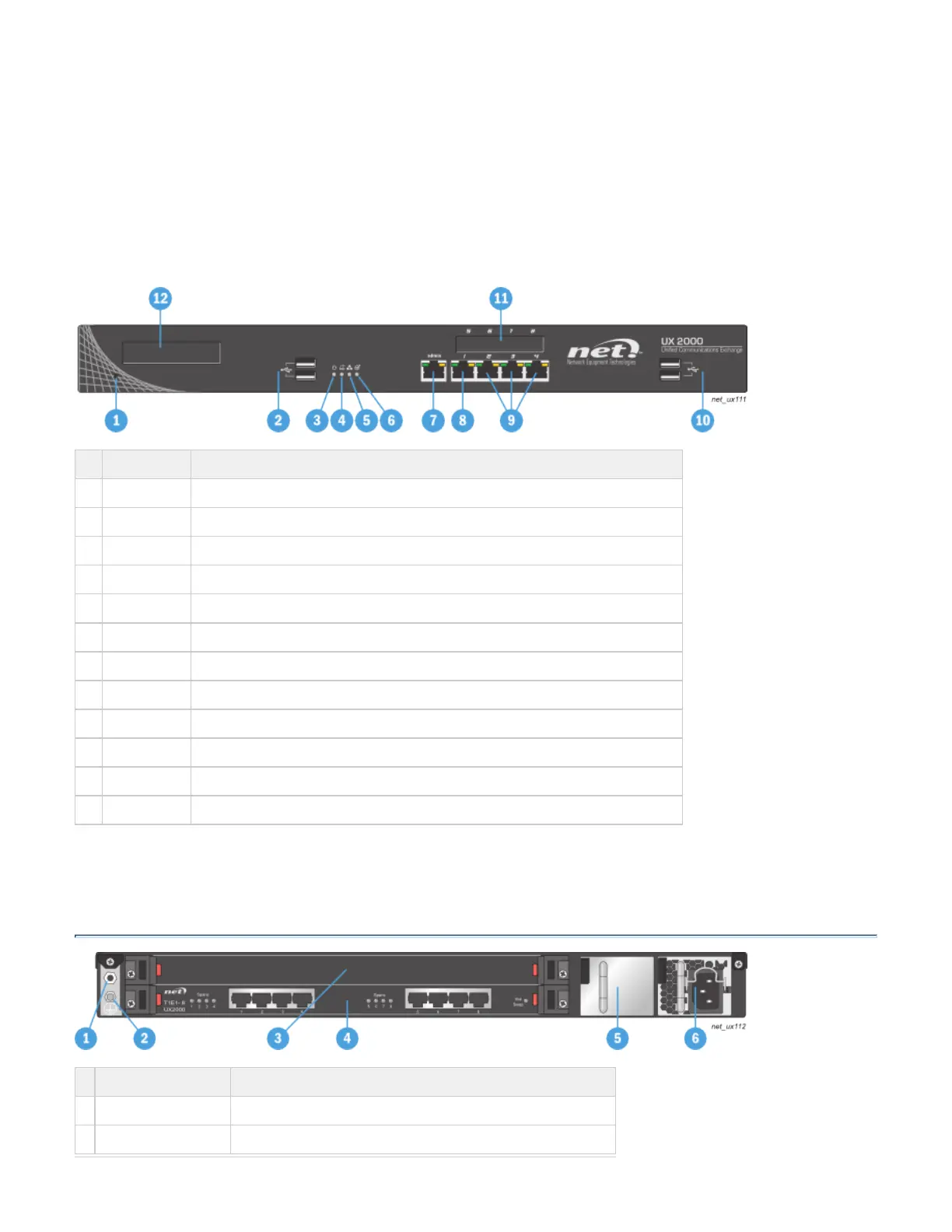
# Name Description
1 Reset System reset button. For more information, see .Resetting Configuration to Factory Defaults
2 USB Ports USB ports for UX main board
3 Power Power Status LED
4 Alarm Alarm Status LED
5 Peer Node Peer Node Status LED
6 Ready Ready Status LED
7 Admin System Administration Ethernet Port
8 Port 1 Primary Application Ethernet Port 1
9 Ports 2 - 4 Ethernet Ports 2 - 4
10 USB Ports USB ports for Application Service Module (when installed)
11 Expansion Bay Networking expansion bay
12 Expansion Bay Future expansion bay
UX2000 Rear Panel
This section describes the expansion slots, power supply bays, and other connectors found on the rear of the UX chassis.
# Name Description / Notes
1 ESD Plug Grounding plug for Electro Static Discharge (ESD) protection wrist strap
2 Ground Bolt Grounding bolt for chassis grounding


 To Next Page