EasyManua.ls Logo

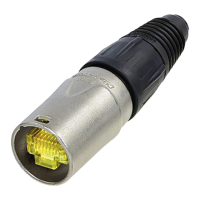
NEUTRIK etherCON NE8MX-B-1 - User Manual

NEUTRIK etherCON NE8MX-B-1
2 pages
Print Icon
To Next Page IconTo Next Page
Loading...
Slide the bushing over the cable.
Assemble the RJ45 plug on the cable.
Cut off the release tab of RJ45 plug.
Put chuck onto the cable.the
Align the opening with the contact side.
Position the RJ45 in the chuck.
Attention:
RJ45 must be straight.
Special versions must engage in the
inner recess of the chuck.
A
B
ASSEMBLY INSTRUCTION
®
etherCON NE8MX-1 & NE8MX-B-1
|
Ruggedized RJ45 Data Cable Connector Carrier
R
C
A
B
D
Page 1BDA 564
STANDARD
VERSION
SPECIAL
VERSION
1
2
B1
1
2
1
D
STANDARD
VERSION
SPECIAL
VERSION
B1
C
D
Question and Answer IconNeed help?

Do you have a question about the NEUTRIK etherCON NE8MX-B-1 and is the answer not in the manual?

Summary

Assembly Instructions

Prepare Cable and RJ45 Plug

Slide the bushing over the cable and assemble the RJ45 plug, cutting off the release tab if necessary.

Attach Chuck and Position RJ45

Put the chuck onto the cable, align it, and position the RJ45 plug straight in the chuck.

Final Assembly Steps

Position Bushing and Slide Unit

Position the bushing onto the chuck and slide the insert/boot into the housing.

Tighten Bushing and Cautions

Tighten the bushing to the specified torque and adhere to the caution regarding overlap.

NEUTRIK etherCON NE8MX-B-1 Specifications

General IconGeneral
BrandNEUTRIK
ModeletherCON NE8MX-B-1
CategoryCables and connectors
LanguageEnglish

Related product manuals