WATT (PROGRAMME 14)
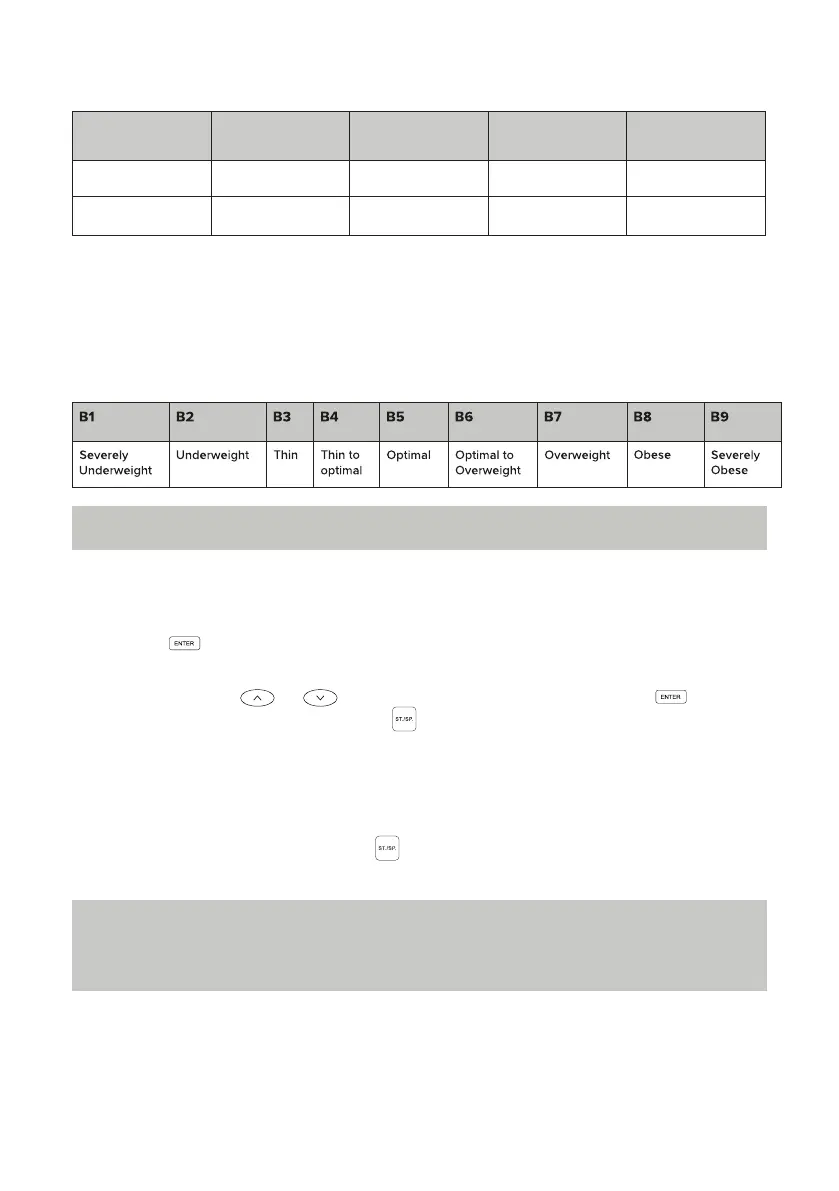
BODY FAT (BODY FAT PERCENTAGE)
BODY TYPE (COMPREHENSIVE TYPE)
1. Press the button to enter the setting mode.
2. In the settings mode, the setting order is as follows: TIME > DISTANCE > STROKES
> WATT. Press the or to toggle through functions. Press the button
to select the next item and press the to start the exercise. During exercise, the
resistance will adjust automatically to match the WATT value set.
3. If any item (TIME, DISTANCE) is set, this item will be displayed as a countdown
during exercise. Once the count reaches zero, the exercise will automatically stop
with a sound prompt of a double beep.
4. During exercise, you can press the button to stop running the device at any time.
BMR (Basal Metabolic Rate, i.e., the average amount of calories consumed to maintain
the basic living condition every day)
Reference value: 1,300 ± 100 (22~40 years old)
Note: Readings provided by this device should only be used as guidance only and
not for medical indication.
Note: The watt value is determined by both torque and speed. In this programme,
the watt value will remain constant, which means that if the stroke speed is high, the
load resistance will decrease, and if the stroke speed is low, the load resistance will
increase, to ensure that the watt value be constant.
GENDER LOW MEDIUM MEDIUM/HIGH HIGH
Male < 13% 13% - 25.9% 26% - 30% > 30%
Female < 23% 23% - 35.9% 36% - 40% > 40%


 To Next Page