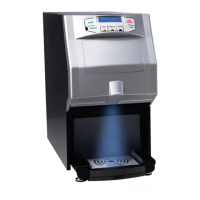
This document is the user manual for the Café Espresso 2.0 commercial coffee machine, manufactured by Newco Enterprises Inc. The machine is designed to brew various espresso-based beverages and offers a range of customizable settings and maintenance features.
Function Description
The Café Espresso 2.0 is a fully automatic espresso machine capable of preparing a wide variety of coffee and milk-based drinks. Users can select desired beverages from a touchscreen interface. The machine grinds whole beans on demand, dispenses coffee, warm milk, milk foam, and hot water according to programmed recipes. It also supports the use of pre-ground coffee. The dispense column is adjustable to accommodate different cup heights.
Important Technical Specifications
- Model: Café Espresso 2.0 (PN 152874)
- Manufacturer: Newco Enterprises Inc.
- Dimensions:
- Height: 22 3/4 inches
- Width: 16 3/4 inches
- Depth: 19 3/4 inches
- Weight: 51 lbs (shipping weight)
- Power:
- Voltage: 120V~60Hz
- Wattage: 1450W
- Capacities:
- Water Tank: Approximately 2 gallons
- Waste Bin: Approximately 35 pucks of coffee grounds
- Bean Hopper: Approximately 2 lbs
- Water Source: Can be used as a pour-over (with water tank) or directly plumbed into a water line.
- Certifications: CULUS LISTED, EPH CLASSIFIED, FC compliant.
- Temperature Levels: High (215.6°F), Medium (201.2°F), Low (186.8°F) for drinks.
Usage Features
Brewing:
- Touchscreen Interface: All operations are managed via a color touchscreen.
- Drink Selection: A main menu displays various drink options such as Ristretto, Espresso, Lungo, Americano, Coffee Crema, Cappuccino, Caffe Latte, Macchiato, Flat White, Latte Macchiato, Barista, Americano (iced), Caffe Latte (iced), Hot Water, Hot Chocolate, and "My Coffee" (custom recipes).
- Process Control: If enabled, users can temporarily adjust drink parameters (grounds strength, pre-brewing time, coffee volume, warm milk time, milk foam time, hot water volume) during the brewing process. These adjustments are not saved to the recipe.
- Pre-Ground Coffee: The machine has a dedicated opening for pre-ground coffee, allowing for alternative coffee options.
- Adjustable Dispense Column: The dispense column can be manually adjusted up or down to fit various cup sizes.
- Grind Dial: An internal dial in the bean hopper allows users to adjust the grind size from coarse (9) to fine (1). Finer grinds are noted to potentially clog the machine.
- Milk Frother Dial (Optional): A knob under a removable panel on the dispense column adjusts milk foam temperature and volume. Clockwise for hotter milk foam and lower volume, counter-clockwise for less hot milk foam and lower volume.
- Canceling Brew Cycles: A "Cancel" button on the screen allows users to stop a brew cycle at any time.
- Larger Drinks: The "Cycle Index" setting in Drinks Setting allows repeating a brew cycle up to 5 times for larger drinks.
Customization and Settings:
- Shortcut Menu Bar: Accessible by pressing and holding a tab at the bottom of the screen for 5 seconds, providing quick access to "Wipe Protect," "Milk Rinse," "Brewer Warming Up," "Service Menu," and "Power Off."
- Service Menu: Provides access to all machine settings and programming, categorized into Maintenance, Drinks Setting, Machine Setting, Eng. Setting, and Information.
- Drinks Setting: Allows users to set base recipes for each drink type, including grounds strength (1-5), coffee volume, milk outflow time, foam dispense time, hot water volume, pre-brewing time (1-5 seconds), cycle index (1-5 repetitions), making method (coffee first/last), and temperature level (High, Medium, Low).
- "My Coffee": Users can create and save up to 200 custom recipes. Recipes not used for over 3 months are automatically deleted.
- Drinks Lock: Allows users to select which drinks are displayed on the main drink selection screen.
- Position Change: Users can swap the positions of drink icons on the main menu.
- Machine Setting:
- Language: Choose from 17 system languages.
- English Shows: Displays English drink names below the system language names.
- Time/Date: Set 12/24 hour format, current time, and date.
- Auto Power-off: Recommended to be "Off." If enabled, the machine powers off after a set number of hours (1-24) of inactivity.
- Eco Mode:
- Eco 1: After 1 hour of inactivity, steam heating thermoblock temperature drops to coffee heating thermoblock temperature.
- Eco 2: After 1 hour of inactivity, both steam and coffee heating thermoblocks drop to 140°F.
- Unit: Select volume (Milliliter or Ounce) and temperature (°Celsius or °Fahrenheit) units.
- Password: Set a 4-digit password (default 1609) for accessing the Service Menu.
- Display Setting: Adjust screen brightness (1-100, default 100).
- Eng. Setting (Engineering Settings): Requires a passcode based on the current time (sum of hour digits + sum of minute digits).
- Grounds Calibration: Calibrate the grinder by weighing coffee grounds. Calibration warnings can be set to prompt at 2,000 cycles and every 5,000 cycles thereafter.
- Grinding Index: Adjusts the strength of coffee drinks for all recipes from 70% to 130% (0.7 to 1.3).
- Water Supply: Select water source (Tap Water for direct plumbing or Tank for pour-over).
- Factory Settings: Reset drink recipes, engineering settings, or perform a full factory reset.
- Menu Password: Turn password requirement for accessing Service Menu on or off.
- Information:
- Total Cups: Displays total cups dispensed, broken down by recipe.
- Maintenance Records: Shows total cycles run for cleaning cycles.
- Software Version: Displays machine software version.
- Parameter Import/Export: Allows importing or exporting drink recipes, machine settings, or all settings to/from a flash drive via a USB port located behind a rubber flap on the lower left side of the display tablet.
Maintenance Features
Daily Cleaning:
- General Wiping: Use a clean cloth to wipe the machine exterior. Use "Wipe Protect" from the shortcut menu bar before cleaning the screen to prevent accidental brews.
- Rapid Rinses: Run brewer and milk rapid rinses multiple times a day using the shortcut menu bar.
- Emptying Drip Tray and Coffee Grounds: The waste bin assembly consists of a drip tray, drip tray grill, grounds container, and grounds container support. It should be emptied regularly. The grounds container and drip tray are hand wash only.
- Milk Frother Components: Recommended to disassemble and thoroughly clean milk frother components daily by soaking in warm soapy water for at least 2 minutes, wiping clean, and allowing to dry completely before reinstallation. Ensure tight connections to prevent machine failure.
Deep Cleaning (Every 100-200 cycles):
- Brewer Deep Clean: Follow on-screen instructions to perform a deep clean of the internal plumbing using a manufacturer-recommended cleaning product. The frequency of prompts can be set in Machine Settings (recommended 100-200 drinks).
- Milk Deep Clean: Follow on-screen instructions to perform a deep clean of the milk frother and related plumbing using a manufacturer-recommended cleaning product. The frequency of prompts can be set in Machine Settings (recommended 100-200 drinks with milk dispensed).
- Descaling: Removes mineral buildup based on water hardness. Follow on-screen instructions using a manufacturer-recommended descaling product. The frequency of prompts is determined by the "Water Hardness Setting" in Machine Settings (recommended 100 ppm).
- Water Draining: For storage or moving, water can be drained from the machine by removing the side tank and pressing a button on the screen. Recommended for long storage periods or temperatures below 50°F.
Installation and Care:
- Placement: Maintain at least 2 inches between the machine and other appliances/walls.
- Water: Only use pure, filtered water. Do not add water to the bean hopper or use hot/iced water in the water tank.
- Beans: Only use whole, non-frozen, non-specialty (e.g., cocoa or sugar-coated) coffee beans. Stir beans occasionally to prevent sticking due to oiliness.
- Power: Always use the power button on the shortcut menu to power off the machine, allowing it to flush water before shutting down. Then, flip the switch on the back to the "O" (off) position. Do not turn off power during cleaning cycles.
- Temperature: Do not operate the machine in temperatures below 50°F or above 104°F.
- Outdoor Use: Never use the machine outdoors.
- Plumbing: Water inlet connection is at the rear. Must comply with plumbing codes (BOCA, FDA). Flush water line and filter (if applicable) before connecting.
- Electrical: Must be plugged into a grounded outlet. Voltage must match serial tag specifications. Incorrect voltage voids warranty.

 Need help?
 General

 To Next Page