13-May-13 Phone: 1.800.325.7867 Fax: 1.636.925.0029 www.newcocoffee.com
5
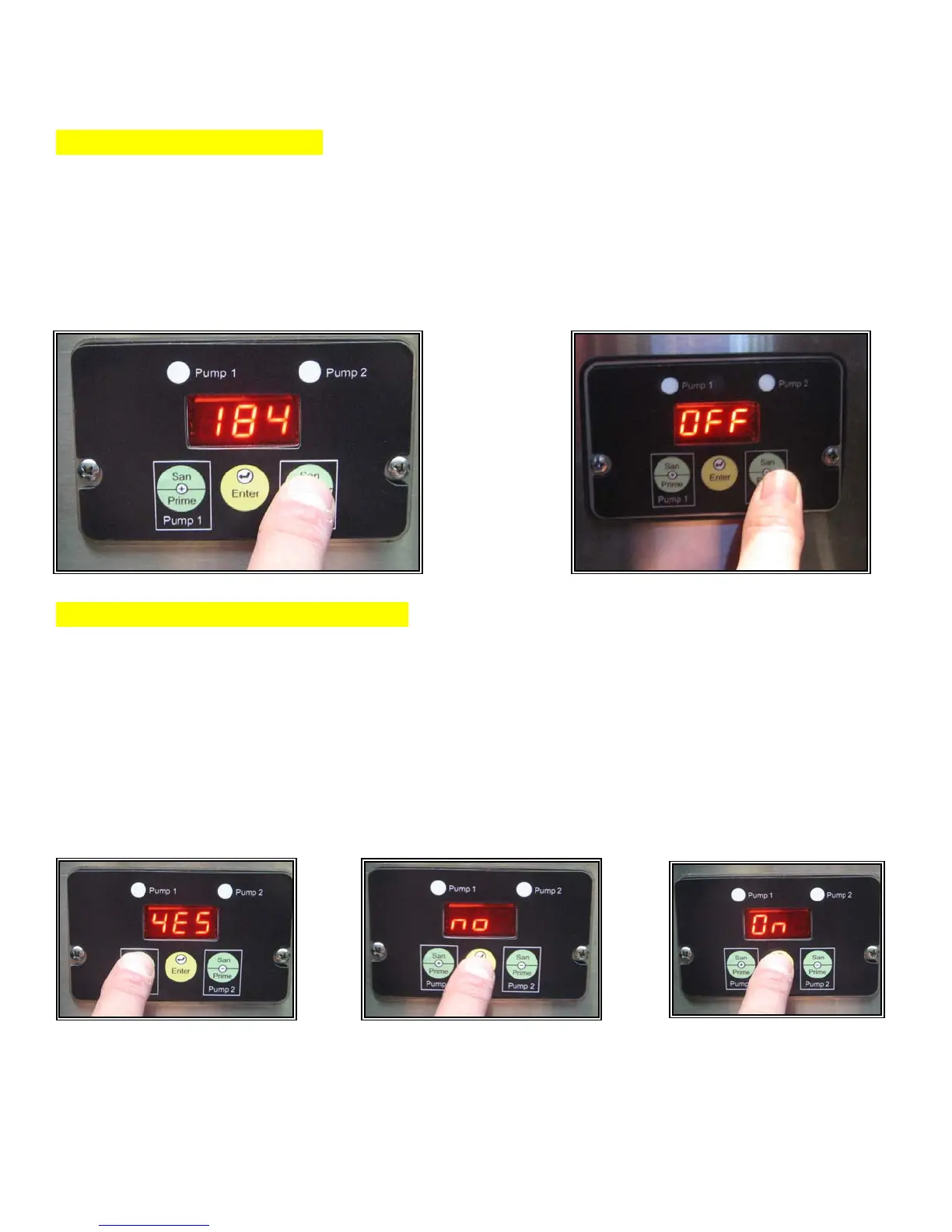
Step 2. Adjust Temperature
The machine features an adjustable temperature range of 100-200F. Use the + or – switch to scroll to
the desired temperature setting. (To turn off the heater press the + or - switch until “OFF” is
displayed.) As shown in figures 3 & 3A.
Press the “Enter” switch to save and proceed to the next programming option. Either the word “YES”
or the word “NO” will appear on the display screen.
Step 3. Enable/Disable BIB Tracking
This machine features the option to track the liquid output of a BIB and then alert the operator when
the BIB is empty. (Display will flash the pump number affected and buzzer will beep if enabled.)
To Enable BIB Tracking, use the + or – switch to scroll until the display reads YES. To disable BIB
Tracking, use the + or – switch to scroll until the display reads NO. As shown in figures 4 & 5. When
you have made your selection, press
“ Enter” to save and proceed to the next programming option. On or Off will appear on the display
screen. As shown in figure 6.
Fig. 3
Fig 4 Fig 5
Fig. 3A
Fig 6



 To Next Page