
 Need help?
Do you have a question about the Newland NLS-HR11 and is the answer not in the manual?
Provides an introduction to the NLS-HR11 hand-held barcode scanner and its manual.
Outlines the content and topics covered in each chapter of the user guide.
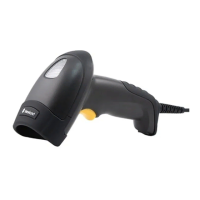
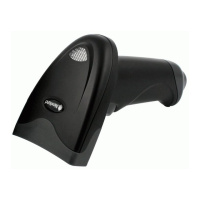
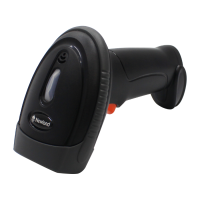
Describes the HR11 scanner's performance, technology, and ergonomic design.
Provides instructions for unpacking the scanner and checking the package contents.
Illustrates the USB connection for the scanner to a host device.
Illustrates the RS-232 connection for the scanner to a host device.
Shows the dimensions of the scanner from the left side view.
Shows the dimensions of the scanner from the front view.
Shows the dimensions of the scanner from the top view.
Introduces the two methods for scanner configuration: barcode programming and command programming.
Explains how to configure the scanner by scanning programming barcodes.
Explains how to configure the scanner using serial commands sent from the host device.
Configures scan mode, illumination, and silent mode via register 0x0000.
Configures the scanner's security level via register 0x000A.
Sets the USB country keyboard layout via register 0x0019.
Configures RS-232 data bits, parity, and stop bits via register 0x0029.
Enables or disables symbologies like Code 128 via register 0x0061.
Configures Code 39 settings including check digit and ASCII mode via register 0x0074.
Describes the manual scan mode where a trigger pull activates decoding.
Temporarily enables or disables the decode beep sound.
Controls the illumination of the scanner's aiming beam.
Introduces the RS-232 and USB interfaces for host communication.
Explains the RS-232 interface and matching communication parameters.
Details the USB HID-KBW interface mode for scanner operation.
Explains appending prefixes and suffixes to scanned data for customization.
Defines the order of prefix elements: Code ID, Custom, and AIM ID.
Allows appending user-defined prefixes up to 5 characters.
Provides steps to set a custom prefix using barcodes and numeric values.
Allows appending user-defined suffixes up to 5 characters.
Enables or disables the transmission of terminating character suffixes.
Introduces symbology configuration for scanner identification.
Global settings for enabling or disabling all symbologies.
Enables or disables all symbologies for barcode identification.
Allows the scanner to read inverted barcodes.
Restores factory default settings for Code 128 symbology.
Enables or disables the Code 128 symbology.
Restores factory default settings for UCC/EAN-128 symbology.
Enables or disables the UCC/EAN-128 symbology.
Decodes UCC/EAN-128 barcodes as Code 128.
Restores factory default settings for AIM 128 symbology.
Enables or disables the AIM 128 symbology.
Decodes AIM 128 barcodes as Code 128.
Restores factory default settings for EAN-8 symbology.
Enables or disables the EAN-8 symbology.
Controls the transmission of the EAN-8 check digit.
Restores factory default settings for EAN-13 symbology.
Enables or disables the EAN-13 symbology.
Controls the transmission of the EAN-13 check digit.
Restores factory default settings for ISSN symbology.
Enables or disables the ISSN symbology.
Decodes ISSN barcodes as EAN-13.
Restores factory default settings for ISBN symbology.
Enables or disables the ISBN symbology.
Decodes ISBN barcodes as EAN-13.
Restores factory default settings for UPC-E symbology.
Enables or disables the UPC-E symbology.
Controls the transmission of the UPC-E check digit.
Restores factory default settings for UPC-A symbology.
Enables or disables the UPC-A symbology.
Decodes UPC-A barcodes as EAN-13.
Restores factory default settings for Interleaved 2 of 5 symbology.
Enables or disables the Interleaved 2 of 5 symbology.
Restores factory default settings for ITF-6 symbology.
Enables or disables the ITF-6 symbology.
Restores factory default settings for ITF-14 symbology.
Enables or disables the ITF-14 symbology.
Restores factory default settings for Deutsche 14 symbology.
Enables or disables the Deutsche 14 symbology.
Restores factory default settings for Deutsche 12 symbology.
Enables or disables the Deutsche 12 symbology.
Restores factory default settings for Matrix 2 of 5 symbology.
Enables or disables the Matrix 2 of 5 symbology.
Restores factory default settings for Industrial 25 symbology.
Enables or disables the Industrial 25 symbology.
Restores factory default settings for Standard 25 symbology.
Enables or disables the Standard 25 symbology.
Restores factory default settings for Code 39 symbology.
Enables or disables the Code 39 symbology.
Restores factory default settings for Codabar symbology.
Enables or disables the Codabar symbology.
Restores factory default settings for Code 93 symbology.
Enables or disables the Code 93 symbology.
Restores factory default settings for Code 11 symbology.
Enables or disables the Code 11 symbology.
Restores factory default settings for Plessey symbology.
Enables or disables the Plessey symbology.
Restores factory default settings for MSI-Plessey symbology.
Enables or disables the MSI-Plessey symbology.
Restores factory default settings for RSS-14 symbology.
Enables or disables the RSS-14 symbology.
Controls transmission of Application Identifier "01" for RSS-14.
Restores factory default settings for RSS-Limited symbology.
Enables or disables the RSS-Limited symbology.
Controls transmission of Application Identifier "01" for RSS-Limited.
Restores factory default settings for RSS-Expand symbology.
Enables or disables the RSS-Expand symbology.
Safety precautions related to electrical usage and power adapter.
Information on scanner's LED safety compliance with IEC 62471.
Compliance with EMC standards and ESD precautions.
General safety advice, including disassembly warnings.
 General
| Type | Handheld |
|---|---|
| Scanning Technology | Laser |
| Scan Rate | 100 scans/sec |
| Interfaces Supported | USB, RS232, Keyboard Wedge |
| Humidity | 5% to 95% (non-condensing) |
| Drop | 1.5 m |
| Dimensions | 170 × 65 × 95 mm |
| Weight | 125g |
| Scan Angle | 42° |
| Print Contrast | ≥ 25% |
| Resolution | ≥4 mil |
| Interface | USB, RS232 |
| Power Supply | 5V DC |
| Operating Temperature | 0°C to 50°C |
| Storage Temperature | -40°C to 60°C |



 To Next Page