
 Need help?
Do you have a question about the Newland NLS-HR100 and is the answer not in the manual?
Step-by-step guide for connecting the scanner using a USB cable.
Step-by-step guide for connecting the scanner using an RS232 cable.
Step-by-step guide for connecting the scanner using a PS/2 cable.
Explains power states, idle mode, and procedures for restarting the scanner.
Instructions on how to perform a successful barcode scan with the HR100.
Explains how to configure settings using programming barcodes.
Explains how to configure settings using Pro CMD strings.
Instructions to reset all scanner parameters to their original default states.
Configures the scanner's operational modes like Shut Down, Sleep, or Test Mode.
Sets the scanning behavior, such as Hand-held Mode or Auto Mode.
Configures serial communication settings such as baud rate and parity.
Sets up USB communication modes like Virtual Keyboard or COM Port Emulation.
Allows adding a custom prefix to barcode data for identification.
Appends a custom suffix to barcode data for additional information.
Adds a termination string to barcode data for transmission.
Settings for enabling, disabling, and configuring Code 128 barcodes.
Settings for enabling, disabling, and configuring UCC/EAN-128 barcodes.
Settings for EAN-8 enable/disable, addenda codes, and check digit.
 General
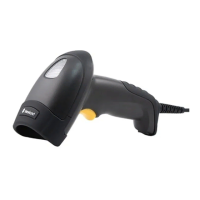
| Type | Handheld |
|---|---|
| Scanning Technology | Laser |
| Weight | 200 g |
| Storage Temperature | -20°C to 60°C |
| Scan Rate | 100 scans per second |
| Operating Humidity | 5% to 95% (non-condensing) |
| Motion Tolerance | Up to 1.5 m/s |
| Power Supply | 5VDC ±5% |
| Humidity | 5% to 95% (non-condensing) |
| Interface | USB, RS-232 |
| Decode Capability | 1D |
| Operating Temperature | 0°C to 50°C |
| Scan Angle | ±65° |
| Image Sensor | Not applicable |



 To Next Page
