
 Need help?
Do you have a question about the Newland NLS-HR20-BT and is the answer not in the manual?
Legal disclaimer for product usage and manual reference.
Statements regarding FCC regulations, RF exposure, and CE compliance.
Overview of the manual's purpose and chapter breakdown.
Defines icons used in the manual for clarity.
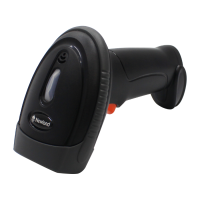
Introduces the HR20-BT scanner and its core capabilities.
Details the Easyset software for scanner setup and development.
Explains methods for configuring scanner parameters.
Covers barcode, command, and Easyset programming options.
Configuration for Good Read LED, Beep, and Vibration feedback.
Details various scan modes like Level, Trigger, Sense, and Batch.
Explains different USB connection modes for the scanner.
Configuration for USB HID Keyboard and country-specific layouts.
Covers ALT+Keypad, Function Key Mapping, and Delays.
Details USB CDC and HID POS interface configurations.
Overview of wireless operating modes: Bluetooth HID, BLE, and 2.4G.
Configuration for Batch Mode, including options and transmit delays.
Settings for auto power-off, scanner name, and date/time.
Lists and configures all supported barcode symbologies.
Covers global, 1D, and 2D symbology enabling/disabling.
Detailed settings for popular symbologies like Code 128, EAN, UPC.
Covers coupon codes, GS1 Databar, and twin codes.
Explains how to customize scanned data output.
Methods to add, select, and manage data formats.
Details commands for manipulating data strings.
Covers adding prefixes, suffixes, and data packing options.
User-defined prefixes and suffixes for scanned data.
Options for packetizing data and adding termination characters.
Reference barcodes for digits and save/cancel operations.
Includes Factory Defaults, AIM ID, Code ID, Symbology ID, ASCII, and Unicode Maps.
 General
| Brand | Newland |
|---|---|
| Model | NLS-HR20-BT |
| Category | Barcode Reader |
| Language | English |


 To Next Page