
 Need help?
Do you have a question about the Newland NLS-HR22 and is the answer not in the manual?
Overview of the scanner, guide purpose, and initial setup procedures.
Details on port types, connection methods, and scanner power states.
Step-by-step guide on how to scan barcodes and program the device.
Settings for RS-232 serial communication, including parameters.
USB connection types, enumeration, and keyboard emulation.
Polling rate, country layouts, and inter-keystroke delay.
Customizing scanner behavior, data formatting, and emulation modes.
Batch, Manual, Sense, and Continuous modes with timeout configurations.
Preventing re-reads of the same barcode and adjusting light response.
Defining and specifying the scanning zone for improved accuracy.
Managing the scanner's illumination LEDs and aiming beam.
Configuration of startup beeps, good read alerts, and indicator LEDs.
Modifying scanned data output using prefixes, suffixes, and AIM/Code IDs.
Configuring custom data additions like prefixes, suffixes, and end markers.
Overall barcode type management and reading inverted barcodes.
Settings for retail and common barcode types like EAN, UPC, and Code 128.
Settings for industrial, Febraban, ITF, and other specific barcode types.
Configuration options for PDF 417, QR Code, and Data Matrix barcodes.
Adjusting the orientation of captured images (horizontal, vertical).
Purpose of data formatter and setup via barcodes/batch commands.
Detailed commands for data manipulation within the formatter.
Guidelines for creating commands and generating batch barcodes.
Solutions for readability, output errors, and beam issues.
Default settings for interfaces, modes, and symbologies.
Standard identifiers for various barcode types.
User-defined identifiers for various barcode types.
Hexadecimal and decimal values for ASCII characters.
Practical guides for setting timeouts, prefixes, and delays.
Barcodes used for programming digits and letters.
Controls for saving or canceling configuration changes.
Mapping ASCII values to function keys and layout differences.
Linking numeric barcodes to specific code pages for character encoding.
Unique numerical identifiers for various barcode types.
 General
| Certification | FCC Part15 Class B, CE EMC Class B |
|---|---|
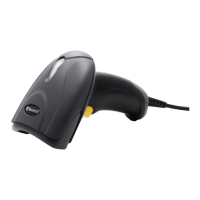
| Product color | Black |
| LED indicators | Yes |
| Protection features | Electrostatic Discharge (ESD) protection |
| International Protection (IP) code | IP42 |
| Type | Handheld bar code reader |
| Sensor type | CMOS |
| Scanner type | 1D/2D |
| Linear (1D) barcodes supported | China Post, Codabar, Code 11, Code 128, Code 39, Code 93, EAN-13, EAN-8, GS1 DataBar, ISBN, ISSN, ITF-14, ITF-6, Interleaved 2 of 5, Matrix 2 of 5, Plessey, UPC-A, UPC-E |
| Optical sensor resolution (W x H) | 640 x 480 pixels |
| 2D (matrix & stacked) barcodes supported | Aztec Code, Data Matrix, Micro QR Code, MicroPDF417, PDF417, QR Code |
| Input voltage | 5 V |
| Power consumption | 950 mA |
| Power source type | USB |
| Cable length | 3 m |
| Connectivity technology | Wired |
| Storage temperature (T-T) | -40 - 70 °C |
| Operating temperature (T-T) | -20 - 60 °C |
| Operating relative humidity (H-H) | 5 - 95 % |
 Weight and Dimensions
| Depth | 101 mm |
|---|---|
| Width | 145 mm |
| Height | 68 mm |
| Weight | 111 g |


 To Next Page