4 | ni.com | NI 9211 Calibration Procedure
Accuracy Verification
Complete the following procedure to determine the As-Found status of the NI 9211.
1. Set the calibrator to Standby mode (STBY).
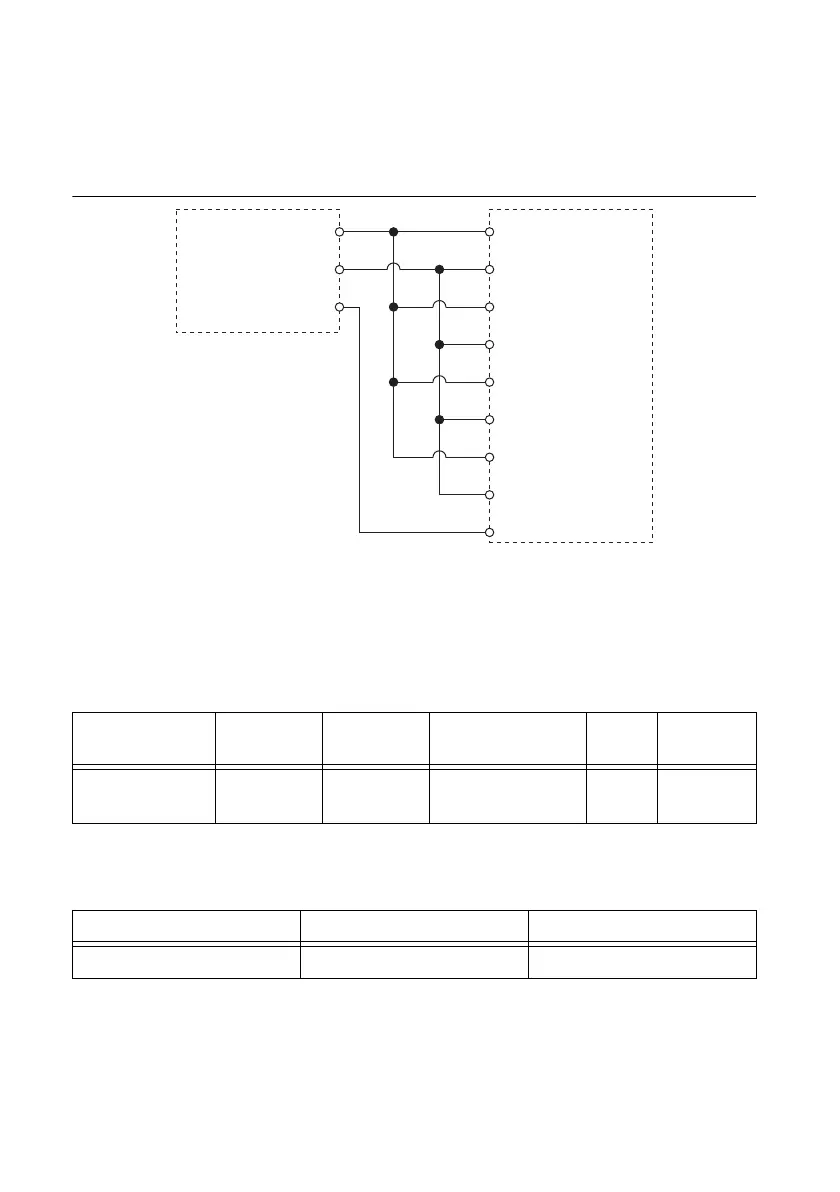
2. Connect the NI 9211 to the calibrator as shown in Figure 1.
Figure 1. Accuracy Verification Connections
3. Set the calibrator output to a Test Point value indicated in Table 4.
4. Set the calibrator to Operate mode (OPR).
5. Acquire and average samples.
a. Create and configure an AI voltage channel according to Table 2.
b. Configure the AI voltage channel timing according to Table 3.
c. Start the task.
d. Read samples from the NI 9211.
e. Average the samples for each channel.
f. Clear the task.
Table 2. NI 9211 AI Voltage Channel Configuration
Input Terminal
Configuration
Minimum
Value (V)
Maximum
Value (V)
Physical
Channels Units Autozero
Differential -0.08 0.08 cDAQMod8/ai0:3 Volts Every
Sample
Table 3. NI 9211 Timing Configuration
Samples Per Channel Sample Mode Rate (S/s)
100 Finite 7
Calibrator
NI 9211
TC3–
COM
TC3+
TC2–
TC2+
TC1–
TC1+
TC0–
TC0+
LO
HI
Guard



 To Next Page