Contact with F730
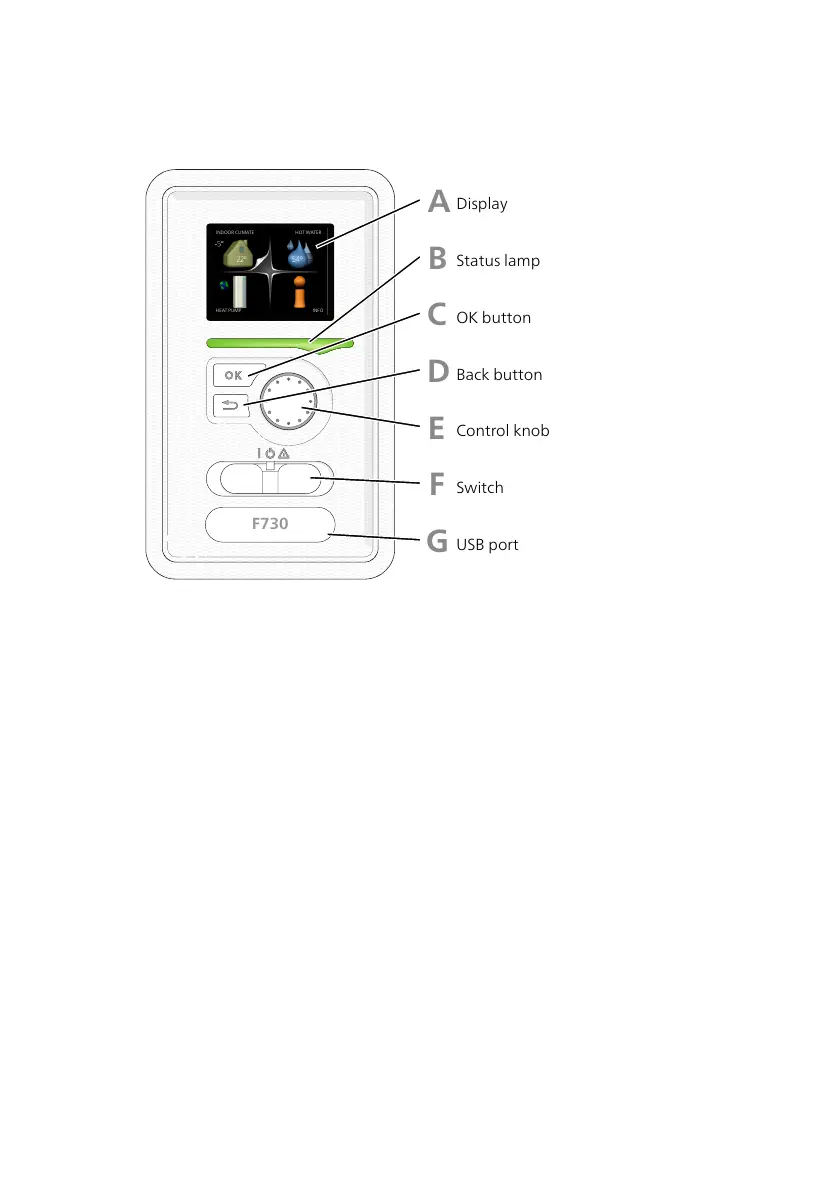
DISPLAY UNIT
A
B
C
D
E
F
Display
Status lamp
OK button
Back button
Control knob
Switch
INDOOR CLIMATE
HEAT PUMP INFO
HOT WATER
There is a display unit on the front of the heat pump, which is used to
communicate with F730.. Here you:
• switch on, switch off or set the heat pump in emergency mode.
• sets the indoor climate and hot water as well as adjusts the heat pump
to your needs.
• receive information about settings, status and events.
• see different types of alarms and receive instructions about how they
are to be rectified.
Display
Instructions, settings and operational information are shown on the
display. You can easily navigate between the different menus and
options to set the comfort or obtain the information you require.
A
NIBE F730Chapter 2 | The heat pump – the heart of the house12



 To Next Page