59
Taking Pictures—Fine-Tuning Camera Settings
Fine-Tuning Camera Settings
The -Mode Menu
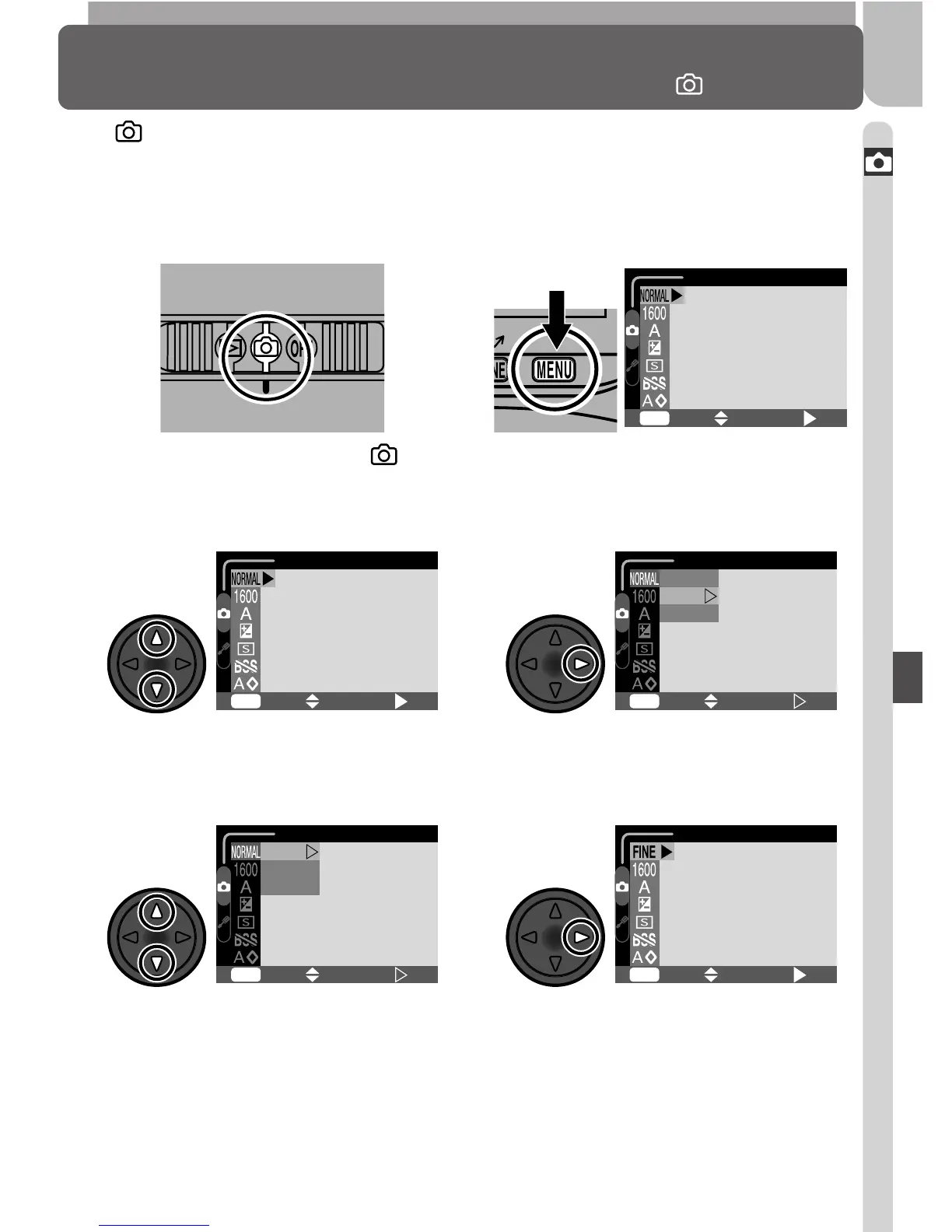
In mode, changes to some settings are made with the help of a SHOOT-
ING menu that appears when the MENU button is pressed.
To make selections from the SHOOTING menu:
Slide mode selector to
1
Press MENU button to display
menu for current mode
2
IMAGE QUALITY
MENU
SELECT
SET
OFF
To exit the menu and return to shooting mode, press the MENU button.
Make selection
Highlight menu item
3
6
Highlight option
(to return to previous menu, press
multi selector to left)
5
IMAGE QUALITY
MENU
SELECT
SET
OFF
IMAGE QUALITY
MENU
SELECT
SET
OFF
MENU
SELECT
SET
OFF
IMAGE QUALITY
FINE
NORMAL
BASIC
Display options
4
IMAGE QUALITY
FINE
NORMAL
BASIC
MENU
SELECT
SET
OFF




 To Next Page