
EasyManua.ls Logo

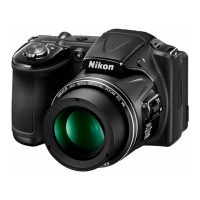
Nikon Coolpix L830 - User Manual

Nikon Coolpix L830
248 pages
Print Icon
To Next Page IconTo Next Page
Loading...
Nikon
Quick Start
Guide
Confirming
the
Package
Contents
3
First Steps
6
Shooting
and Playback
15
Using ViewNX 2
21
Other
Functions
26
For Your Safety
32

Table of Contents

Other manuals for Nikon Coolpix L830

Questions and Answers

  • J
    johnstevensSep 18, 2025
    Why can't I zoom in on images on my Nikon Coolpix L830 Digital Camera?
    • S
      Samuel GloverSep 18, 2025
      • Playback zoom cannot be used with movies. • When viewing small images, the playback zoom ratio that is displayed may not match the actual image zoom ratio. • This Nikon Digital Camera may not be able to zoom in on images captured with another make or model of digital camera.
  • J
    Joseph PhillipsAug 25, 2025
    How to fix blurry images on Nikon Coolpix L830 Digital Camera?
    • E
      Eric MccarthyAug 25, 2025
      If your images are blurred when using your Nikon Digital Camera, consider the following: * Use the flash. * Increase the ISO sensitivity value. * Enable vibration reduction or motion detection. * Use D (Best Shot Selector). * Use a tripod to stabilize the camera (using the self-timer at the same time is more effective).
  • O
    okellerAug 25, 2025
    Why my Nikon Coolpix L830 Digital Camera cannot focus?
    • S
      savannahedwardsAug 26, 2025
      Your Nikon Digital Camera might not be able to focus because the subject is too close or hard to focus on. Try shooting in easy auto mode, Close-up scene mode, or macro mode. Also, set AF assist in the setup menu to Auto. You can also try turning the camera off and then on again.
  • J
    Jasmine ZimmermanAug 26, 2025
    What to do if my Nikon Digital Camera is on but does not respond?
    • H
      hansonlindaAug 27, 2025
      If your Nikon Digital Camera is on but not responding, first wait for any recording to finish. If the issue continues, turn the camera off. If it still doesn't turn off, remove and reinsert the battery or batteries, or disconnect and reconnect the AC adapter if you're using one. Note that any data being recorded will be lost, but previously recorded data will remain unaffected.
  • C
    cdavenportSep 19, 2025
    Why can't I rotate images on my Nikon Coolpix L830?
    • L
      Lori CarlsonSep 22, 2025
      This Nikon Digital Camera cannot rotate images captured with another make or model of digital camera.
  • J
    Joshua MullinsSep 23, 2025
    Why can't I select paper size with my Nikon Digital Camera?
    • L
      Luis FryeSep 23, 2025
      The camera cannot be used to select the paper size in the following situations, even when printing from a PictBridge-compatible printer. Use the printer to select the paper size.
  • A
    annedavisSep 9, 2025
    Why are no indicators displayed on the monitor of my Nikon Coolpix L830?
    • C
      charlottebartlettSep 9, 2025
      If no indicators are displayed in the monitor of your Nikon Digital Camera, Hide info is likely selected for Photo info in Monitor settings in the setup menu.
  • M
    Melissa HarrisonSep 12, 2025
    Why is the print date not available on my Nikon Coolpix L830?
    • A
      angelareyesSep 12, 2025
      If the print date is not available on your Nikon Digital Camera, Time zone and date has not been set in the setup menu.
  • B
    Brandon RothSep 3, 2025
    How to fix overexposed images on Nikon Coolpix L830 Digital Camera?
    • P
      Peter BennettSep 3, 2025
      If your images are too bright (overexposed) on your Nikon Digital Camera, adjust exposure compensation.
  • J
    Jeffrey MorganSep 1, 2025
    What to do if my Nikon Coolpix L830 is on but not responding?
    • K
      Kenneth GregorySep 1, 2025
      If your Nikon Digital Camera is on but not responding, wait for any recording to end. If the problem continues, turn the camera off. If it still doesn't turn off, remove and reinsert the battery (or batteries). If you're using an AC adapter, disconnect and then reconnect it.

Summary

First Steps

Insert the Batteries and a Memory Card

Guides users through inserting batteries and memory cards into the camera.

Select a Language and Set the Camera Clock

Covers language selection and setting the camera's date and time.

Shooting and Playback

Focus and Shoot

Explains how to achieve focus and release the shutter to capture an image.

For Your Safety

General Warnings

Covers critical warnings for malfunction, disassembly, and flammable gas usage.

Handling Precautions

Safety advice on handling the camera, batteries, and avoiding hazards.

Operational and Environmental Safety

Safety measures for moving parts, flash, liquid crystal, and travel environments.

Nikon Coolpix L830 Specifications

General IconGeneral
Camera TypeCompact digital camera
Optical Zoom34x
Digital Zoom4x
Aperturef/3.0-5.9
LCD Monitor Resolution921, 000 dots
Image StabilizationLens-shift Vibration Reduction (VR)
Video Resolution1920 x 1080 (Full HD)
Movie RecordingYes
Effective Pixels16.0 MP
Image Sensor1/2.3-inch CMOS
ISO SensitivityISO 125-1600, ISO 3200 (available when using Auto mode)
Display Size3.0"
Shutter Speed1/1500 - 1 sec
Battery TypeAA
Power SourcesAC Adapter EH-67 (optional)
DimensionsApprox. 111.0 x 75.8 x 91.2 mm (4.4 x 3.0 x 3.6 in)
WeightApprox. 508 g (1 lb 2.0 oz) with batteries and SD memory card
Storage MediaSD/SDHC/SDXC memory cards
Lens Focal Length4.0 - 136 mm (35mm Equivalent: 22.5 - 765 mm)

Related product manuals









