EasyManua.ls Logo

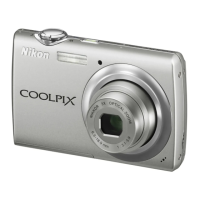
Nikon Coolpix S220 - User Manual

Nikon Coolpix S220
7 pages
Print Icon
To Next Page IconTo Next Page
Loading...
instructables
Replacing Screen on Nikon Coolpix S220
by ctrauger
Step 1: Materials
Do you own a Nikon Coolpix S220, or possibly one of its
predecessors? Has the screen stopped working? You
could have been running to capture the perfect
moment and accidentally dropped it, do not worry these
things happen to the best of us. If you have a broken
screen and have a few spare minutes to x it, you have
come to the right place! These instructions will allow you
to follow step by step to replace your broken LCD
screen. It is quite simple and you will only need a few
tools to complete it! If you want to learn how to
complete this task keep on reading!
LCD screen replacement
You can buy the LCD replacement screen for very cheap on Ebay or Amazon. It should be less than $10. Make sure you
buy the correct size and model before purchasing.
Phillips screw driver
tweezers
Replacing Screen on Nikon Coolpix S220: Page 1

Other manuals for Nikon Coolpix S220

Question and Answer IconNeed help?

Do you have a question about the Nikon Coolpix S220 and is the answer not in the manual?

Overview

This device manual describes the process of replacing the screen on a Nikon Coolpix S220 camera. The primary function of this guide is to provide step-by-step instructions for users who have a broken or non-functional LCD screen on their Nikon Coolpix S220 camera and wish to repair it themselves. The overall goal is to enable users to restore their camera to full working order by replacing the damaged screen with a new one. This repair process is presented as a relatively simple task that can be accomplished with a few basic tools and some spare time.

The usage features of this manual are centered around guiding the user through a DIY repair. It begins by addressing common scenarios that might lead to a broken screen, such as accidental drops, and reassures the user that such incidents are common. The manual emphasizes that the repair is straightforward and requires minimal tools, making it accessible to individuals with limited technical expertise. The instructions are designed to be followed sequentially, ensuring that each step builds upon the previous one for a logical and effective repair.

Key usage features include:

  • Problem Identification and Solution: The manual directly addresses the problem of a broken camera screen and offers a clear solution: screen replacement.
  • Accessibility: It highlights that the necessary replacement screen is inexpensive and readily available from online retailers like eBay or Amazon, making the repair economically viable.
  • Tool Requirement: The manual explicitly lists the few tools required (LCD screen replacement, Phillips screwdriver, tweezers), allowing users to gather everything they need before starting.
  • Step-by-Step Guidance: Each step is clearly delineated with a heading (e.g., "Step 1: Materials," "Step 2: Remove Screws"), making it easy for users to track their progress and understand the current task.
  • Visual Aids: The inclusion of images for each step is a crucial usage feature, providing visual confirmation and clarification for the written instructions. This helps users correctly identify parts, understand the actions required, and avoid mistakes.
  • Troubleshooting Advice: A significant usage feature is the dedicated "Step 3: Stripped Screw?" section. This anticipates a common problem during screw removal and offers multiple practical solutions, demonstrating a thoughtful approach to user support and preventing frustration. This shows that the manual is designed to be helpful even when unexpected difficulties arise.
  • Emphasis on Caution: Throughout the process, the manual advises caution, particularly when handling delicate components like screws (to avoid stripping) and the ZIF connector (to prevent damage to internal camera parts). This promotes careful handling and increases the likelihood of a successful repair.
  • Clear Objectives for Each Step: Each step has a clear objective, from gathering materials to reassembling the camera and testing its functionality. This structured approach helps users stay focused and understand the purpose of each action.
  • Confirmation of Success: The final step involves putting the battery back in and turning the camera on, with the expectation that it should be working successfully. This provides a clear endpoint and a way for users to verify the success of their repair.

Maintenance features, in the context of this manual, are primarily focused on the repair process itself rather than ongoing device maintenance. The manual serves as a maintenance guide for a specific repair task.

Key maintenance features include:

  • Component Replacement Focus: The core maintenance feature is the detailed instruction on how to replace a specific component (the LCD screen). This is a direct maintenance action aimed at restoring functionality.
  • Careful Disassembly and Reassembly: The instructions emphasize careful handling during disassembly (removing screws, opening the casing, disconnecting the ZIF connector) and reassembly (putting the new screen in, screwing screws back in). This careful approach is a maintenance practice designed to prevent further damage to the camera during the repair.
  • Preventive Measures During Repair: The advice on how to avoid stripping screws or how to deal with them if they are stripped can be seen as a maintenance feature, as it helps preserve the integrity of the camera's casing and internal structure during the repair process.
  • Preservation of Internal Components: The instruction to be careful when removing the ZIF connector to "not damage anything inside of the camera" highlights a maintenance concern – protecting the delicate internal electronics while performing the screen replacement.
  • Correct Component Orientation: The instruction to ensure the LCD screen is "facing the right direction when putting it in, screen facing outward" is a critical maintenance detail, ensuring the new component is installed correctly for proper function.
  • Systematic Approach to Repair: The structured, step-by-step nature of the manual itself is a maintenance feature, providing a reliable and repeatable method for performing the repair, thereby minimizing errors and maximizing the chances of a successful outcome.
  • Cost-Effective Repair: By guiding users through a DIY repair, the manual promotes a cost-effective maintenance strategy, allowing users to extend the life of their camera without incurring professional repair costs.

In summary, this manual is a practical guide for a specific camera repair. Its usage features are designed to make the repair process as clear, accessible, and foolproof as possible for the average user, incorporating visual aids and troubleshooting tips. The maintenance features are embedded within the repair instructions, focusing on careful handling, correct component installation, and the preservation of the camera's overall integrity during the screen replacement procedure. The manual empowers users to perform a significant repair themselves, thereby extending the useful life of their Nikon Coolpix S220 camera.

Nikon Coolpix S220 Specifications

General IconGeneral
Megapixel10 MP
Camera typeCompact camera
Sensor typeCCD
Image stabilizerYes
Image sensor size1/2.33 \
Maximum image resolution3648 x 2736 pixels
Optical zoom3 x
Focal length range6.3 - 18.9 mm
InterfaceUSB
Digital SLRNo
Camera shutter speed1/1000 - 2 s
Effective sensor resolution10000000 pixels
Focal length (35mm film equivalent)35 - 105 mm
Normal focusing range0.6 - ∞ m
Auto focusing (AF) modesCentre weighted Auto Focus
Macro focusing range (wide)0.10 - ∞ m
ISO sensitivity80, 100, 200, 400, 800, 1600, 2000, Auto
Internal memory44 MB
Compatible memory cardssd, sdhc
Motion JPEG frame rate30 fps
Video formats supportedAVI
Maximum video resolution640 x 480 pixels
Display diagonal2.5 \
Display resolution (numeric)150000 pixels
USB version2.0
Product colorPurple
Battery typeEN-EL10
Battery capacity740 mAh
Power requirementsDC 3.7V
Battery life (CIPA standard)180 shots
Number of batteries supported1
Operating temperature (T-T)0 - 40 °C
Operating relative humidity (H-H)0 - 80 %
Flash modesRed-eye reduction
Scene modesBacklight, beach, Close-up (macro), dusk, Fireworks, Museum, Night landscape, Night portrait, Panorama, party (indoor), Portrait, Sports, Sunset, Landscape (scenery)
Image editingRotating
Photo effectsblack&white, Sepia, Vivid
White balanceauto, Cloudy, daylight, flash, Fluorescent, Incandescent, manual
Camera playbacksingle image, slide show
Camera shutter typeelectronic, mechanical
Weight and Dimensions IconWeight and Dimensions
Depth18 mm
Width89.5 mm
Height55.5 mm
Weight100 g

Related product manuals