
 To Next Page

K
Kelli HughesSep 18, 2025
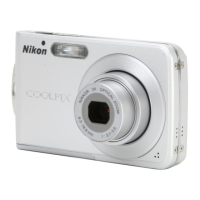
Why cannot zoom in on picture on my Nikon CoolPix S202?
- KkpalmerSep 18, 2025
If you cannot zoom in on a picture, playback zoom cannot be used with movies, small pictures, or cropped pictures. Select a different picture.

Why cannot zoom in on picture on my Nikon CoolPix S202?
If you cannot zoom in on a picture, playback zoom cannot be used with movies, small pictures, or cropped pictures. Select a different picture.
Why my Nikon Digital Camera cannot focus?
If your Nikon Digital Camera cannot focus, it might be that the autofocus doesn't perform well with the intended subject; try changing the subject or focusing manually. Also, there might be a focus error; turn the camera off and then on again.
How to fix blurred pictures on Nikon CoolPix S202 Digital Camera?
If your pictures are blurred, try the following: * Use flash. * Use high-sensitivity shooting mode. * Use electronic vibration reduction. * Use BSS. * Use a tripod and self-timer.
Why are my Nikon CoolPix S202 pictures too dark (underexposed)?
If your pictures are too dark (underexposed), ensure that the flash is turned on. Also, check that the flash window is not blocked.
Why cannot use D-Lighting, electronic VR, crop, or small picture options on my Nikon CoolPix S202?
If you cannot use D-Lighting, electronic VR, crop, or small picture options, these options cannot be used with movies. Select a different picture.
Why cannot select paper size with camera on my Nikon CoolPix S202 Digital Camera?
If you cannot select paper size with the camera, the printer does not support the paper sizes used by the camera. Use the printer to select the paper size.
How to fix unnatural colors on Nikon Digital Camera?
If the colors in your pictures are unnatural, the white balance may not match the light source. Adjust the white balance to correct this.
Why is date imprint not available on my Nikon CoolPix S202 pictures?
If the date imprint is not available, the camera clock has not been set. Set the camera clock to enable the date imprint feature.
How to fix monitor that is hard to read on my Nikon CoolPix S202 Digital Camera?
If the monitor is hard to read, it might be dirty; clean it. Alternatively, the monitor may have dimmed to save power; adjust the monitor brightness.
Why Nikon Transfer does not start when my Nikon Digital Camera is connected?
If Nikon Transfer isn't starting when you connect your camera, it could be because the camera is off; turn it on. Alternatively, the battery might be exhausted; replace or charge the battery.
Lists registered trademarks and intellectual property notices.
Explains the manual's purpose, symbols, and conventions used.
Covers important usage guidelines, accessories, and manual policies.
Details critical safety instructions to prevent injury or damage.
Provides regulatory and legal information for different regions.
Identifies and labels physical components of the camera body and controls.
Explains various indicators shown on the camera's monitor during shooting and playback.
Describes fundamental button functions, menus, and multi-selector usage.
Guides on charging the battery, inserting components, and setting basic options.
Covers Auto mode, scene modes, flash, self-timer, macro, and exposure compensation.
Explains reviewing, editing pictures, viewing by date, and movie functions.
Instructions for connecting to TVs, computers, printers, and creating print orders.
Details options within Shooting, Playback, and Setup menus for camera configuration.
Lists compatible accessories, memory cards, and detailed camera technical specifications.
Offers advice on cleaning, storage, error messages, and problem-solving.
Explains technical standards and provides an index for quick reference.
 General
| Type | Compact Digital Camera |
|---|---|
| Image Sensor Type | CCD |
| Effective Megapixels | 10.0 MP |
| Optical Zoom | 3x |
| Digital Zoom | 4x |
| ISO Range | ISO 80 - 1600 |
| Video Resolution | 640 x 480 |
| Battery Type | Li-ion rechargeable battery |
| Supported Flash Memory | SD/SDHC |
| Image Sensor Size | 1/2.3-inch |
| LCD Screen Size | 2.7-inch |