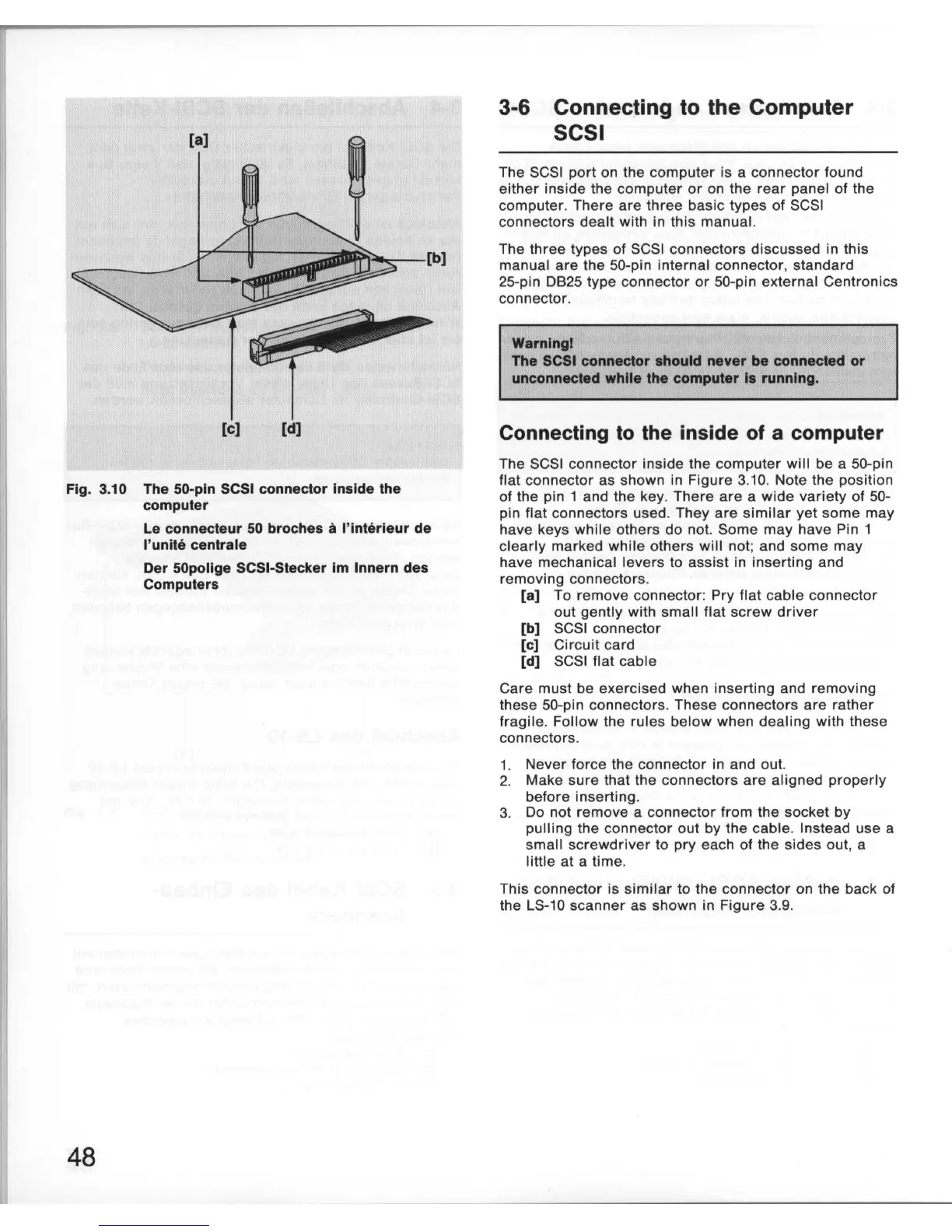
Fig. 3.10 The 50-pin SCSI connector Inside the
computer
48
Le
connecteur
50
broches
it
I'lnterleur de
I'unite centrale
Der 50pollge SCSI-Stecker
1m
Innern des
Computers
3-6 Connecting
to
the Computer
SCSI
The SCSI
port
on the
computer
is a connector found
ei
ther
inside the
computer
or
on the
rear
panel
of
the
computer
.
There
are
three
basic types
of
SCSI
connectors
dealt
with in this manual.
The
three
types of SCSI connectors discussed in this
manual
are
the 50-pin internal connector, standard
25-pin
0825
type
connector
or
50
-pin external Centronics
connector.
Warnlngl
The SCSI connector should never
be
connected or
unconnected while the computer Is running.
Connecting
to
the inside
of
a computer
The SCSI connector inside the
computer
will be a 50-pin
flat
connector as shown in Figure 3.
10
. Note the position
of the pin 1 and the key.
There
are
a
wide
variety
of 50-
pin
flat
connectors used. They
are
similar
yet
some
may
have keys
while
others do not. Some
may
have Pin 1
clearly
marked
while
others
will
not; and
some
may
have mechanical levers to assi
st
in
inserting
and
removing
connectors.
[a] To
remove
connector: Pry
flat
cable
connector
out
gently
with small
flat
screw
driver
[b] SCSI connector
[c] Ci
rcuit
card
[d] SCSI flat cable
Care must be exercised when
inserting
and
removing
these 50-pin connectors. These connectors
are
rather
fragile
. Follow the rules
below
when
dealing
with these
connectors.
1. Never force the connector in and out.
2. Make
sure
that the
connectors
are
aligned
properly
before
inserting
.
3. Do not remove a
connector
from the socket by
pulling
the connector out by
the
cable
. Instead
use
a
small
screwdriver
to
pry
each
of
the sides
out
, a
little at a
time
.
This connector is si
milar
to the connector on the back of
the
LS
-
10
scanner
as shown in
Figure
3.9.













 To Next Page