'kG.
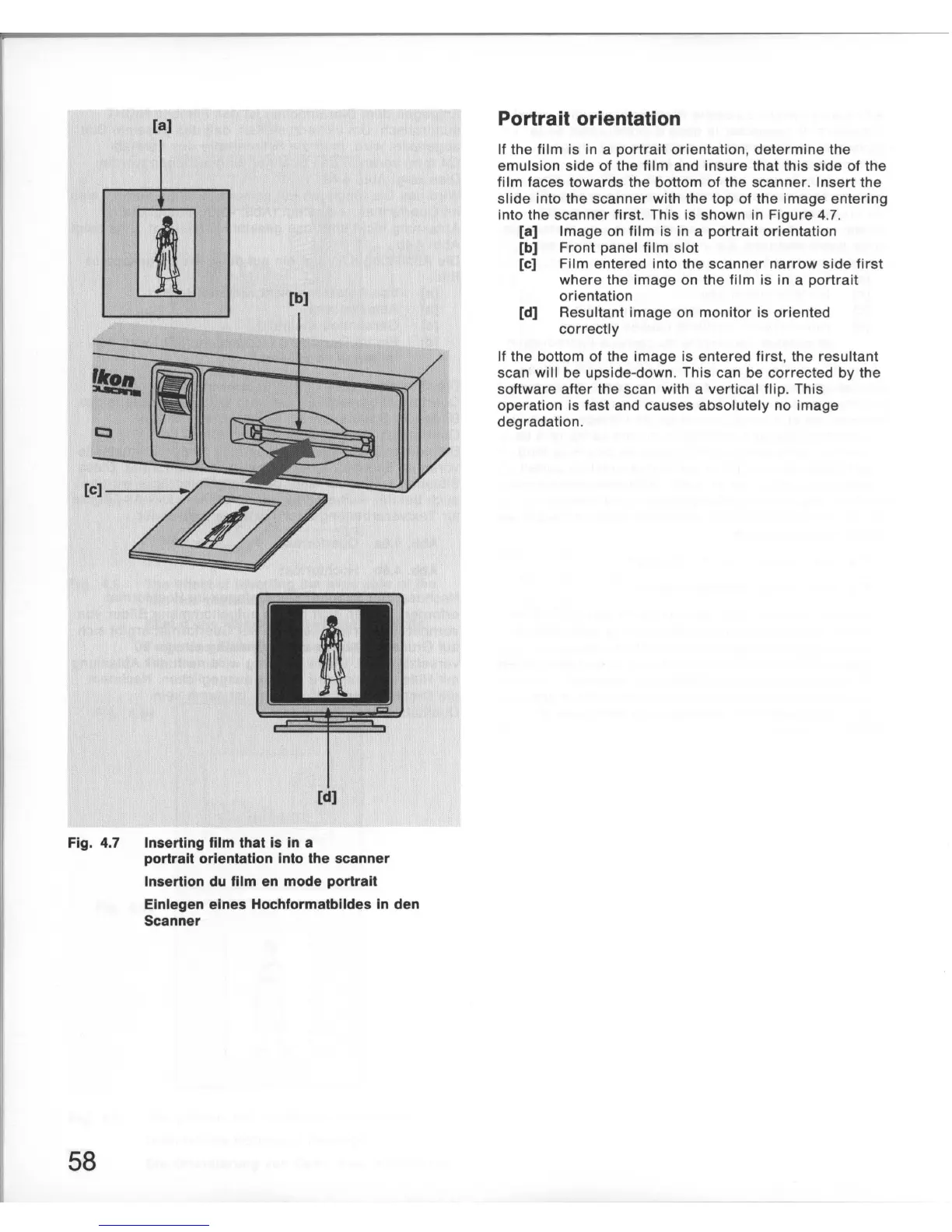
Fig. 4.7
58
[8]
[b)
Inserting film that
is
in a
portrait orientation into the scanner
Insertion
du
film en mode portrait
Elnlegen elnes Hochformatblldes
In
den
Scanner
Portrait orientation
If
the
film
is in a
portrait
orientation
,
determine
the
emulsion
side
of
the
film
and
insure
that
this
side
of the
film faces
towards
the bottom of
the
scanner
. Insert the
slide
into the
scanner
with the top of the
image
entering
into the
scanner
first. This is shown in Figure 4.7.
[a]
Image
on
film
is in a
portrait
orientation
[b] Front panel
film
slot
[c] Film entered into the
scanner
narrow
side
first
where
the
image
on the
film
is in a
portrait
orientation
[d] Resultant
image
on
monitor
is oriented
correctly
If the bottom of the
image
is entered
first
, the resultant
scan will be upside-down. This can be corrected by the
software
after
the scan with a vertical flip.
This
operation is fast and causes
absolutely
no image
degradation.













 To Next Page