186
J
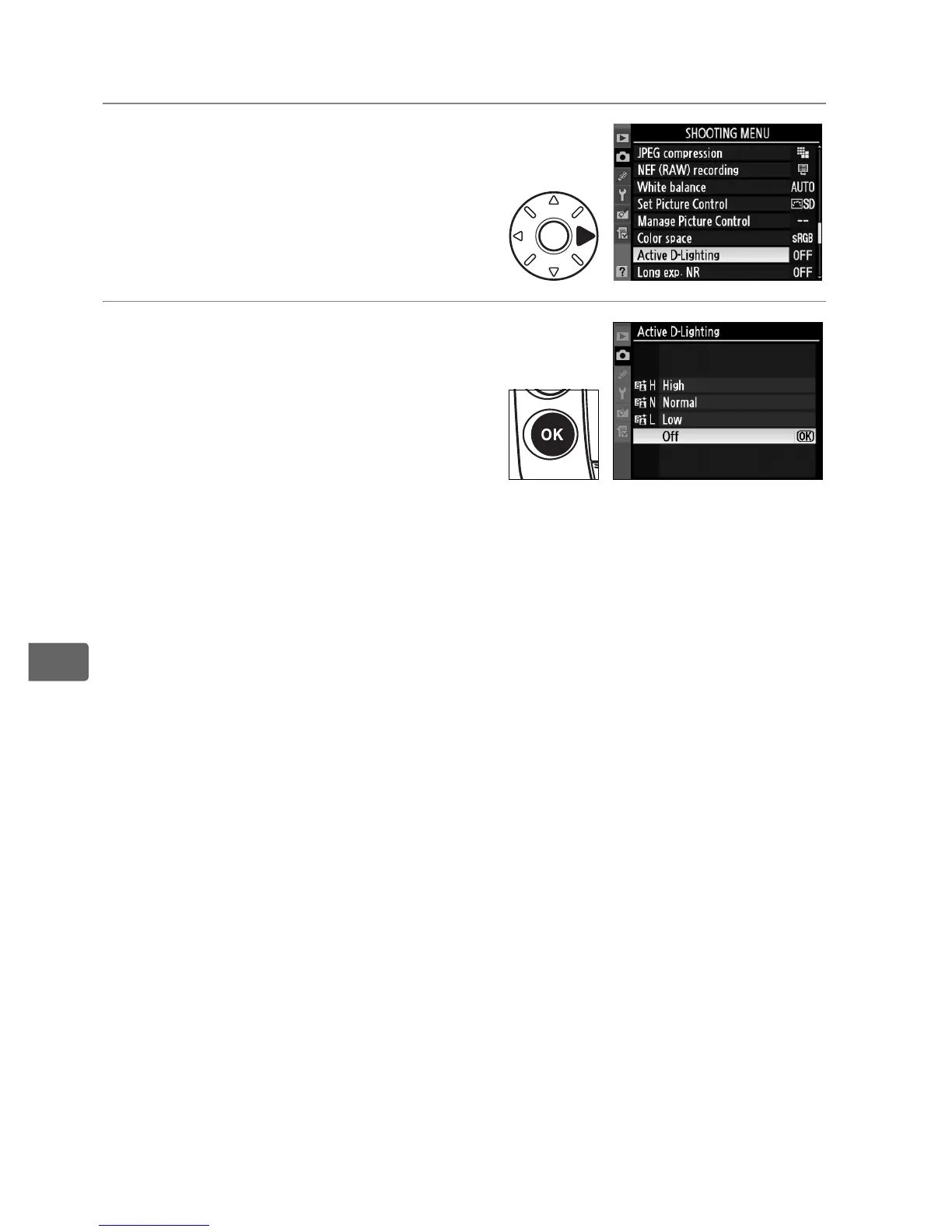
To use active D-lighting:
1 Select [Active D-Lighting].
In the shooting menu (pg. 290),
highlight [Active D-Lighting]
and press 2.
2 Choose an option.
Highlight [Off], [Low],
[Normal], or [High] and
press J.
D Active D-Lighting
Additional time is required to record images when Active D-lighting is on
(pg. 425). Use matrix metering (pg. 114). Although exposure is in fact
reduced to prevent loss of detail in highlights and shadows, highlights,
underexposed areas, and mid-tones are automatically adjusted to prevent
the resulting photograph from being underexposed.
The [Brightness] and
[Contrast] Picture Control settings (pg. 171) can not be adjusted while
active D-lighting is in effect. Noise, distortion or banding may be visible at
high ISO sensitivities. Note that Active D-Lighting is not available with
sensitivities of HI 0.3 or higher.
D “Active D-Lighting” versus “D-Lighting”
The [Active D-Lighting] option in the shooting menu adjusts exposure
before shooting to optimize the dynamic range, while the [D-Lighting]
option in the retouch menu optimizes dynamic range in images after
shooting.



 To Next Page