9
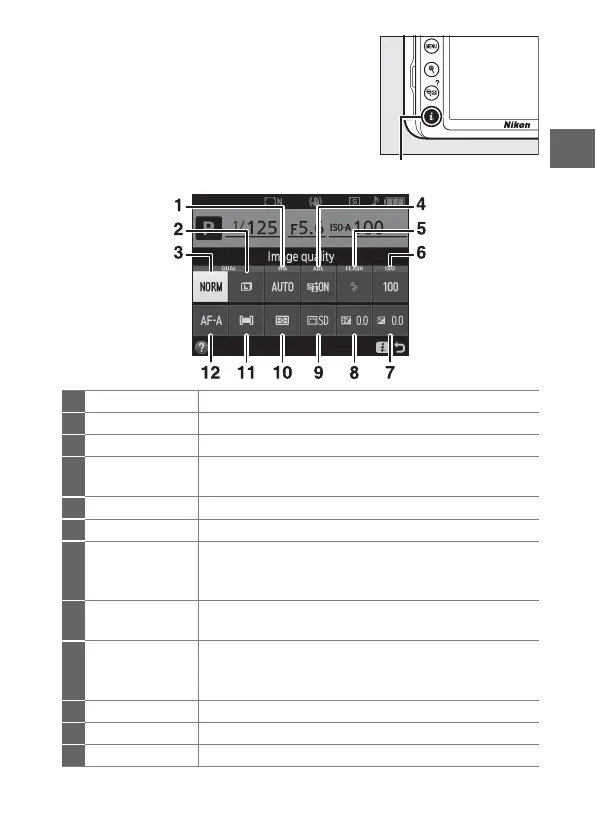
Changing settings: To change the settings at
the bottom of the display, press the P
button, then highlight items using the
multi selector and press J to view
options for the highlighted item.
You can
also change settings by pressing the P
button during live view.
1
White balance Adjust settings for different types of lighting.
2
Image size Choose a size for new photos.
3
Image quality Choose a file format and compression ratio.
4
Active
D-Lighting
Improves the level of detail in highlights and
shadows under high-contrast conditions.
5
Flash mode Choose the flash mode.
6
ISO sensitivity Control the camera’s sensitivity to light.
7
Exposure
compensation
Adjust exposure from the value metered by the
camera, making the entire frame brighter or
darker.
8
Flash
compensation
Adjust flash level.
9
Set Picture
Control
Picture Controls determine how new photos are
processed.
Choose a Picture Control according to
the type of scene or your creative intent.
10
Metering Choose how the camera meters exposure.
11
AF-area mode Choose how the focus area is selected.
12
Focus mode Choose how the camera focuses.



 To Next Page