8
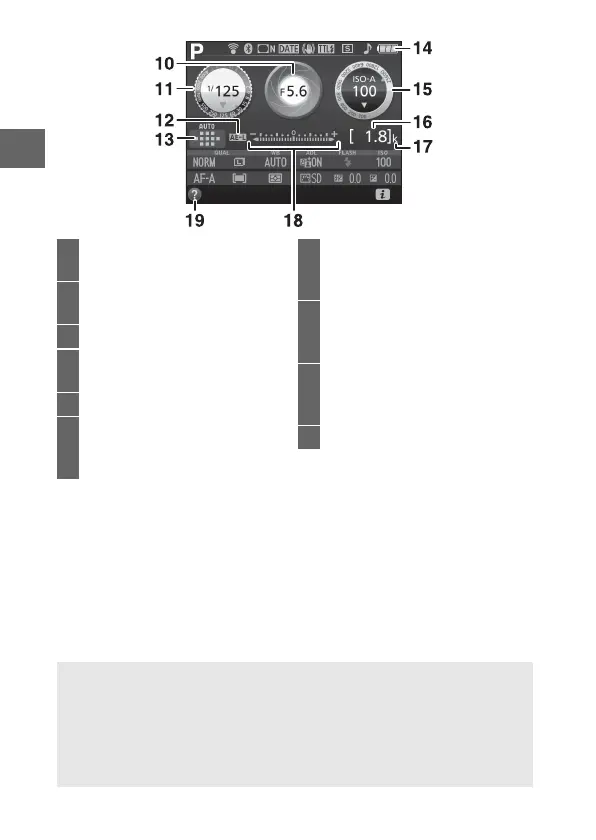
Note: Display shown with all indicators lit for illustrative purposes.
10 Aperture (f-number).....................66
Aperture display ............................66
11 Shutter speed .................................66
Shutter-speed display ..................66
12 Autoexposure (AE) lock indicator
13 AF-area mode indicator .................9
Focus point......................................29
14 Battery indicator............................26
15 ISO sensitivity ...................................9
ISO sensitivity display
Auto ISO sensitivity indicator
16 Number of exposures remaining
..........................................................26
White balance recording indicator
17 “k” (appears when memory
remains for over 1000 exposures)
..........................................................26
18 Exposure indicator........................66
Exposure compensation indicator
..........................................................67
19 Help icon .........................................90
A Turning the Monitor Off
To clear shooting information from the monitor, press the R button or
press the shutter-release button halfway.
The monitor will turn off
automatically if no operations are performed for about 8 seconds (the
Auto off timers option in the setup menu, can be used to choose how
long the monitor remains on).



 To Next Page