118
Setup Menu [Recording Shooting Data]—continued
• Deleting shooting data
1
Turn the power switch on when no film loaded, press the MENU button
to display menu and then display Shooting data menu in the SET-UP
menu.
• See steps 1 and 2 on page 116 to display the Shooting data menu.
• Unload the film before deleting shooting data. Shooting data cannot be
deleted when the film is loaded.
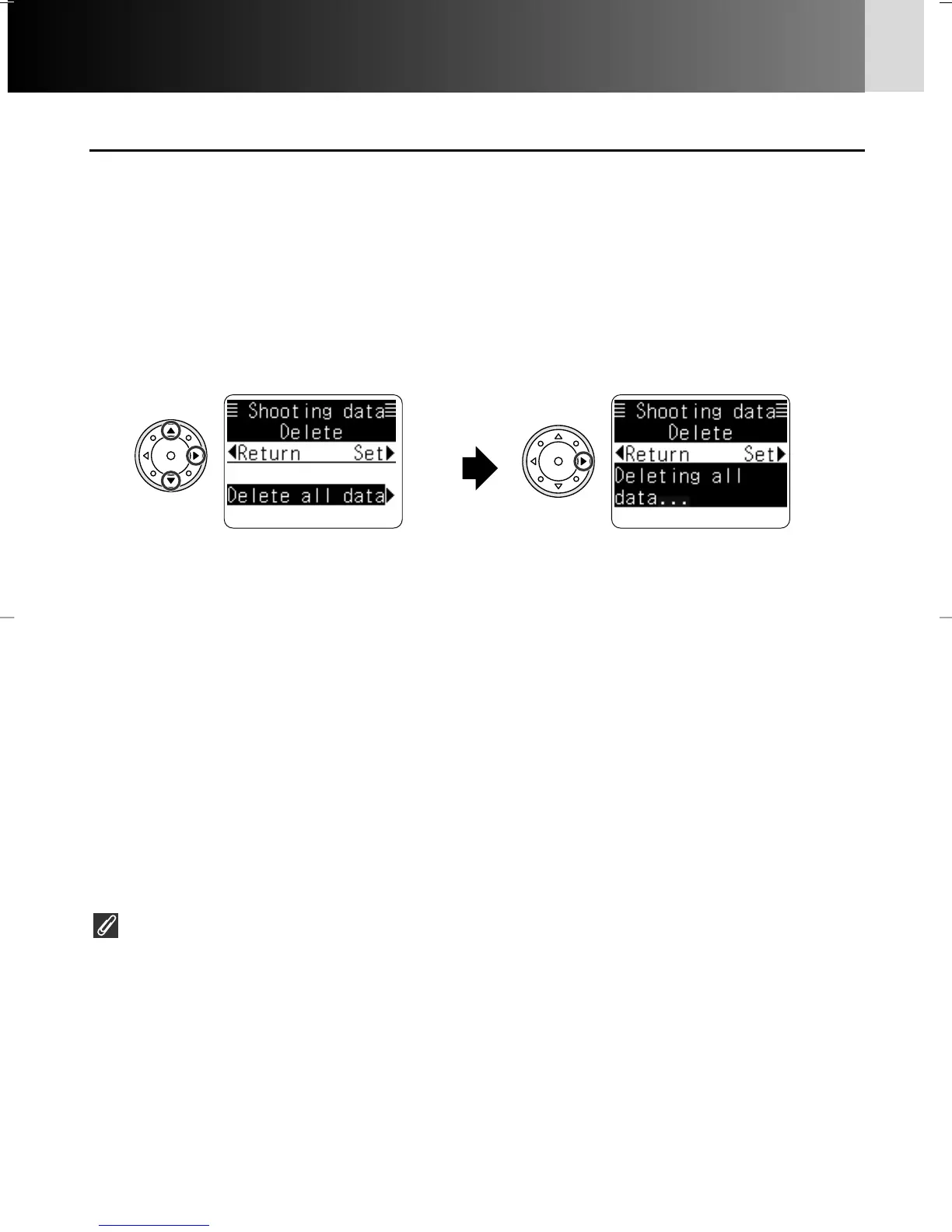
• Press > to select “Delete all data”.
Confirm “Deleting all data” then
press > again to delete all the data.
(Press < to abort deleting data and
return to Shooting data menu.)
• After all the data is deleted, the
display returns to Shooting data
menu.
• Press P/{ on multi-selector to
select “Delete” and > to set.
2
Select Delete all data.
3
Complete the procedure.
• Press < to backtrack display by display, or press MENU button twice to return
to the Shooting data display.
When shooting data is copied onto a CF Memory card
When shooting data is copied onto a CompactFlash™ card using the optional Data
Reader MV-1 (x 166), data stored in the camera’s memory is automatically deleted.
(When film is loaded, shooting data of the loaded film is not copied and remains in
the camera’s memory.)
P930_En 04.10.19 7:19 PM Page 118



 To Next Page