9
En
Fr
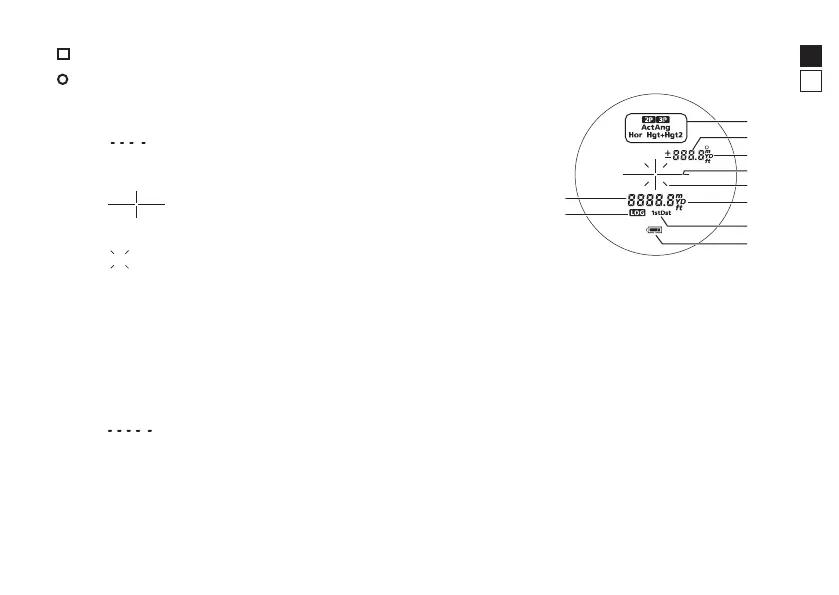
Indicators
l Internal display
1 Measurement display mode
*1
2 Distance or angle
*2
(sub-indicator)
: “Failed to measure” or “Unable to measure”
3 Unit of measure (°: angle in degrees/m: meter/YD: yard/ft: feet)
4 Target mark
: Aim at the target you want to measure.
Position the target at the center of the mark.
5 Laser emission mark
: Appears while the laser is being emitted for a
measurement. Do not look towards the objective lens
side while this mark is shown.
6 Unit of measure (m: meter/YD: yard/ft: feet)
7 Target Priority mode (1st: First Target Priority mode/
Dst: Distant Target Priority mode)
8 Battery level indicator
9 Log indicator
*3
0 Distance or height
*2
(main indicator)
: “Failed to measure” or “Unable to measure”
*1
See page 20 for more information.
*2
Varies depending on the measurement display mode.
*3
See “Log indicator” (page 10) and “Enabling or disabling the log function (F4)” (page 15) for more
information.
• The internal display of this product is enlarged by the eyepiece. Although you may see dust that has
entered, it does not affect the accuracy of measurement.





 To Next Page