52 Basic Photography and Playback
A The Shutter-Release Button
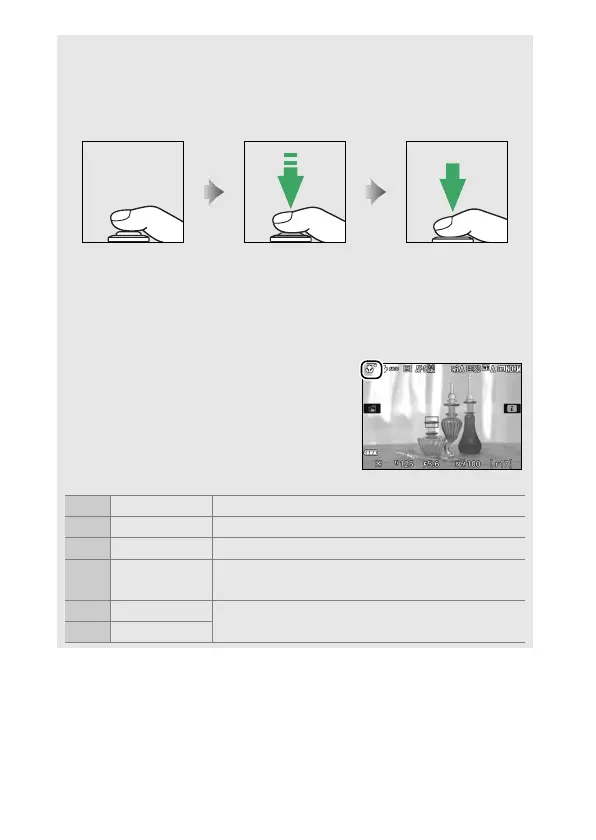
The camera has a two-stage shutter-release button.
The camera
focuses when the shutter-release button is pressed halfway.
To take
the photograph, press the shutter-release button the rest of the way
down.
Focus: press halfway Shoot: press all the
way down
Pressing the shutter-release button halfway also ends playback and
readies the camera for immediate use.
A Automatic Scene Selection (Scene Auto Selector)
If live view is selected in i or j mode, the
camera will automatically analyze the
subject and select the appropriate
shooting mode when the shutter-release
button is pressed halfway to focus using
autofocus. The selected mode is shown in
the monitor.
c Portrait Human portrait subjects
d Landscape Landscapes and cityscapes
e Close up Subjects close to the camera
f Night portrait
Portrait subjects framed against a dark
background
Z Auto
Subjects suited to i or j mode or that do not
fall into the categories listed above
b Auto (flash off)











 To Next Page