•
-BASIC
OPERATION-continued----------
-
t
Ii
.
I
----
I
.,htt
~""
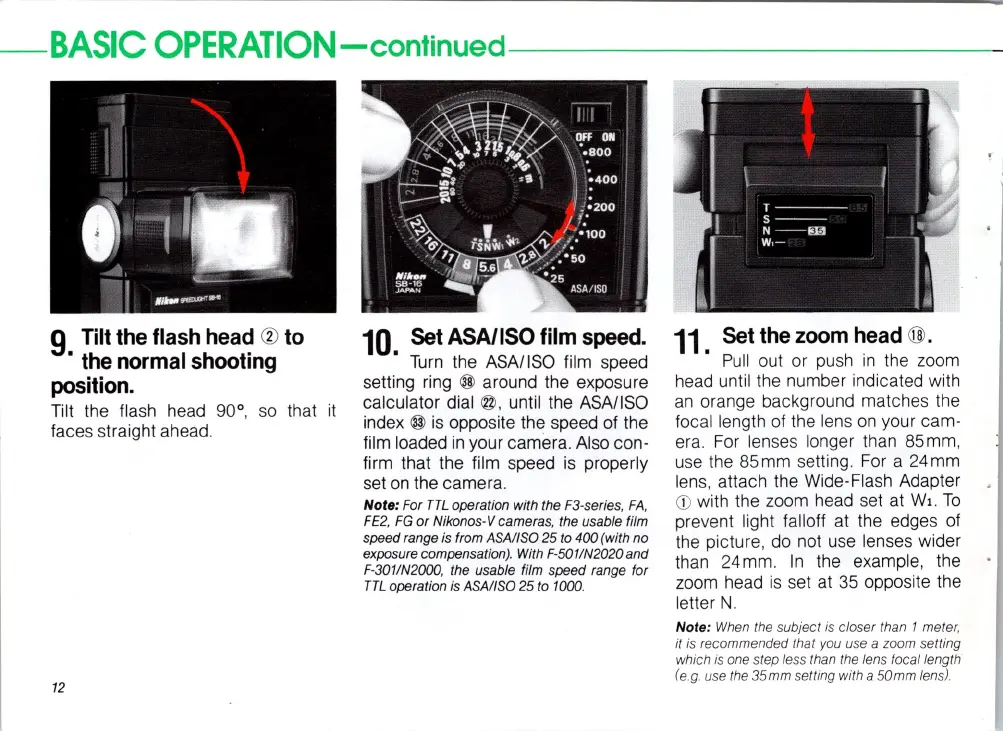
9
Tilt
the
flash
head
®
to
.
the
normal
shooting
position.
Tilt the flash head 90°,
so
that
it
faces straight ahead.
12
10.
Set
ASA/ISO
film
speed.
Turn
the ASAIISO film speed
setting
ring
@ around the exposure
calculator dial
@ , until the ASAIISO
index
@
is
opposite the speed of the
film loaded
in
your camera. Also con-
fi
rm
that the film speed
is
properly
set
on
the camera.
Note: For
TTL
operation with the F3-series,
FA,
FE
2,
FG
or
Nikonos-V cameras, the usable film
speed range is from ASAIISO
25 to 400 (with no
exposure compensation). With F-5011N2020 a
nd
F-301IN2000, the usable film speed range for
TTL
operation is ASAIISO 25 to 1000.
11.
Set
the
zoom
head
@ .
P
ull
out or push
in
the zoom
head until the number indicated with
an
orange background matches the
focal length
of
the lens
on
your cam-
era. For
len
ses
longer than 85mm,
use
the 85mm
se
tting .
For
a 24mm
lens
, attach the Wide-Flash Adapter
<D
with the zoom head
se
t
at
Wl.
To
pre
ven
t light falloff
at
the edges
of
the
pi
cture, do not use lenses wider
than 24mm.
In
the example, the
zoom head
is
set
at
35
opposite the
letter
N.
Note: When the subject
is
closer than 1 meter,
it
is
recommended that you use a zoom setting
whieh
is
one step less than the lens foeallength
(e
.g. use the
35mm
setting with a
50mm
lens).














 To Next Page