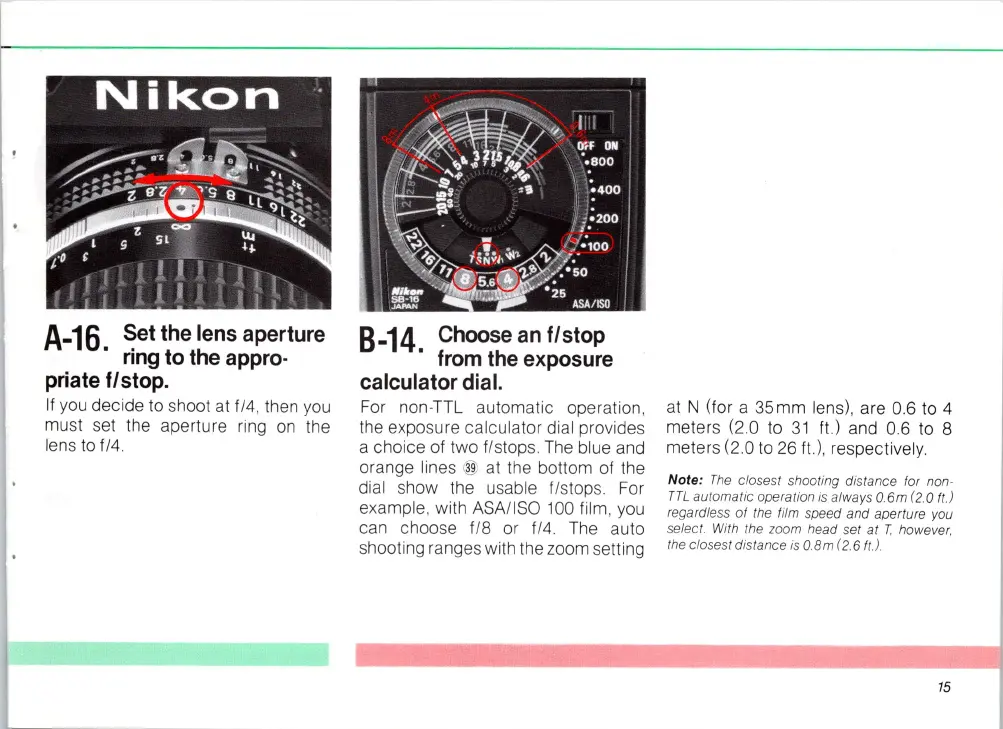
A-16
Set
the
lens
aperture
.
ring
to
the
appro·
priate
f/stop.
II you decide to shoot at
114
, then
you
must set the aperture ring
on
the
lens to
1/4.
8-14.
Choose
an
flstop
from
the
exposure
calculator
dial.
For non-TTL automatic operation,
the exposure calculator dial provides
a choice
01
two I/stops.
The
blue and
orange lines
@ at the bottom
01
the
dial show the usable I
/s
tops. For
example, with
ASA
/I
SO
100
lilm, you
can choose
1/8 or 1/4.
The
auto
shooting ranges with the zoom setting
at
N (for a 35mm lens), are 0.6 to 4
meters
(20
to
31
It)
and 0.6 to 8
meters
(20
to
26
It)
, respectively.
Note:
The
closest shooting d
is
t
an
ce lor non·
TTL
automatic operation is al
wa
ys
a.6m
(2
.
0.
It
.)
rega rdless
01
the film speed and aperture
yo
u
select. With the zoom head set at T however.
the closest distance
is o.8m (2.6
It
.!.
15














 To Next Page