-BASIC
OPERATION-continued----------
-
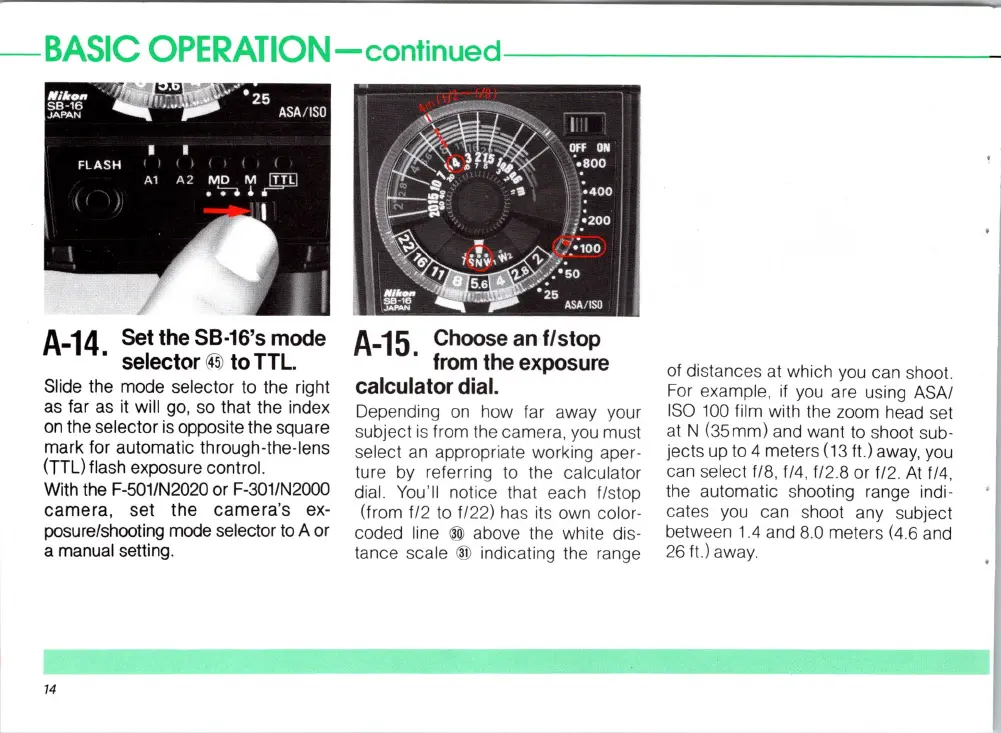
A-14
Set
the
58·16's
mode
.
selector
~
to
TTL
Slide the mode selector to the right
as
far
as
it will go, so that the index
on
the selector
is
opposite the square
mark for automatic through-the-Iens
(TTL) flash exposure control.
With the F·501/N2020 or F-301/N2000
camera,
set the
camera
's ex-
posure/shooting mode selector
to
A or
a manual setting.
14
A-15.
Choose
an
f/stop
from
the
exposure
calculator
dial.
Depending
on
how far away your
subject is from the camera, you
mu
st
select
an
appropriate worki
ng
aper-
ture
by
referring
to
the calculator
dial.
You
'
ll
notice that each flstop
(from
fl2 to f/22)
ha
s
it
s own color-
coded line
® above the white
di
s-
tance scale ® indicating the range
of distanc
es
at which
yo
u can shoot.
For example,
if
you are using ASAI
ISO
100
film with
th
e zoom head set
at
N (35mm) and want
to
s
ho
ot sub-
jects
up
to 4 meters (13 ft.) away, you
can select
fl8
, f/4 , fl2.8 or fl
2.
At
f
/4,
the automatic shoot
ing
range indi-
cates you can shoot any subject
between
1.4
and 8.0 meters
(4
.6 and
26
ft)away
.














 To Next Page