2) Set
the
zoom
setting
knob
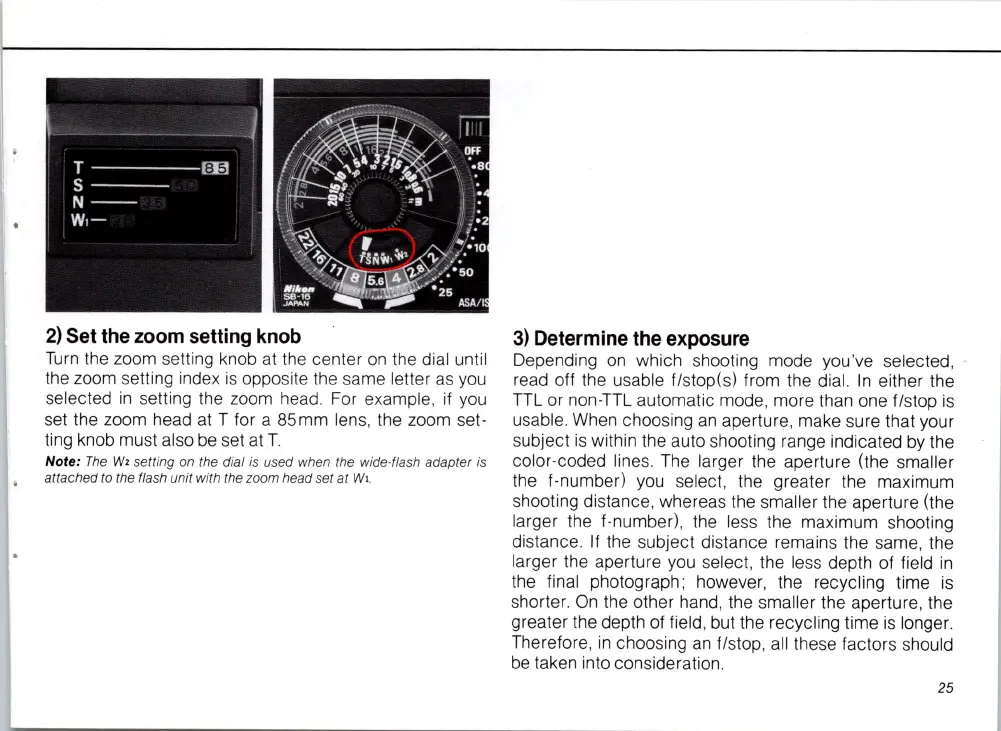
Turn
the zoom setti
ng
knob at the center
on
the dial until
the zoom setting index is opposite the same letter as you
select
ed
in
setting the zoom
he
ad. For example, if y
ou
set the zoom head at T for a 85mm lens, the zoom set-
ting knob must also
be
set at
T.
Note:
The
W,
setting on the dial is used when the wide· flash adapter is
attached to the flash unit with the zoom head set
at
Wi
.
3)
Determine
the
exposure
Depending
on
which shooting mode you '
ve
selected, -
read off the usable f/stop(s) from the dial. In either the
TTL
or non-TTL automatic mode, more than one f/stop is
usable. When choosing
an
aperture, make sure that your
subject is within the auto shooting range indicated
by
the
color-coded lines.
The
larger the aperture (the smaller
the f-number)
you
select, the greater the maximum
shooting distance, whereas the smaller the aperture (the
larger the f-number), the less the maximum shooting
di
stance. If the subject distance remains the same, the
larger the aperture you select, the
le
ss
depth of field
in
the final photograph ; however, the recycling time
is
shorter.
On
the other hand, the smaller the aperture, the
greater the depth of field, but the recycling time
is
longer.
Therefore,
in
choosing
an
f/stop, all these factors should
be
taken into considerati
on
.
25














 To Next Page