-CONTROLS
IN
DETAIL-continued---------
---1
For through-the-lens (TTL) operation
On
the dial the
re
are eight IIstops ranging from
112
to
1122
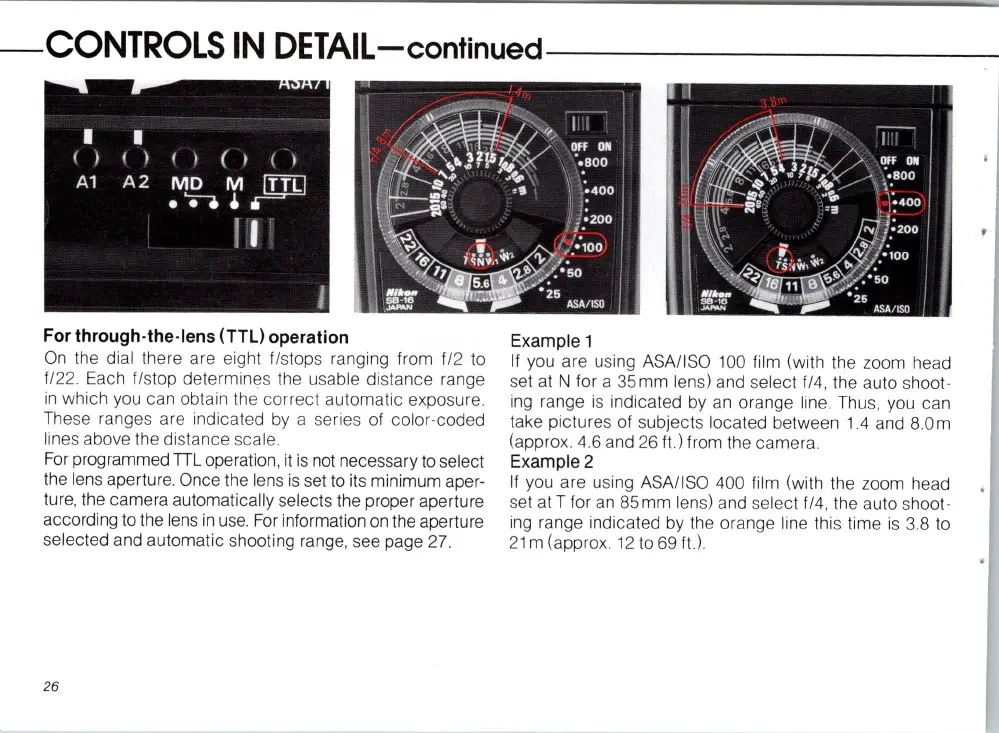
. Each IIstop determines the usable distance range
in
which you can obtain the correct automatic exposure.
The
se
rang
es
are indicated
by
a series of color-coded
lines above the distance scal
e.
For
programmed
TIL
operation, it
is
not
necessary
to
select
the lens aperture. Once the lens
is
set to its minimum aper-
ture, the camera automatically
se
lects the proper aperture
according to the
len
s
in
use.
For
information
on
the aperture
selected and automatic shooting range, see page
27.
26
Example 1
If
you are using
ASA
/I
SO
100
film (with the zoom
he
ad
set at N for a
35
mm
len
s) and
se
le
ct
114,
the auto shoot-
ing
range is indicated
by
an
orange line.
Thu
s,
you
can
take pictures of subjects located between 1.4 and 8.0 m
(a
pprox. 4
.6
and
26
ft.) from the camera.
Example 2
If
you are u
si
ng
ASA/ISO 400 film (with the zoom head
set
atT
for an
85mm
lens) and
se
lect f/4,
th
e auto shoot-
ing
range indicat
ed
by
the orange line this time is 3.8 to
21 m (approx 12 to
69
It
.)














 To Next Page