5.
Attach the 58·21 to the
lens.
Depending
on
the
desired effect,
you
can attach the
S8-21
in
either
horizontal or vertical position.
With lens in reverse position
With lens in normal posi
tio
n
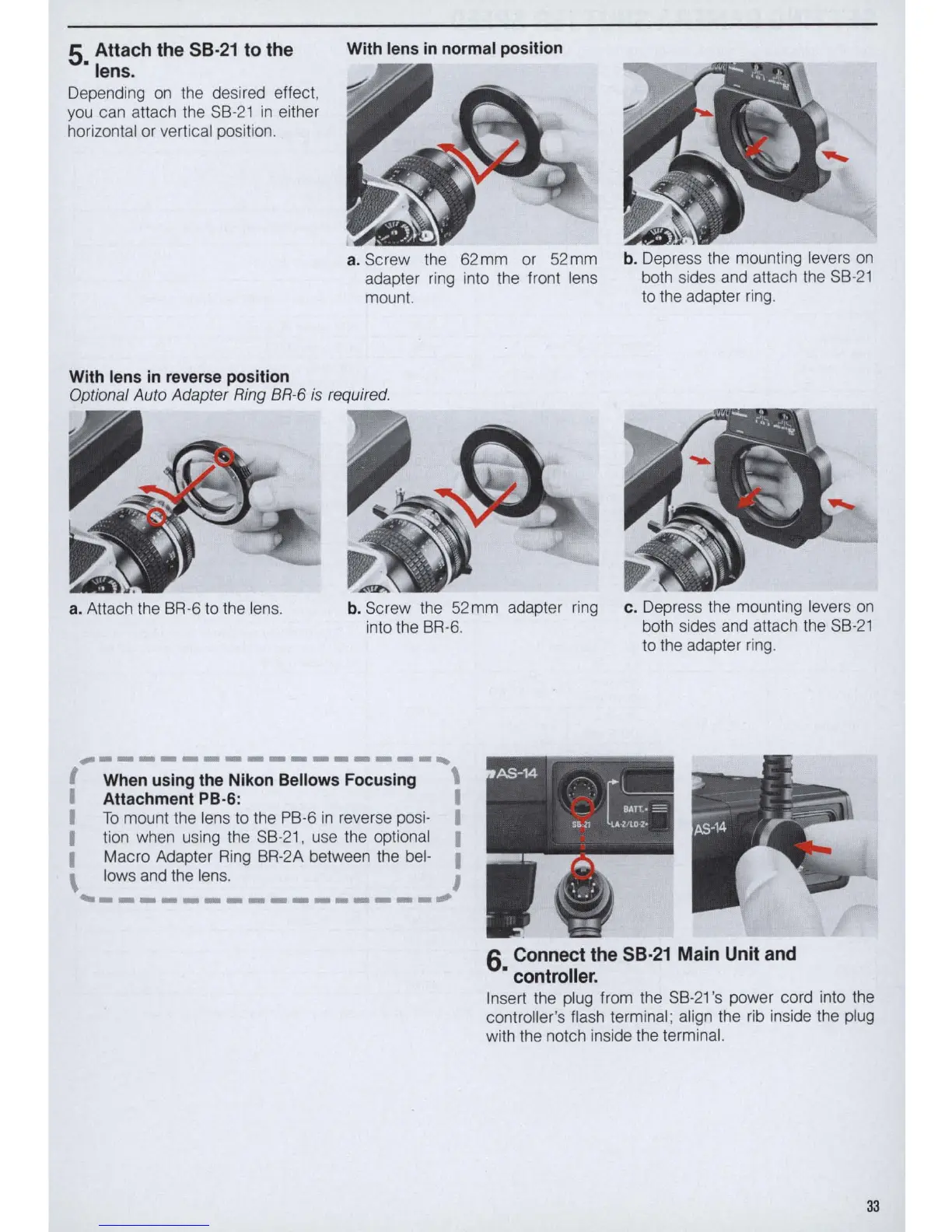
a. Screw the
62
mm
or
52
mm
adapter ring into the front lens
mount.
Optional Auto Adapter Ring BR-6
is
required.
a. Attach the 8R·6
to
the lens.
b.
Screw the 52mm adapter
ring
into
the
8R·6.
~----
-----------,
I When using the Nlkon Bellows Focusing \
I Attachment PB·6: I
I
To
mount the lens
to
the
P8·6
in
reverse posi· I
I tion when using the
S8-21
, use the optional I
I
Macro Adapter
Ring
8R·2A between the bel· I
\ lows and the lens. I
~----------------~
b.
Depress the mounting levers
on
both sides and attach
the
S8·21
to
the adapter
ring
.
c. Depress the mounting levers
on
both sides
and
attach
the
S8·21
to
the adapter
ring
.
6 Connect the 58·21 Main
Un
it and
• controller.
Insert the plug from the
S8·21
's power cord into the
controller's flash terminal ; align the
rib
inside the plug
with the notch inside
the
terminal.
33



 To Next Page