'1111
Nine
Eagles
R
("'11111
)(
'I " I
C--I-I-
()
I'
-,
("'11111
)(
'I " I
C--I-I-
()
I'
-,
Nine
Eagles
R
INSTRUCTION
MANUAL
J •
..
1.,'
,.:.
J.
..
1.,'
,.:.
INSTRUCTION
MANUAL
3_
SWITCH
BETWEEN
LOW
RATE
AND
HIGH
RATE
roduct
has
low
and
high rate setting to
meet
needs
of
different level users.
...,
I'
i
•
TX<= TX<=
.-
..
-
..
-.
o
I_I I_I
IJ
0
.
•.
-
..
-.
o
I_I
I_I
I_I
0
__
D~_
•
__
D~_
_~D_f)
_~D_
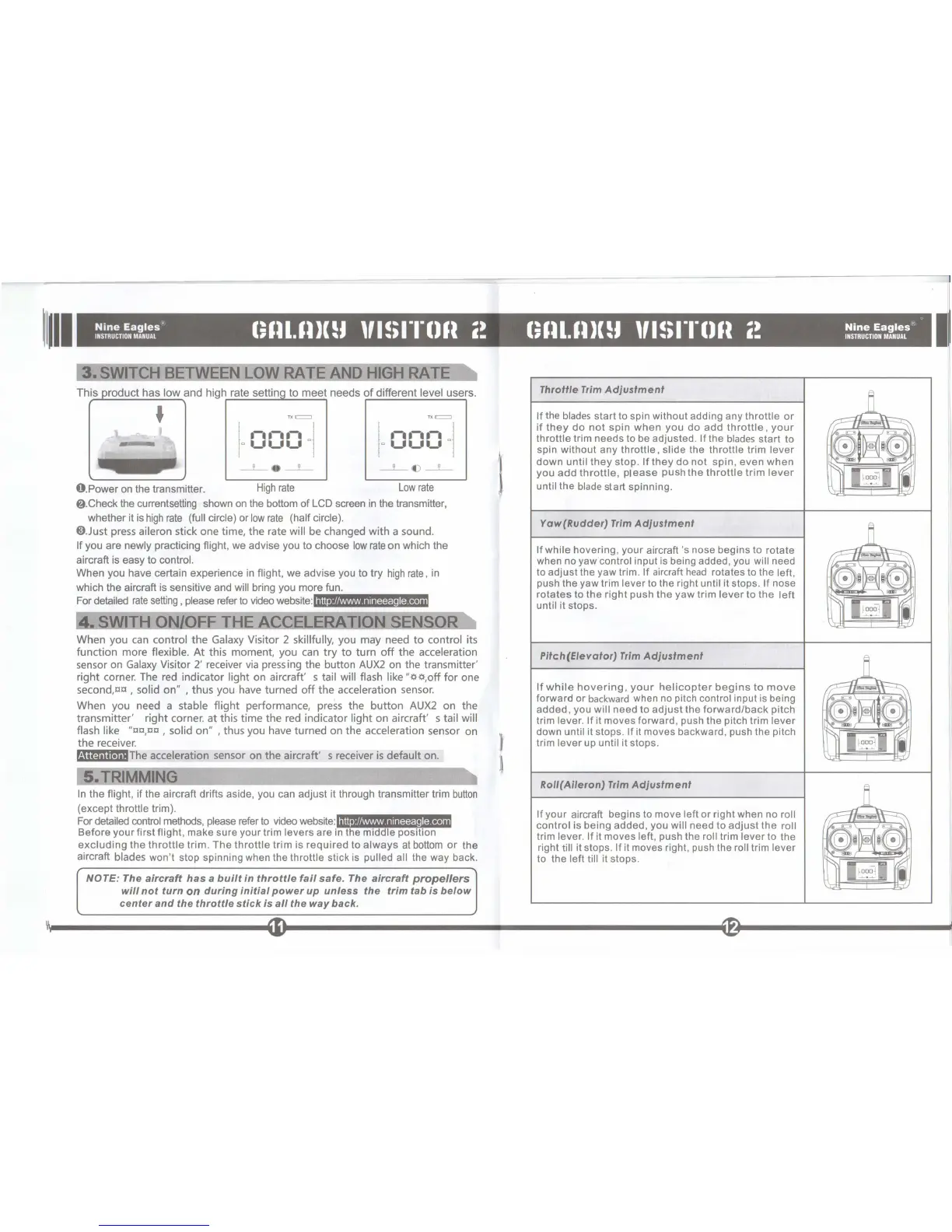
O.Power
on
the transmitter.
High
rate
Low
rate
f).Check the currentsetting shown
on
the bottom of LCD screen
in
the transmitter,
whether it
is
high
rate
(full circle) or
low
rate
(half circle).
O.Just
press aileron stick one time,
the
rate will be changed
with
a sound.
If you are newly practicing flight, we advise you to choose
low
rate
on
which the
aircraft
is
easy to control.
When you have certain experience
in
flight, we advise you to try
high
rate,
in
which the aircraft is sensitive and will bring you more fun.
For
detailed
rate
setting, please refer
to
video website:
http
://www.nineeagle.
com
When
you can control
the
Galaxy Visitor 2 skillfully, you may need
to
control its
function
more flexible.
At
this moment, you can
try
to
turn
off
the
acceleration
sensor on Galaxy Visitor 2' receiver
via
pressing the button
AUX2
on the transmitter'
right
corner. The red indicator
light
on aircraft' s tail will flash like
"l)l),off
for
one
second,aa , solid
on"
, thus you have
turned
off
the
acceleration sensor.
When you need a
stable
flight
performance, press
the
button
AUX2
on
the
transmitter'
right
corner.
at
this
time
the
red indicator
light
on
aircraft' s tail will
flash like
"tltl,tltl,
solid
on"
,thus
you have
turned
on the acceleration sensor on
the
receiver.
r.ijit:1i\n.J.'The acceleration sensor on
the
aircraft' s receiver
is
default
on.
S_TRIMMING
In
the flight, if the aircraft drifts aside, you can adjust it through transmitter trim
button
(except throttle trim).
http
://www.nineeagle.com
For
detailed
control
methods, please refer
to
video
website:"""!'I-IIIII!"'!""!~_~
Before your first flight, make sure your trim levers are
in
the middle position
excluding
the
throttle
trim.
The
throttle
trim
is
required
to
always
at
bottom
or
the
aircraft blades won't stop spinning when the throttle stick
is
pulled all the way back.
NOTE: The
aircraft
has
a
built
in
throttle
fail
safe.
The
aircraft
propellers
will
not
turn
on
during
initial
power
up
unless
the
trim
tab
is
below
center
and
the
throttle
stick
is
all
the
way
back.
I
~
11
Throttle
Trim
Adjustment
If
the
blades
start to spin without adding any throttle
or
if
they
do
not
spin
when
you
do
add
throttle
,
your
throttle trim needs to
be
adjusted.
If
the
blades
start to
spin without any
throttle, slide the throttle trim lever
down
until
they
stop.
If
they
do
not
spin, even
when
you
add
throttle,
please
push
the
throttle
trim
lever
until the
blade
start spinning.
Yaw(Rudder)
Trim
Adjustment
If
while hovering, your aircraft's nose begins to rotate
when no yaw
control input is being added, you will need
to adjust the yaw trim.
If aircraft
head
rotates to the left,
push the yaw trim lever to the right until it stops. If nose
rotates
to the
right
push the yaw trim
lever
to
the
left
until it stops.
Pitch(Elevator)
Trim
Adjustment
If
while
hovering,
your
helicopter
begins
to
move
forward or
backward
when
no
pitch control input
is
being
added, you
will need to
adjust
the
forward/back
pitch
trim
lever.
If
it moves forward, push the pitch trim lever
down until it stops. If it moves backward, push the pitch
trim
lever up until it stops.
RoII(Aileron)
Trim
Adjustment
If your aircraft begins to move left or right when no roll
control
is being added, you will need to
adjust
the roll
trim lever. If it moves left, push the roll trim lever to the
right
till it stops. If it moves right, push the roll trim lever
to the left till it stops.
II
III


 To Next Page