Nokia E72 RM-529 / RM-530
Service Manual Level 1&2
15
Confidential
Copyright © 2009 NOKIA
All rights reserved
Version 1.0
ISSUE 1
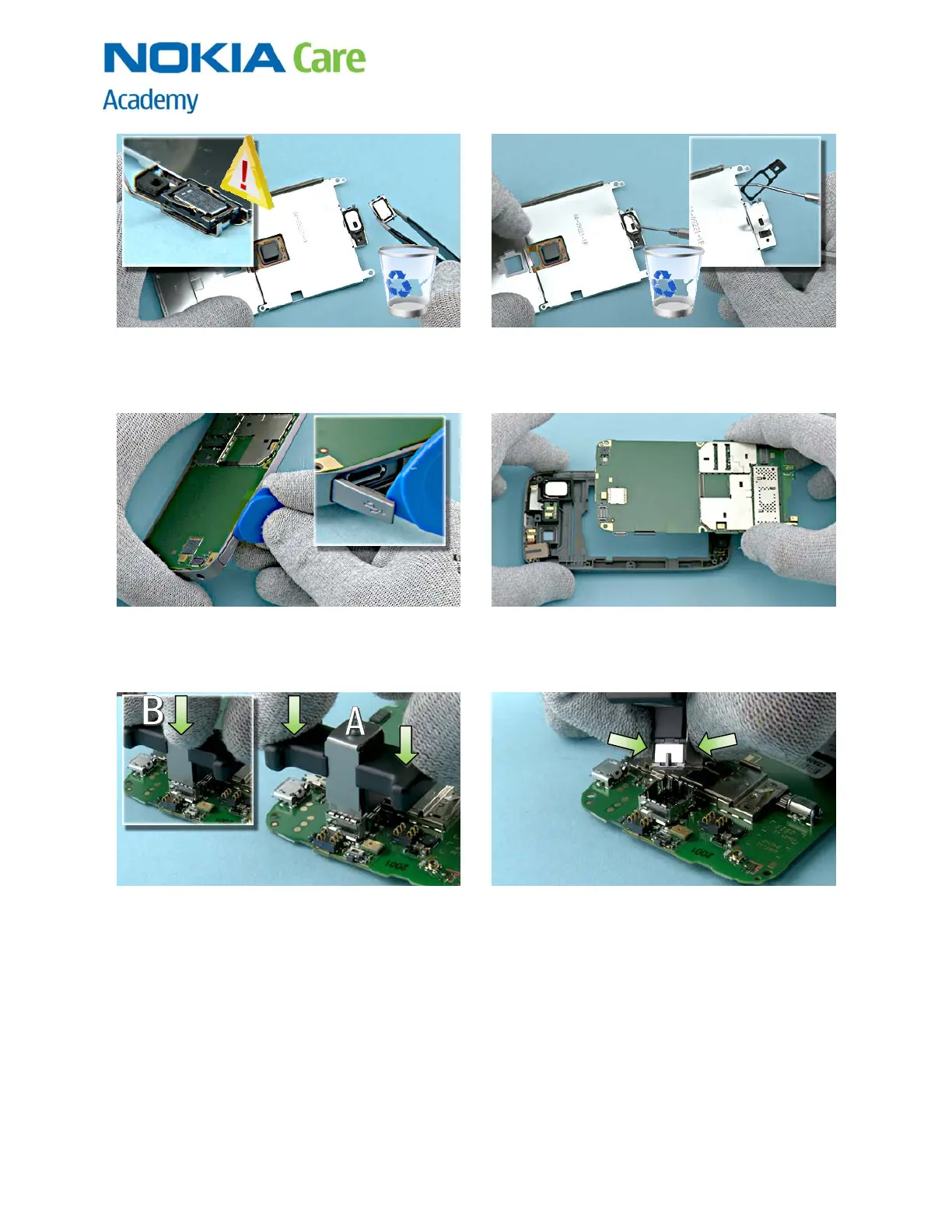
19) Use the dental tool to release the EARPIECE. Be
careful not to injure yourself with the sharp end of
the dental tool! Remove the earpiece with tweezers.
Do not use it again.
20) Remove also the AUDIO GASKET with the dental
tool. Discard the AUDIO GASKET. Discard also the UI
SHIELD ASSEMBLY
21) Before the PWB can be removed, the USB DOOR
has to be opened.
22) Remove the PWB.
23) Insert the SS-210 camera removal tool on top of
the CAMERA. A) Press the CAMERA down a little bit
with the black plastic parts of the SS-210, otherwise
socket locking pins are damaged when metal plates
are pressed down. B) Press metal sheets down, as
shown in small picture.
24) Press metal plates from the sides to tighten
them to the CAMERA and then lift up the CAMERA.



 To Next Page