WWW.NORAC.CA
PRECISIONDEFINED
Page28
Visitwww.solutions.norac.caformoresystem
installationandtroubleshootinginfo.
8 WingRollCylinderAirBleedProcedure
AfterinstallingtheWingRoll Cylinder,airwillhavetoberemovedfrom thesystem.Thefollowingisastepby
stepprocedure forbleedingairfrom thesystemusingboththesprayer joystickandtheNORACmanualvalve
drivescreen.
8.1. UsingaUniversalTerminal(UT)orPULSE
TM
Display
1. Removetheairfromthetiltcylinders,usingthesprayer’sjoystickcontrols.
a) Movethelefttiltcylinderfullstrokethreetimes.
b) Movetherighttiltcylinderfullstrokethreetimes.
2. TheNORACscreenontheUTorPULSEmustbeusedtoremoveairfromtheroll
channel:
a) StartanAutomaticInstall.
i) Ifthisisanewinstall,thesystemwillautomaticallystartanautomaticinstall.
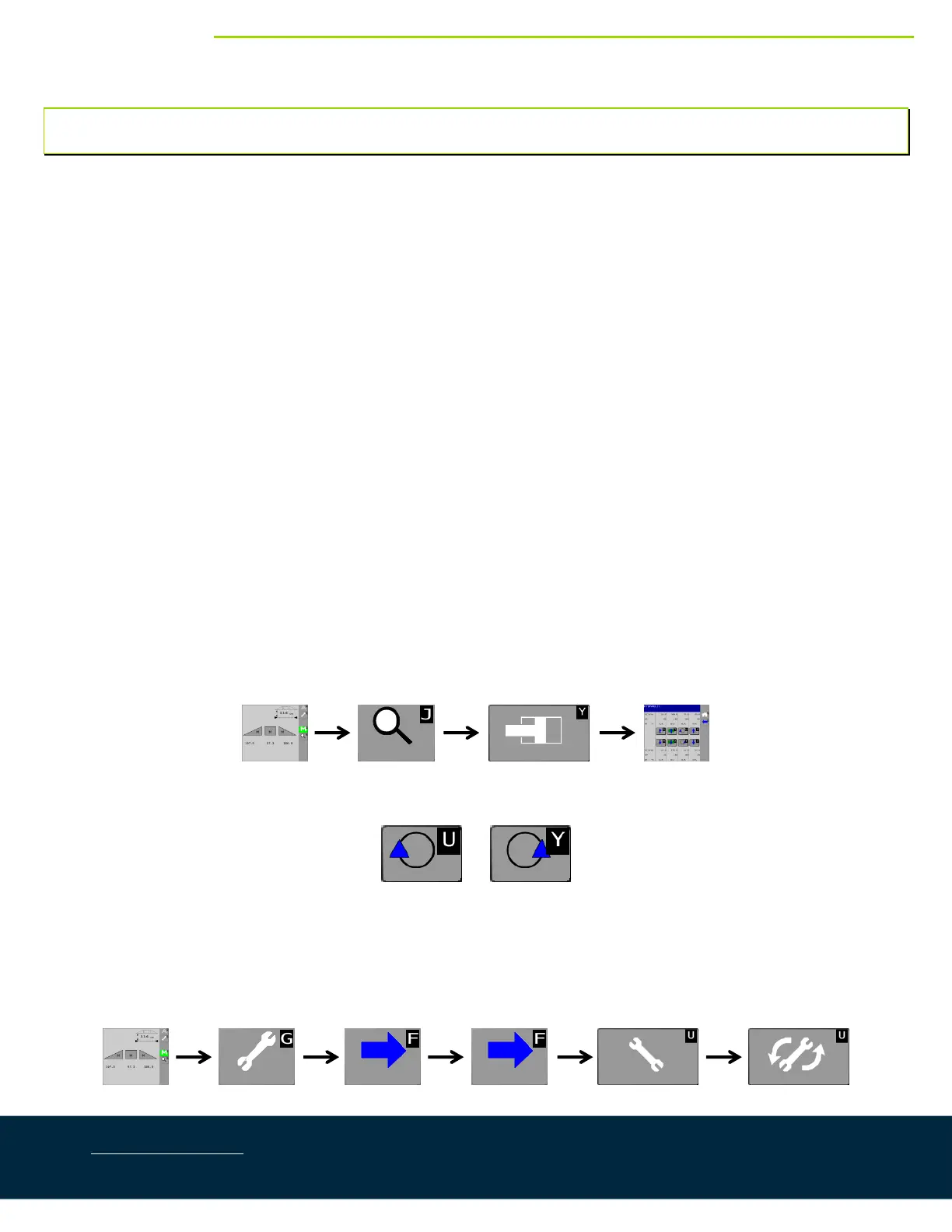
ii) Ifaninstallhasalreadybeenperformed,followtheiconsinstep3tostarttheinstall.
b) Selecttheappropriatesprayermakeandmodelonthescreen.
c) Readthedisclaimermenusandmovethroughthescreens.
d) At the screen reading “level the boom at 35in (90cm)”, press the home button [G] to exit the install
andreturntothemainrunscreen.
e) Usingthesprayer’scontrols,raisetheboomcentertothemaximumheightandlevelthewings.
f) Followthesymbolsbelowtonavigatetothemanualvalvedrivescreen.
g) Use the roll arrows ([U] and [Y]) to roll the boom over as far as possible in each direction three (3)
times,allowingtheairtoescape.*Don’tadjustthewingsindividually,only
usetherollarrows.
h) Stopwiththewingsatapproximatelythesameheight.
i) Ensurethateachrollbuttonallowsfortheboomtorotateinbothdirections.Iftheboomdoesn’troll
inonedirection,rollittheoppositewayandadjustthewingstotheirlevelposition.
3. Runacompleteautomaticinstall.



 To Next Page