EasyManua.ls Logo

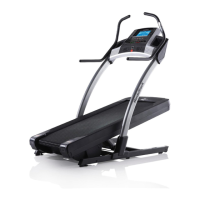
NordicTrack INCLINE TRAINER X5I INTERACTIVE - User Manual

NordicTrack INCLINE TRAINER X5I INTERACTIVE
32 pages
Print Icon
To Next Page IconTo Next Page
Loading...
CAUTION
Read all precautions and instruc-
tions in this manual before using
this equipment. Save this manual
for future reference.
Serial Number
Decal
QUESTIONS?
If you have questions, or if parts are
damaged or missing, DO NOT
CONTACT THE STORE; please
contact Customer Care.
IMPORTANT: Please register this
product (see the limited warranty
on the back cover of this manual)
before contacting Customer Care.
CALL TOLL-FREE:
1-800-TO-BE-FIT
(1-800-862-3348)
Mon.–Fri. 6 a.m.–6 p.m. MT
Sat. 8 a.m.–4 p.m. MT
ON THE WEB:
www.nordictrackservice.com
USER'S MANUAL
Model No. NTL15810.0
Serial No.
Write the serial number in the space
above for reference.
w
ww.nordictrack.com

Questions and Answers

  • M
    melissaperryJul 29, 2025
    Why does the walking belt slow down when I walk on my NordicTrack Treadmill?
    • U
      ugarciaJul 30, 2025
      If your NordicTrack Treadmill's walking belt slows down when you walk on it, ensure you are using a single-outlet surge suppressor that meets the specifications outlined on page 12 of the manual. Also, if the walking belt feels too tight, remove the key and unplug the power cord. Then, use a hex key to turn both idler roller bolts counterclockwise by a quarter turn. When the belt is properly tightened, you should be able to lift each edge about 3 to 4 inches off the platform. Finally, plug the power cord back in, insert the key, and run the treadmill for a few minutes.
  • S
    Sheila StaffordAug 2, 2025
    How to fix a NordicTrack INCLINE TRAINER X5I INTERACTIVE when the power does not turn on?
    • L
      Lynn RobertsAug 3, 2025
      If your NordicTrack Treadmill's power does not turn on, first, ensure the power cord is correctly plugged into a surge suppressor, and the surge suppressor is plugged into a properly grounded outlet. Next, make sure the key is properly inserted into the console after plugging in the power cord. Finally, check the power switch located on the treadmill frame near the power cord. If the switch protrudes, wait five minutes, then press the Tripped Reset switch back in.
  • K
    Kathleen ReynoldsAug 7, 2025
    Why does my NordicTrack Treadmill power off during use?
    • M
      mfloresAug 7, 2025
      If the power turns off during use on your NordicTrack Treadmill, check the power switch and if it has tripped, wait five minutes before pressing it back in. Ensure the power cord is properly plugged in; if it is, unplug it, wait five minutes, and then plug it back in. Also, remove and reinsert the key into the console. If these steps don't resolve the issue, consult the front cover of this manual.
  • A
    Alexander MayAug 11, 2025
    What to do if the walking belt is off-center or slips on my NordicTrack INCLINE TRAINER X5I INTERACTIVE?
    • N
      Nathan MunozAug 11, 2025
      If your NordicTrack Treadmill's walking belt is off-center, remove the key and unplug the power cord. If the belt has shifted left, use a hex key to turn the left idler roller bolt clockwise half a turn. If it has shifted right, turn the bolt counterclockwise half a turn. If the belt slips, remove the key and unplug the power cord. Turn both idler roller bolts clockwise a quarter turn. When correctly tightened, you should be able to lift each edge of the belt 3 to 4 inches off the platform.
  • J
    jenniferbowmanAug 15, 2025
    How to reset incline on NordicTrack INCLINE TRAINER X5I INTERACTIVE?
    • M
      michaelmartinAug 15, 2025
      If the incline of your NordicTrack Treadmill does not change correctly, hold down the Stop button and the Speed increase button simultaneously, then insert the key into the console and release both buttons. Press the Stop button again, then press either the Incline increase or decrease button. The treadmill will automatically rise to the maximum incline and then return to the minimum, recalibrating the incline system. If it still doesn't calibrate, press the Stop button, then press the Incline increase or decrease button again.
  • J
    Julie SmithAug 19, 2025
    How do I fix lines on my NordicTrack Treadmill console display?
    • A
      Alice WeberAug 20, 2025
      If lines appear in the console display of your NordicTrack Treadmill, you can find instructions on how to adjust the contrast level of the display in THE INFORMATION MODE on page 18.
  • J
    Jillian AllisonAug 25, 2025
    How do I turn off demo mode on my NordicTrack Treadmill?
    • K
      Kyle HardingAug 25, 2025
      To turn off the demo mode on your NordicTrack Treadmill, hold down the Stop button for a few seconds. If the displays are still lit, refer to THE INFORMATION MODE on page 18 for instructions on how to turn off the demo mode.

Summary

WARNING DECAL PLACEMENT

Decal Application Guide

Instructions for correctly applying safety warning decals to the incline trainer.

IMPORTANT PRECAUTIONS

General Safety and Usage Rules

Critical safety guidelines, user responsibilities, and operational precautions for the incline trainer.

BEFORE YOU BEGIN

Product Overview and Parts Identification

Introduces the NordicTrack X5i and identifies its key components using a diagram.

ASSEMBLY

Assembly Steps and Hardware

Detailed instructions and a list of necessary hardware for assembling the incline trainer.

OPERATION AND ADJUSTMENT

Power Connection and Surge Protection

Guides on safely connecting the power cord and using surge suppressors for equipment protection.

CONSOLE OPERATION

Console Diagram and Workout Modes

Explains the console layout, manual mode, programmed workouts, iFit, and stereo features.

HOW TO TURN ON THE POWER

Manual Mode Operation

Step-by-step guide to using the manual workout mode, adjusting speed and incline.

HOW TO USE A CALORIE WORKOUT

Calorie Workout Guide

Instructions for selecting and performing calorie-focused programmed workouts.

HOW TO USE A RANDOM WORKOUT

Random Workout Guide

Instructions for selecting and performing randomly generated workouts for varied exercise.

THE INFORMATION MODE

Accessing Usage Data and Settings

How to view total usage, adjust display settings, and check iFit status.

HOW TO USE THE STEREO SOUND SYSTEM

Stereo System Operation

Guide to connecting and playing audio through the console's stereo speakers.

HOW TO USE THE IFIT TRAINING MODE

iFit Live Module Guide

Instructions for connecting and utilizing the iFit Live module for advanced training features.

HOW TO MOVE THE INCLINE TRAINER

Safe Moving and Transport

Guidelines for safely moving the incline trainer, emphasizing proper handling and lifting.

TROUBLESHOOTING

Power, Console, and Display Issues

Solutions for common problems like power failures, demo mode, and console display malfunctions.

Incline Calibration and Belt Performance

Troubleshooting steps for issues with incline adjustment and walking belt speed or slipping.

Belt Alignment and Slipping Issues

Solutions for problems with the walking belt being off-center or slipping during use.

EXERCISE GUIDELINES

Training Intensity and Frequency

Recommendations on exercise intensity, workout types, and optimal training frequency for fitness.

SUGGESTED STRETCHES

Flexibility and Injury Prevention Stretches

Illustrated guide to basic stretches for improving flexibility and preventing exercise-related injuries.

PARTS AND MAINTENANCE

Part List and Exploded Diagrams

Comprehensive list of parts and visual diagrams for identification and maintenance.

EXPLODED DRAWING A

Base and Frame Components View

Visual diagram detailing the assembly of the base and related frame parts.

EXPLODED DRAWING B

Motor and Frame Components View

Visual diagram detailing the assembly of motor and frame sections.

EXPLODED DRAWING C

Upright and Console Mounts View

Visual diagram detailing the assembly of uprights and console mounting hardware.

EXPLODED DRAWING D

Console and Hood Components View

Visual diagram detailing the assembly of the console, hood, and accessories.

REPLACEMENT PARTS AND WARRANTY

Ordering Parts and Warranty Information

Procedures for ordering replacement parts and details on the product's limited warranty.

NordicTrack INCLINE TRAINER X5I INTERACTIVE Specifications

General IconGeneral
Motor3.0 HP DurX Commercial Plus Motor
Running Area20" x 60"
Speed0-12 mph
Display10" Full-Color Touchscreen Display
iFit CompatibilityYes
Weight Capacity300 lbs
AudioDual 2" Speakers

Related product manuals