To Next Page
S
Sean ThompsonAug 16, 2025
How to turn on NordicTrack Elliptical Trainer console?
- LLaura PhamAug 17, 2025
Ensure that the power adapter is fully plugged in and the power switch is pressed on.

How to turn on NordicTrack Elliptical Trainer console?
Ensure that the power adapter is fully plugged in and the power switch is pressed on.
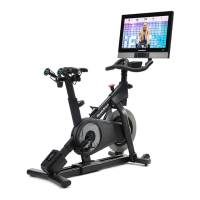
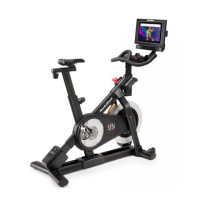
How to fix a loose console on a NordicTrack S22i Exercise Bike?
If the console of your NordicTrack Exercise Bike feels too loose when moved from side to side, use the included studio cycle tool to slightly tighten the M25 Locknut until the console stays in place.
What to do if my NordicTrack Exercise Bike console is loose when tilting?
To resolve the issue where the console of your NordicTrack Exercise Bike feels too loose when tilted upward and downward, tighten the four M6 x 15mm Cap Screws in the Rear Bracket Mount until the up and down movement no longer feels loose.
How to keep NordicTrack S22i Exercise Bike console in place when it is moved?
If the NordicTrack Exercise Bike console doesn't stay in place when moved, tighten the indicated M8 Locknut slightly until the console stays in place.
What to do if NordicTrack Elliptical Trainer console freezes?
If the console does not boot up properly, or if the console freezes and does not respond, reset the console to the factory default settings.
What to do if the Left Crank Arm feels loose on NordicTrack Elliptical Trainer?
If the Left Crank Arm feels loose while you are pedaling, tighten the M12 Crank Screw (15) counterclockwise to 7 Nm (5 ft-lbs), then tighten each M6 x 25mm Screw (96) to 20 Nm (15 ft-lbs). Finally, tighten each M6 x 25mm Screw a second time to 20 Nm (15 ft-lbs) in the same order.
What to do if NordicTrack Elliptical Trainer pedals slip?
If you can feel the pedals slip while you are pedaling, loosen the M10 Axle Nut (27) on each side of the studio cycle, and tighten the Adjustment Nut (26) on each side of the studio cycle one half turn.
How to fix NordicTrack Elliptical Trainer console that does not stay in place when tilted?
If the console does not stay in place when it is tilted upward and downward, tighten the four M6 x 15mm Cap Screws Mount (114) until the up and down movement no longer feels loose.
What to do if NordicTrack Elliptical Trainer console moves from side to side?
If the console does not stay in place when it is moved from side to side, use the included studio cycle tool to tighten the M25 Locknut (152) slightly.
What to do if the pedals slip on my NordicTrack S22i?
If the pedals slip while pedaling your NordicTrack Exercise Bike, even at the highest resistance, try tightening the Adjustment Nut on each side of the studio cycle by one half turn.
Critical instructions and warnings to prevent injury and ensure safe use of the cycle.
Details on yearly checks, unlimited repairs, and coverage for defects and wear.
Information on repair coverage for manufacturer defects and wear and tear for different durations.
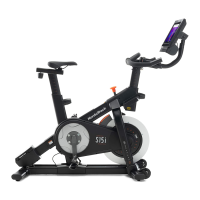
Overview of the cycle's features and physical dimensions.
Visual guide to identify hardware and parts for assembly purposes.
Tips for assembly, including required tools, number of persons, and avoiding damage.
Instructions on plugging in the power adapter and overview of key cycle features.
How to adjust saddle angle, position, and carriage for optimal fit.
Guide for adjusting handlebar post height and console position.
How to adjust leveling feet to ensure stability and eliminate rocking.
Instructions for using pedals (toe cage/clip-in) and the brake knob for resistance.
Details the console's features, iFIT connection, and workout library access.
Guide to turning the console on/off and using its touch screen interface.
Steps for Wi-Fi connection, settings customization, and incline calibration.
How to start, adjust resistance/incline, and follow progress in manual mode.
How to use compatible heart rate monitors to track workouts.
Guide to choosing, starting, and interacting with pre-programmed iFIT workouts.
How to draw routes on the map, save them, and start custom workouts.
Guide to selecting workouts from the library and scheduling them for future use.
How to mark workouts as favorites and view your curated list.
How to access and modify settings for account, equipment, and firmware updates.
Step-by-step guide to enable Wi-Fi and connect to a wireless network.
Cleaning, pedal tightening, and general upkeep for optimal performance.
Solutions for common console issues like power, freezing, or network problems.
How to tighten the console mount if it feels loose.
How to calibrate the incline system if the frame doesn't move correctly.
How to tighten the left crank arm if it feels loose during pedaling.
How to adjust the reed switch for accurate console feedback.
Steps to adjust the drive belt if pedals slip during use.
How to use heart rate zones for fat burning and aerobic exercise.
Recommendations for warming up, training zones, and cooling down.
Instructions for five common stretches to improve flexibility.
A detailed list of all parts with key numbers and quantities for the studio cycle.
Visual breakdown of the studio cycle's main frame and components.
Visual breakdown of the drive system, pedals, and power components.
Visual breakdown of the console and its mounting hardware.
Information and required details for ordering replacement parts.
Details the terms, duration, and conditions of the iFIT product warranty.
 General
| Resistance Levels | 24 digital resistance levels |
|---|---|
| Weight Capacity | 350 lbs |
| Connectivity | Bluetooth, Wi-Fi |
| Display | 22" HD Touchscreen |
| Incline Range | -10% to 20% |
| Pedals | Caged pedals |
| Heart Rate Monitoring | Bluetooth Heart Rate Monitoring |
| Resistance | Silent Magnetic Resistance |
| Warranty | 10-year frame, 2-year parts, 1-year labor |
| Speakers | Two 2-inch digitally amplified speakers |
| Weight | 203 Lb. In Box Product Weight |
| Membership | iFit membership required for interactive features (1-year family membership included) |