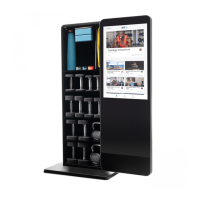
The NordicTrack VAULT is a revolutionary digital fitness mirror with an integrated storage cabinet, designed to provide an immersive and interactive workout experience in the comfort of your home. This innovative equipment allows users to achieve their fitness goals through a variety of guided workouts, while also offering convenient storage for fitness accessories.
Function Description
The core function of the NordicTrack VAULT is to deliver a comprehensive fitness experience through its advanced tablet and mirror display. The device features iFit technology, which provides access to a vast and diverse library of workouts. These workouts are led by iFit coaches through immersive video sessions, guiding users through effective exercise routines. The mirror serves as a display for these workouts, allowing users to follow along with the trainer while simultaneously observing their own form and movements.
The integrated tablet is a full-color touch screen that functions similarly to other tablets, allowing users to navigate menus, select workouts, and input information using an on-screen keyboard. It displays continuous exercise feedback during workouts, and users can measure their heart rate using a compatible Bluetooth® Smart heart rate monitor. The tablet offers multiple display modes, allowing users to customize the workout information shown on the screen.
Beyond its primary fitness function, the VAULT also incorporates a storage cabinet. This cabinet is designed to hold various fitness equipment such as dumbbells, kettlebells, yoga mats, and resistance bands, some of which may be included with certain models or can be purchased separately. The cabinet features adjustable shelves and racks, allowing users to customize the storage space to fit their needs.
Usage Features
To begin using the NordicTrack VAULT, users must first ensure the device is properly assembled and connected to power. The power adapter should always be plugged into the fitness mirror before being plugged into an electrical outlet. If the mirror has been exposed to cold temperatures, it's crucial to allow it to warm to room temperature to prevent damage to the tablet displays or other electronic components.
Once powered on, the tablet can be activated by pressing the power switch located on the rear of the fitness mirror or by simply touching the screen if it's in an inactive, dark state. Before the first use, the tablet requires a one-time setup process. This involves connecting to a wireless network (Wi-Fi), customizing settings such as the unit of measurement and time zone, and logging into or creating an iFit account. Regular firmware updates are also recommended to ensure optimal performance and access to new features.
Users can select iFit workouts from the home screen or the extensive workout library, which categorizes workouts for easy browsing and filtering. Each workout provides an overview with details like duration and estimated calorie burn. During a workout, users can adjust music, trainer voice, and volume options. The tablet's touch screen allows for easy navigation between display modes, viewing workout statistics, and pausing or ending a session. After completing a workout, a summary is displayed, and users have the option to schedule the workout for a future date or mark it as a favorite.
The storage cabinet door is equipped with a latch to ensure it remains securely closed when not in use. To latch the door, users simply pivot the latch on top of the cabinet until it catches the screw on the top of the door. The adjustable shelves and racks inside the cabinet can be customized by inserting hangers into desired adjustment holes and then pressing the shelves or racks firmly into place. It's important to ensure both left and right hangers are set at the same height for proper shelf installation.
For an enhanced workout experience, users can connect Bluetooth-compatible headphones to the tablet to listen to audio from workouts. Additionally, the tablet is compatible with Bluetooth® Smart heart rate monitors, allowing users to continuously monitor their heart rate during exercise to help them stay within their target training zones (fat burning or aerobic).
Maintenance Features
Regular maintenance is essential for the optimal performance and longevity of the NordicTrack VAULT. Users should inspect and properly tighten all parts regularly and replace any worn components immediately with manufacturer-supplied parts.
Cleaning the fitness mirror involves using a damp cloth with a small amount of mild soap or glass cleaner. It is crucial to keep liquids away from the fitness mirror and to protect it from direct sunlight to prevent damage.
Troubleshooting common issues includes ensuring the power adapter is fully plugged in and the power switch is pressed if the tablet does not turn on. If a replacement power adapter is needed, only a manufacturer-supplied regulated power adapter should be used to avoid damaging the tablet. For connectivity issues with wireless networks or iFit accounts, users are directed to support.iFit.com.
In cases where the tablet does not boot properly, freezes, or becomes unresponsive, a factory reset may be necessary. This process requires two people and will erase all custom settings. It involves pressing the power switch, unplugging the power adapter, pressing and holding a small reset button on the back of the tablet with a bent paper clip, and then having a second person plug in the power adapter and press the power switch simultaneously until the tablet turns on. After a reset, checking for firmware updates is recommended.
The door and hinge of the fitness mirror can be adjusted if the door does not move easily or moves too freely. This involves loosening or tightening specific M8 x 15mm screws located on the back of the door and on the lower right side of the cabinet until the door moves as desired. When assembling the door, it's important to apply grease to the pin bushing and screw bushing to ensure smooth operation of the hinge. Care should be taken to avoid pinching the hinge wire or damaging the mirror during assembly and adjustment.
When the fitness mirror is not in use, it is important to turn off the tablet by pressing the power switch and unplugging the power adapter. This helps prevent premature wear of the electrical components. The device should be kept indoors, away from moisture and dust, and not placed in a garage, covered patio, or near water. Due to its weight and size, moving the fitness mirror requires two or three persons. It should be placed on a level surface with a mat underneath to protect the floor or carpet, ensuring adequate clearance for exercises. The fitness mirror should also be secured to a wall stud using the included tether to prevent tipping.


 To Next Page
 General