91
<When setting the maximum temperature to 125-160°F>
1. Turn the water heater o by pressing the ON/OFF button on the remote
controller.
2. Disconnect electrical power to the water heater.
3. Remove the front cover of the water heater (4 screws).
4. Locate the bag of temperature selection wires attached to the inside
of the unit in the bottom left corner.
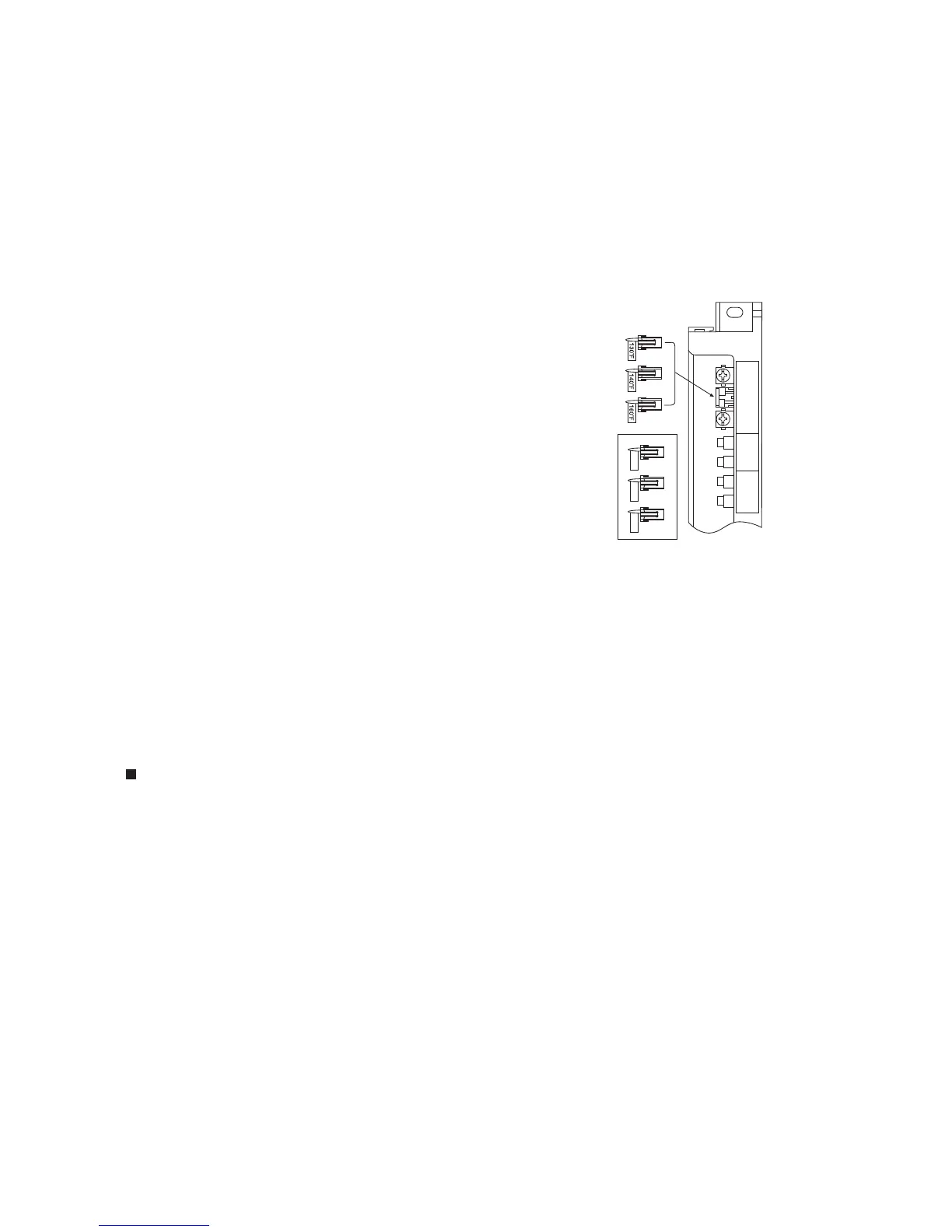
5. Connect the temperature selection wire labeled "160°F" to
the circuit board as shown on the right.
6. Replace the front cover of the water heater (4 screws).
7. Reconnect electrical power to the water heater, but do not turn it on.
8. Press and hold the FLOW METER ALARM SET button until a sound is
heard (2 sec.) and "120°F" appears on the display.
9. Set the upper limit of the hot-water supply temperature to
125°F, 130°F, 135°F, 140°F, 145°F, 150°F, 160°F using
the UP and DOWN setting buttons.
10. To put the water heater back into operation, press the ON/OFF button on the remote controller.
To keep the water heater o, let the unit sit for 30 sec. to return to the original display.
UP
DOWN
EMW
Remote
Controller
Changing Default Temperature Setting
* The water heater has been factory set to allow a maximum temperature setting of 120°F.
To access higher temperature settings through the remote controller, follow the below steps.
* When using the remote controller with a multi-system controller, the maximum temperature of the
water heater can be set up to 180°F without making the following settings.
t When changing the temperature, make sure to conrm with the customer that the temperature of
the hot water will be very high and that there is a risk of scalding.
t Water temperatures above 125°F can cause severe burns or death from scalding.
<When setting the maximum temperature to 125-140°F>
1. Turn the water heater o by pressing the ON/OFF button on the remote controller.
2. Press and hold the FLOW METER ALARM SET button until a sound is heard (2 sec.) and 120°F
appears on the display.
3. Set the upper limit of the hot-water supply temperature to 125°F, 130°F, 135°F or 140°F using the
UP and DOWN setting buttons.
4. To put the water heater back into operation, press the ON/OFF button on the remote controller.
To keep the water heater o, let the unit sit for 30 sec. to return to the original display.
<NR98/NC199/N-0751M Series, NCC199/N-0841MC Series,
NRC199/N-0842MC Series, NR111/NC199/N-0931M Series>
<continued from previous page>
<When setting the maximum temperature to 125-140°F>
1. Turn the water heater o by pressing the ON/OFF button on the remote controller.
2. Press and hold the FLOW METER ALARM SET button until a sound is heard (2 sec.) and "120°F"
appears on the display.
3. Set the upper limit of the hot-water supply temperature to 125°F, 130°F, 135°F or 140°F using the
UP and DOWN setting buttons.
4. To put the water heater back into operation, press the ON/OFF button on the remote controller.
To keep the water heater o, let the unit sit for 30 sec. to return to the original display.
130°F
135°F
140°F
NR50-OD


 To Next Page