16
How to use Control Panel- User mode
Chapter3.–UnitOperation
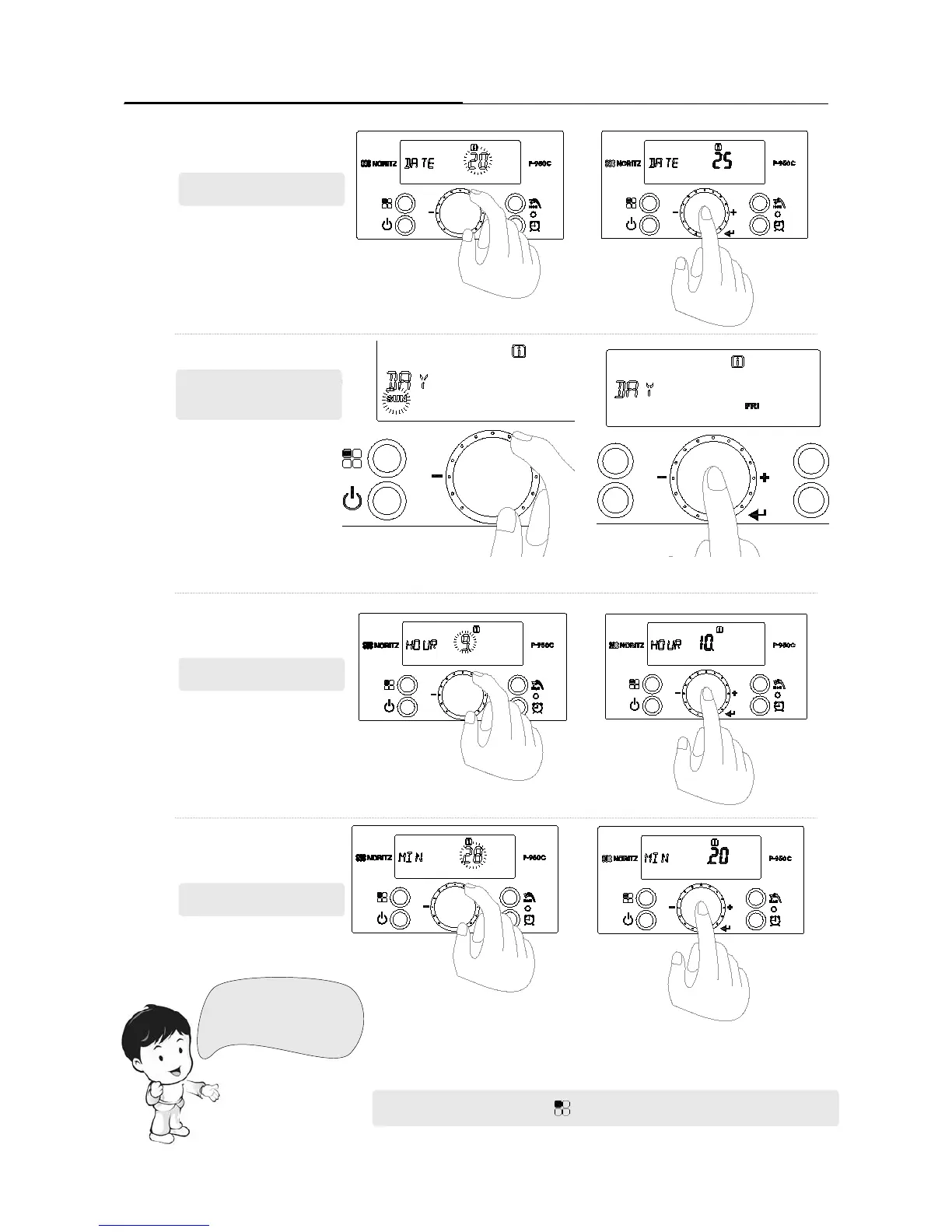
Press the dial
button to store
the setting.
Press the dial
button to store
the setting.
Press the dial button to store the setting.
Press the dial button to store the setting.
3. Setting day : 25
5. Setting hour : 10
6. Setting minute : 20
4. Setting day of the
week: Friday
Set the ‘day’ by turning the dial button. (Only the
ashing number can be changed.)
Set the ‘hour’ by turning the dial button. (Only the
ashing number can be changed.)
Set the ‘minute’ by turning the
dial button. (Only the ashing
number can be changed..)
Set the ‘day of the week’ by turning
the dial button. (Only the ashing
number can be changed.)
Press‘FunctionButton()’toreturntonormaloperationmode.
[ For example ]
2014 / July / 25 / Friday /
10 hour / 20 min





 To Next Page