27
How to use Control Panel - User mode
Chapter 3. – Unit Operation
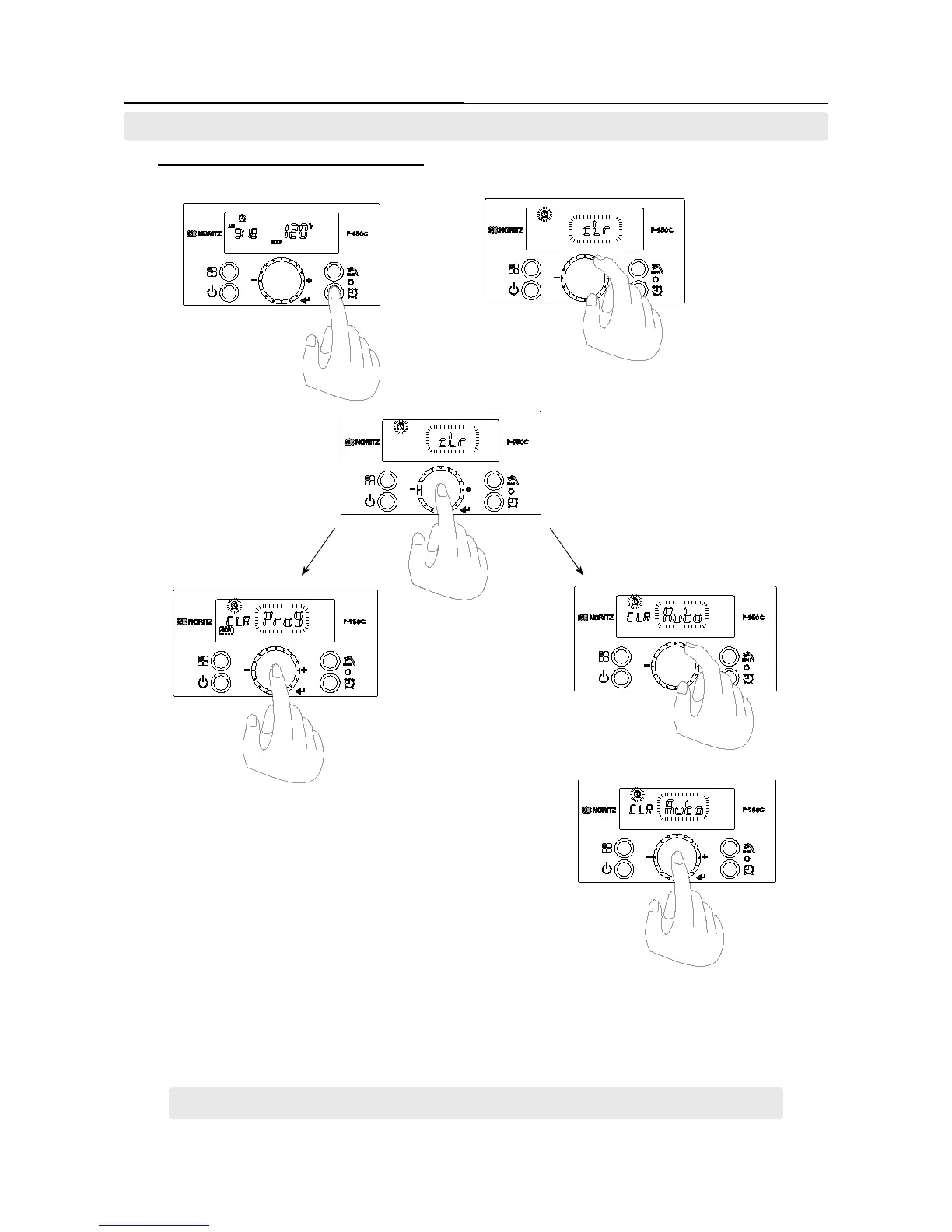
7-3 Recirculation function initialization setting
- Reserved contents can be initialized.
1. Press the ‘Recirculation
Timer Button’ when display
screen is turned on.
2. [Act] character is ashing on display screen. Turn the
‘Dial Button’ clockwise to select the [cLr] character.
3. Press the ‘Dial Button’ when [cLr] is
ashing character on display screen.
4A-1 Press the ‘Dial Button’ to initialize the program
recirculation setting when the [Prog] character is
ashing on the display screen.
4A-2 Press the ‘Recirculation Timer Button’ to return
to the previous step after setting completion.
4B-1 Turn the ‘Dial Button’ to [Auto]
ashes. Then press the ‘Dial Button’ to
initialize the auto recirculation setting.
4B-2 Press the dial button to complete the initialization setting for
initializing the auto reservation setting when the [Auto] character is
ashing.
4B-3 Press the ‘Recirculation Timer Button’ to return to previous
step after setting completion.
If no hot water is used for more than 30 hours, the recirculation program will be stopped.
7. Setting the ‘Recirculation Timer’. (Recirculation Initialization)





 To Next Page