26
How to use Control Panel - User mode
Chapter 3. – Unit Operation
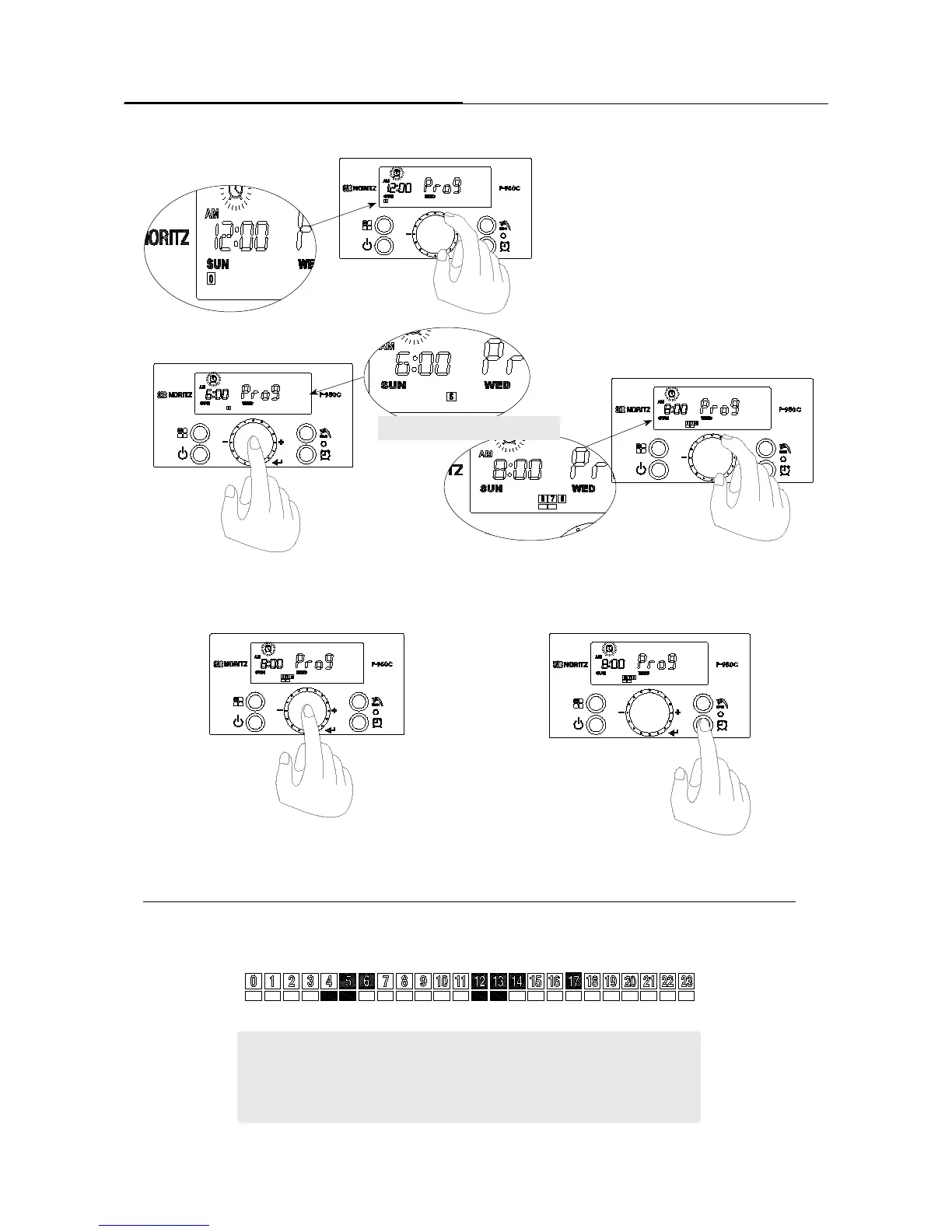
4-1 Time is stated from 12:00. Turn the ‘Dial
Button’ clockwise, time on the display screen is
changed in increments of 30 minutes.
4-2 Press the ‘Dial Button’ after locating the
desired start time.
5. If all of settings are stored, press the ‘Recirculation Timer
Button’ to return to initial mode.
[TIP for the ‘Recirculation Timer’]
- Press the dial button (less than 1 second) : Selecting a start time and an end time
- Turn the dial button : selecting a number of times
- Press the dial button (more than 2 seconds) : storing the reservation time setting
4-4 Press the ‘Dial Button’ for approximately 2 Seconds to store.
ex) Setting time : 4:30 ~ 6:00 , 12:00~14:00 . 17:00~17:30.
4-3 Turn the ‘Dial Button’ to ending time. Then-
press the ‘Dial Button’ after locating the dial button
by desired time.
Setting from 6 to 8 O’clock





 To Next Page