20
How to use Control Panel- User mode
Chapter3.–UnitOperation
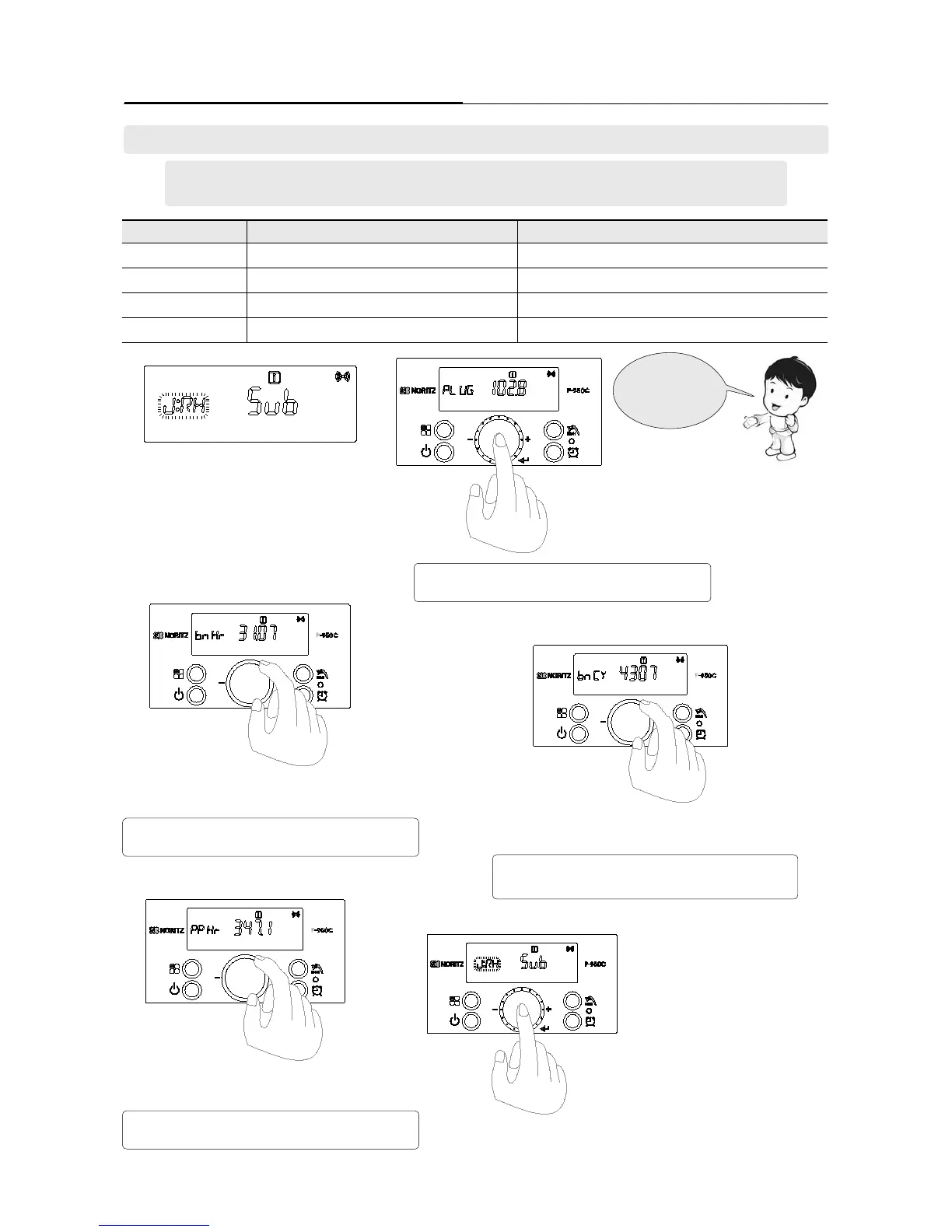
1. Select the ‘[J:RH] mode’ by turning the
‘Dial Button’ in ‘User mode’.
2. If ‘Dial Button’ is pressed in ‘[J:RH]
mode’, ‘[J:RH]’ character is changed to
[PLUG] character.
[PLUG] : Means the time of the power supply.
EX) 102.8 → 102.8 X 1000 = 102,800 hour
[bnHr] : Means the time of the combustion.
EX) 31.07→ 31.07 X 1000 = 31,070 hour
[PPHr] : Means the time of the PUMP operating
EX) 347.1→ 347.1 X 1000 = 347,100 hour
[bnCY] : Means the number of the combustion.
EX) 4307→ 4307 X 1000 = 4,307,000 times
3. Turn the ‘Dial Button’ clockwise to be
changed to ‘[bhHr] mode’
4. Turn the ‘Dial Button’ clockwise to be
changed to ‘[bnCY] mode’.
5. Turn the ‘Dial Button’ clockwise to be
changed to ‘[PPHr] mode’.
6. Press the ‘Dial Button’ to return to ‘User mode’.
RunningHistory
mode
Screen Display Operation Description
PLUG Power-on time
EX) 102.8 → 102.8 X 1000 = 102,800 hour
bnHR Combustion time
EX) 31.07→ 31.07 X 1000 = 31,070 hour
bnCY Number of the combustion
EX) 4307→ 4307 X 1000 = 4,307,000 times
PPHr Pump running time
EX) 347.1→ 347.1 X 1000 = 347,100 hour
5. How to check the ‘Running History’. [J:RH]
- Refer to page 18 ‘User mode’ setting method and set to ‘User mode’.
- Function can be checked by turning the dial button.





 To Next Page