21
How to use Control Panel - User mode
Chapter3.–UnitOperation
UnitSetting
mode
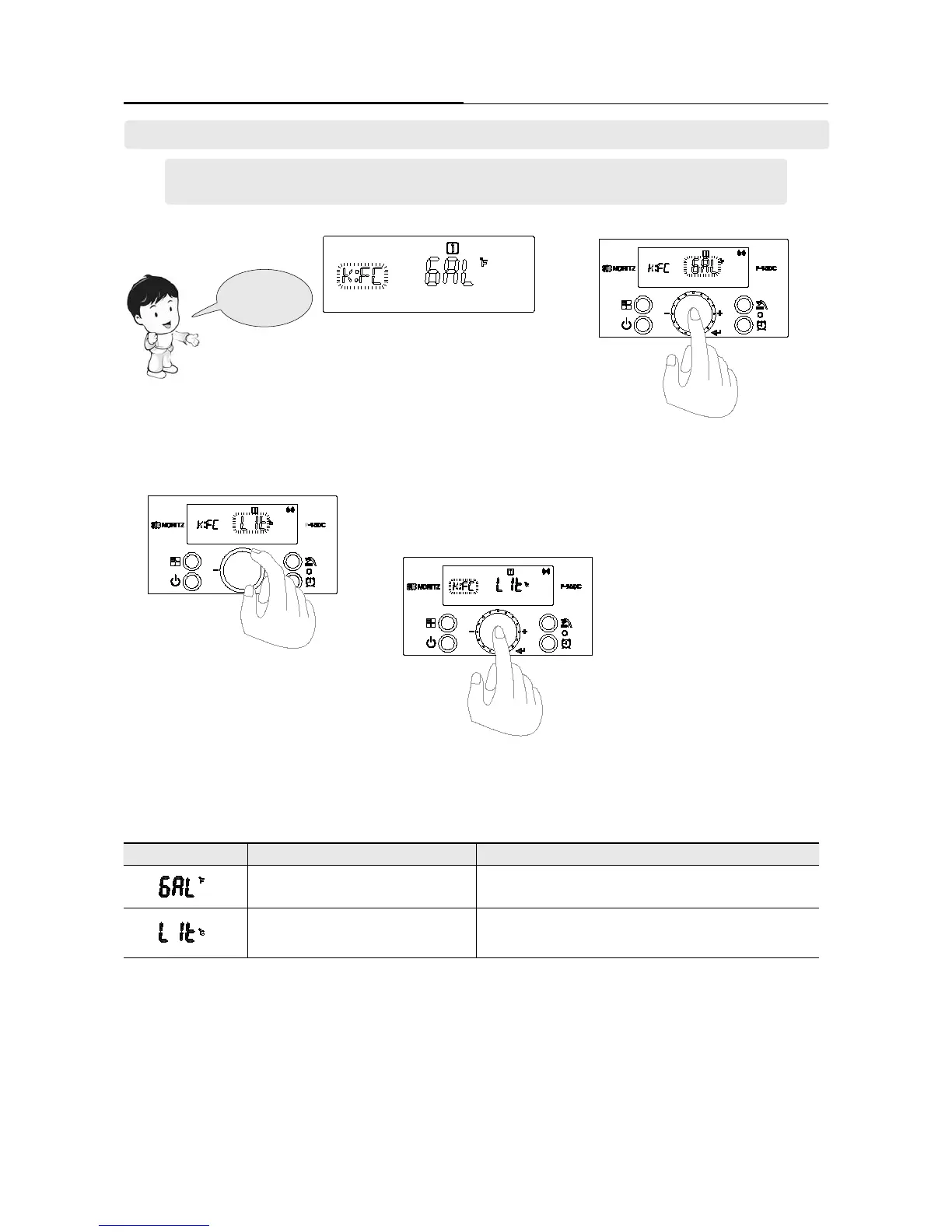
1. Select the ‘[K:FC]’ by turning the ‘Dial
Button’ in ‘User mode’.
3. Turn the ‘Dial Button’ counter-clockwise
to ‘LIt’, the units displayed on the display
screen are LPM and Celsius.
4. Units currently displayed on the display
screen are determined when you press ‘Dial
Button’. And return to ‘User mode’.
2. If ‘Dial Button’ is pressed in ‘[K:FC]’, ‘GAL’ character
is ashing. (If ashing character is ‘GAL’, units dis-
played on the display screen are GPM and Fahrenheit.)
Screen Display Operation Description
Unit : Gallon & Fahrenheit
All of the units displayed on the display screen are GPM & °F
Unit : Liter & Celsius
All of the units displayed on the display screen are LPM & °C
6. Setting the ‘Unit’. [K:FC]
- Refer to page 18 ‘User mode’ setting method and set to ‘User mode’.
- Function can be checked by turning the dial button.





 To Next Page