25
How to use Control Panel - User mode
Chapter 3. – Unit Operation
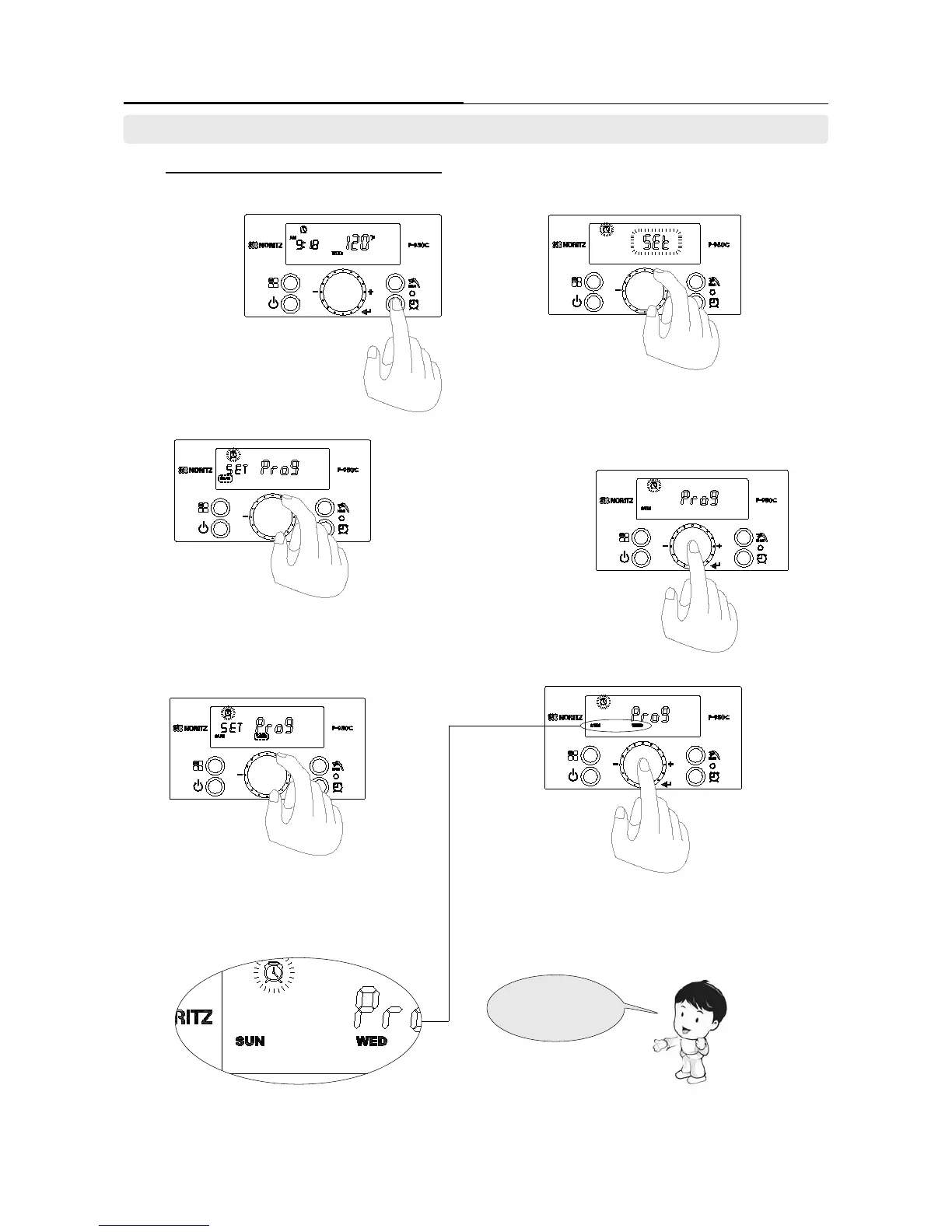
7-2 Set the ‘Recirculation Timer’ in ‘Prog’ mode.
- Customer can directly set the day and time in ‘Recirculation Mode’.
1. Press the ‘Recirculation
Timer Button’ while power
of the display screen is
turned on.
2. If [Act] character is ashing, select the
[SEt] by turning the ‘Dial Button’. The press
‘Dial Button’ to enter the ‘Setting mode’.
3-1 Set the day in ‘[Prog] mode’ by turning
the ‘Dial Button’.
3-3 Turn the ‘Dial Button’ until next desired
day appears on display screen.
Repeat this step for more days.
3-2. If desired day appears on the
display screen, press the ‘Dial Button’
to select and store.
3-4 Press the ‘Dial Button’ to store when desired
days are displayed. Press and hold ‘Dial Button’
for approximately 2 Seconds to enter the time
‘Setting mode’.
Chose Sunday and
Wednesday.
7. Setting the ‘Recirculation Timer’. (Recirculation_Program Mode)





 To Next Page