24
How to use Control Panel - User mode
Chapter 3. – Unit Operation
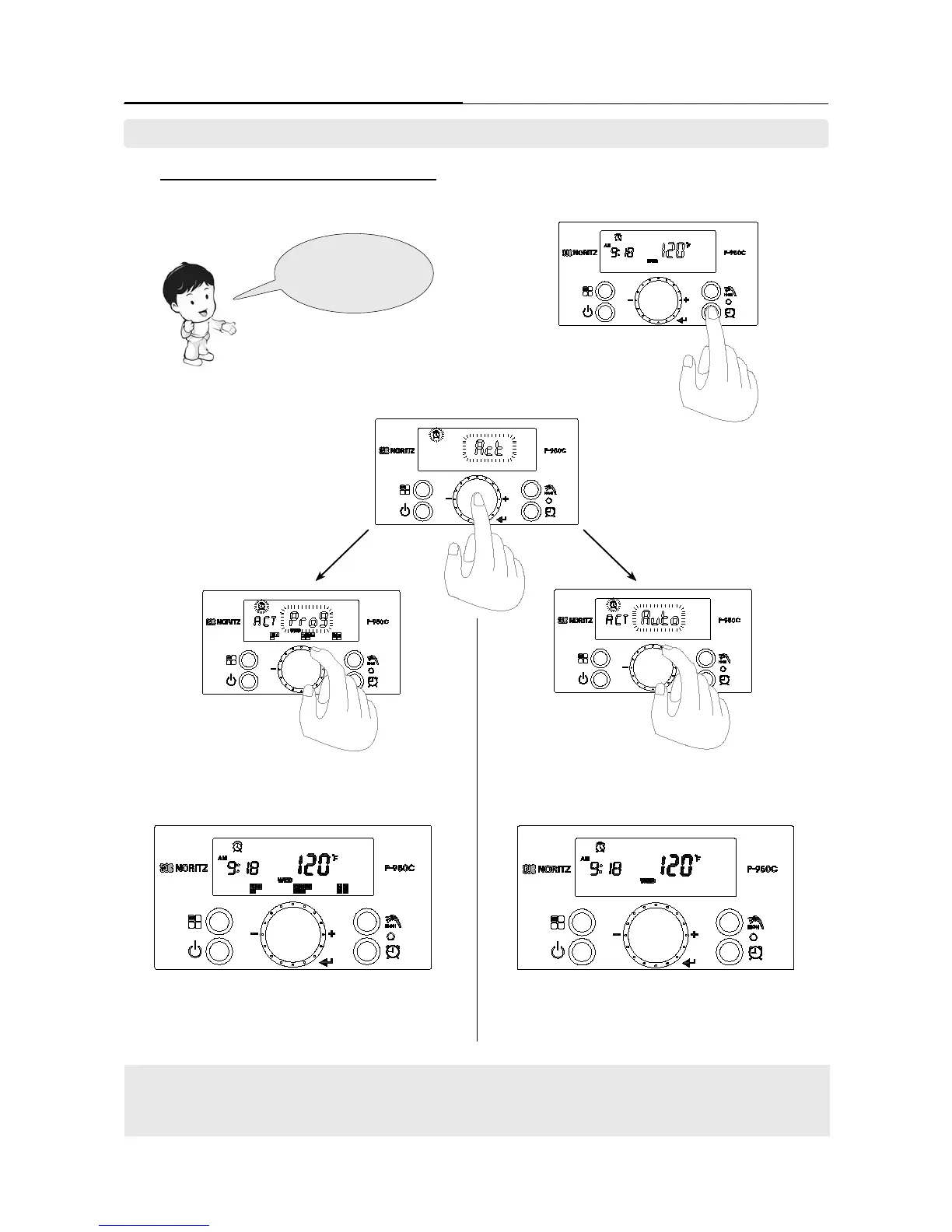
7-1 Set the ‘Recirculation Timer’ in ‘Auto’ mode.
- Users can select between ‘Programming mode’ or ‘Auto’ mode
Select the
(Auto or Prog) in
‘Recirculation Timer’
mode.
1. Press the ‘Recirculation Timer Button’ when
power of the display screen is turned on.
2. ‘Recirculation Timer Icon’ and [Act]
character are ashing on display screen.
Press the dial button to activate the
‘Recirculation TImer’ function.
3-A. Select the [Prog] by turning the ‘Dial Button’ clockwise to
set the program. Then press the ‘Dial Button’ to set.
4-A. Pre-reserved day and time are displayed when program
function is selected.
[Auto Function] :
If ame is detected by customer usage, that time is stored. The following day, the water pattern from the
previous day is used to control the pre-heat and provide prompt hot water.
4-B. Recirculation function is operated from next day after
automatically recognizing the user’s patterns when auto
recirculation function is selected.
3-B. Select the [Auto] character by turning the ‘Dial Button’
counterclockwise to set the auto mode. Then press the ‘Dial
Button’ to set.
7. Setting the ‘Recirculation Timer’. (Recirculation _Auto (Self Learning Mode))





 To Next Page