23
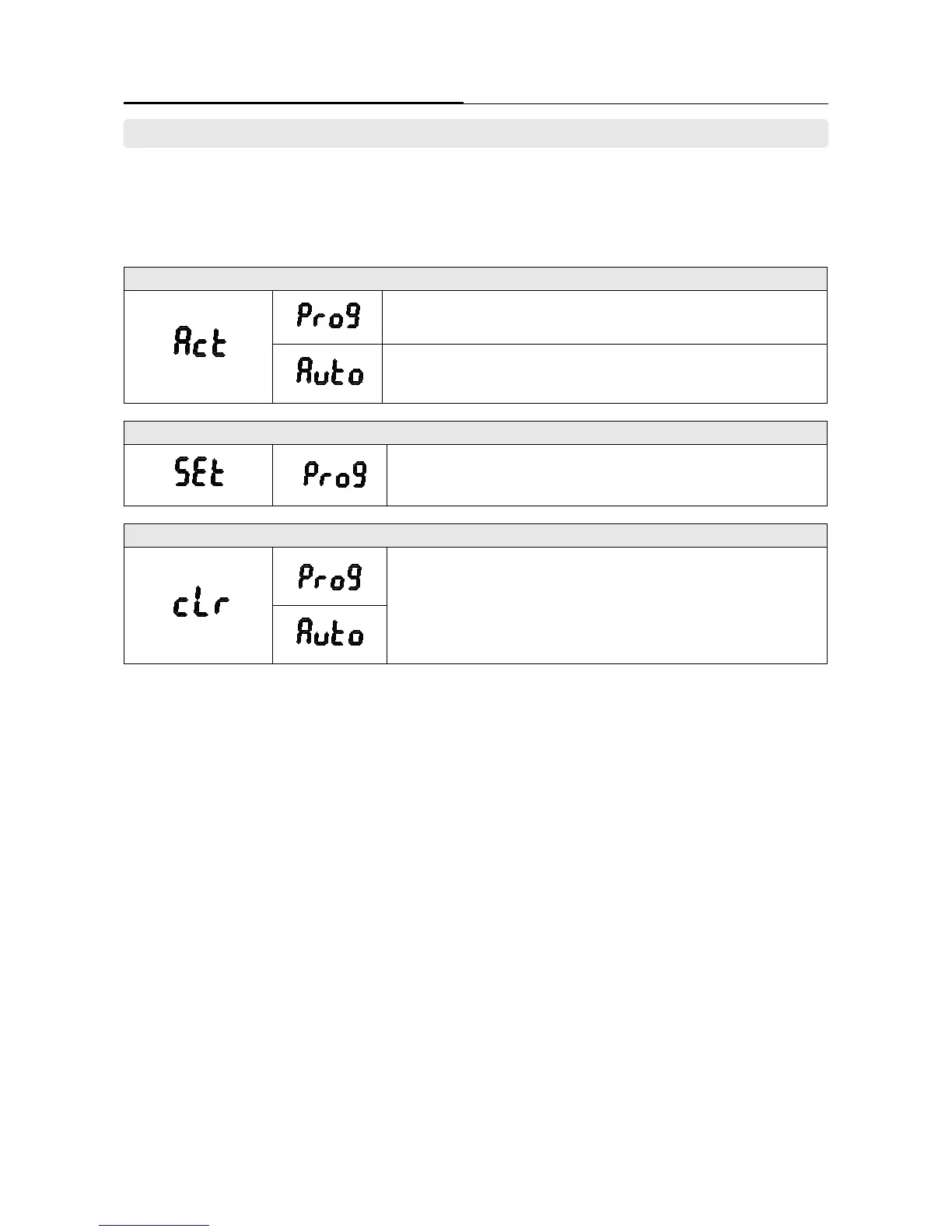
STEP 1. To set the ‘Recirculation Timer’ Type
Customized reservation function setting. (Day, Time)
Selecting the program mode must be set in ‘STEP 2’ for details.
Unit memorizes the user’s hot water usage patterns.
Uses info to generate setting.
Refer to the ‘page 24’ for details. (Self Learning)
STEP 2. To set the ‘Recirculation Timer’.
Customized reservation function setting. (Day, Time)
Refer to the ‘25~26 page’ for details.
STEP 3. ‘Recirculation Timer’ function initialization setting
‘Prog’ or ‘Auto’ ‘Recirculation timer’ function initialization.
Refer to the ‘27 page’ for details.
How to use Control Panel - User mode
Chapter 3. – Unit Operation
► Table for ‘Recirculation Timer’ setting.
‘Recirculation Timer’ function has three settings ([Act], [SEt], [cLc]). ‘[Act] mode’ is to set the ‘Recirculation Timer’, ‘[Set] mode’ is to
manually set the day and times of a pattern appropriate to the consumer and ‘[cLc]’ mode is to initialize the setting.
7. Programming to use the Recirculation System





 To Next Page