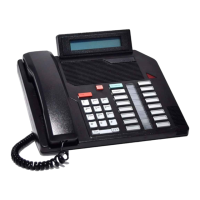
The Norstar M7324 is a telephone designed for business environments, offering a range of features for efficient call management and system interaction. It is part of the Norstar line of products, known for their robust functionality and integration within business communication systems.
Function Description:
The Norstar M7324 serves as a primary communication device, facilitating internal and external calls, managing multiple lines, and providing access to various system features. Its core function is to enable users to make, receive, and manage telephone calls effectively within a business setting. The phone is equipped with a display that provides visual feedback, guiding users through features and displaying call information. Memory and line buttons allow for quick dialing and feature activation, enhancing productivity. The device supports both handset and handsfree operation, offering flexibility in how calls are handled.
Important Technical Specifications:
While specific technical specifications like dimensions, power consumption, or exact display resolution are not detailed in the provided pages, the manual highlights several functional aspects that imply certain technical capabilities. The phone supports multiple lines, indicated by "Memory and line buttons" and "External calls using numbered Line buttons." The display is capable of showing "time, date, call information," and "display button instructions," suggesting a multi-line character display. The mention of "Release 10 (REL 10) and higher comply with the Americans with Disabilities Act (ADA)" indicates that the phone adheres to accessibility standards, which might include features like hearing aid compatibility or visual indicators for calls. The system relies on a "System Coordinator" for programming, implying a networked or PBX-based architecture for its operation.
Usage Features:
The Norstar M7324 offers a comprehensive set of usage features designed to streamline communication:
- Display and Display Buttons: The display is central to the phone's usability, showing call information, time, date, and guiding users through features. The "lower line of the display is reserved for display button instructions," making feature access intuitive. Display buttons are context-sensitive, changing their labels based on the active feature.
- Memory and Line Buttons: These buttons are crucial for one-touch dialing, feature operation, and line access. They can be programmed to store frequently dialed numbers (external or internal autodial) or activate specific features. Indicators beside these buttons provide visual cues, such as a flashing light for a line on hold or an indicator for a busy internal number.
- Call Handling:
- Making Calls: Users can make internal calls using Intercom or extension buttons and external calls using numbered Line buttons or extension buttons with an external line access code.
- Dialing without Lifting the Handset: This feature allows users to dial a call first and then pick up the receiver or switch to handsfree once the call is answered.
- Holding Calls: Calls can be put on hold manually using the "Hold" button, with a flashing indicator beside the line button. Calls are also automatically put on hold when switching between lines.
- Handsfree Operation: The "Handsfree" button activates the phone's built-in microphone and speaker, allowing for calls without using the handset. Users can switch between handsfree and handset operation.
- Mute Function: The "Mute" button allows users to turn the microphone ON or OFF during a call, useful for private conversations or minimizing background noise.
- Personalization:
- Adjusting Display Contrast: Users can adjust the display contrast using the "Feature *7" code and the UP/DOWN display buttons.
- Selecting Ring Type and Volume: The phone allows users to choose from different ring types (1, 2, 3, or 4) and adjust the ring volume while the phone is ringing, using "Feature *6" and the volume control.
- Programming Memory Buttons: This advanced feature allows users to customize their phone by programming memory buttons for:
- External Autodial: Storing external telephone numbers for one-touch dialing.
- Internal Autodial: Storing internal extension numbers for quick access.
- Features: Assigning feature codes to buttons for rapid activation of system functionalities.
- Erasing Memory Buttons: Users can easily clear programmed memory buttons.
- Button Inquiry: A "Feature *0" function allows users to check the programming of any memory or line button, confirming its assigned function.
Maintenance Features:
The manual does not explicitly detail "maintenance features" in the traditional sense (e.g., cleaning instructions, troubleshooting steps). However, it does touch upon aspects related to system configuration and user-level checks:
- System Coordinator Role: The "System Coordinator" is mentioned as responsible for supplying internal numbers and programming "Handsfree" to the telephone, indicating that certain configurations are managed centrally rather than by individual users.
- Button Snap-on Caps: The "Button inquiry" feature suggests a user-level check to "Confirm that your memory and line buttons have the correct snap-on caps by checking their programming." This implies that the physical caps on the buttons might be interchangeable or require verification to match their programmed functions, which could be considered a minor user-level maintenance or configuration check.
- Software Release Compliance: The note about "M7324 telephones Release 10 (REL 10) and higher comply with the Americans with Disabilities Act (ADA)" indicates that software updates or specific releases ensure compliance with accessibility standards, which is a form of ongoing system maintenance or upgrade.
In summary, the Norstar M7324 is a feature-rich business telephone designed for efficiency and user customization within a managed communication system. Its intuitive interface, flexible call handling options, and programmable buttons make it a valuable tool for daily business operations.

 Need help?









 To Next Page

 General