EasyManua.ls Logo

Nortel M3110 - User Manual

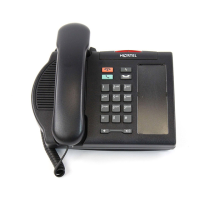
Nortel M3110
506 pages
Print Icon
To Next Page IconTo Next Page
Loading...
Nortel Communication Server 1000
Nortel Communication Server 1000 Release 4.5
Telephones and Consoles
Description, Installation, and Operation
Document Number: 553-3001-367
Document Release: Standard 3.00
Date: August 2005
Year Publish FCC TM
Copyright © Nortel Networks Limited 2005
All Rights Reserved
Produced in Canada
Information is subject to change without notice. Nortel Networks reserves the right to make changes in design
or components as progress in engineering and manufacturing may warrant.
Nortel, Nortel (Logo), the Globemark, This is the Way, This is Nortel (Design mark), SL-1, Meridian 1, and
Succession are trademarks of Nortel Networks.
Title page

Table of Contents

Questions and Answers

  • E
    Elizabeth MaxwellAug 18, 2025
    How to fix Nortel M3110 Telephone that does not work?
    • C
      Carol BrownAug 18, 2025
      If your Nortel Telephone does not work, first try unplugging the line cord from the telephone and then plugging it back in. If the telephone uses external power, verify that the transformer or closet power supply is properly connected and that the power supply board is correctly installed. If your telephone does not use external power, ensure that jumpers connect the bottom two sets of pins on the P1 connector located on the main circuit board.
  • J
    Jessica CrawfordAug 20, 2025
    What to do if Nortel Telephone display does not work?
    • I
      Isaiah HarrisAug 21, 2025
      To troubleshoot a Nortel Telephone's display that is not working, start by unplugging the line cord and plugging it back in. If it's an M2008 model, ensure the transformer is plugged in or the closet power is connected, and that the power supply board is properly installed. Also, check that the display ribbon cable is correctly connected to the display board and not pinched. Verify that the display board is securely installed with a mounting screw. For M2006, M2008, and M2616 models, ensure that ADD Class of Service is configured in LD 11.
  • D
    Donald Jones DVMAug 23, 2025
    How to troubleshoot Nortel M3110 Telephone Key Expansion Module that does not work?
    • J
      judybushAug 23, 2025
      If the Key Expansion Module for your Nortel Telephone is not working, try these steps: Unplug and then plug the line cord back in. Ensure that the transformer is properly connected or that the closet power supply is connected. Also, check that the power supply board is correctly installed and that the ribbon cable connecting the telephone and the Key Expansion Module is properly routed and not pinched.
  • S
    shaunmillerAug 26, 2025
    What to do if Nortel M3110 MCA does not operate at all?
    • D
      Derrick CollierAug 26, 2025
      If your Nortel Telephone's MCA does not operate, verify if the LED on the back of the telephone is flashing. If the LED is steadily lit, the MCA might need system configuration or could be faulty. If the LED is unlit, the MCA requires external power. Ensure the cable from the terminal or PC is connected to the MCA, and check the data parameters for the display. Confirm that the transformer is plugged in or the closet power is connected. Ensure the cable between the MCA and the telephone is connected and not pinched. Finally, make sure the power card is correctly installed and set to Verify or V.35, depending on your setup.
  • L
    Laura BondAug 28, 2025
    What to do if all LCDs flash and Nortel M3110 does not function?
    • Q
      qevansAug 28, 2025
      If all LCDs on your Nortel Telephone are flashing and the telephone is not functioning, try pressing the Release (Rls) key. If that doesn't work, unplug the line cord from the telephone and then plug it back in.
  • B
    Brittany WilliamsAug 30, 2025
    How to fix Nortel M3110 Telephone External Alerter that does not work?
    • P
      pgreenAug 30, 2025
      If the External Alerter on your Nortel Telephone does not work, ensure that the External Alerter Board is installed properly. Check that the connections between the alerting device and the telephone connecting block are correct, and verify that the jumpers are placed correctly on the pins on the External Alerter Board. Also, ensure that the transformer is plugged in or the closet power is connected, and that the power supply board is properly installed.
  • A
    Angel BranchSep 2, 2025
    Why does Nortel M3110 show CALL CONNECTED SESSION STARTS followed by RELEASE?
    • S
      Sarah RodgersSep 2, 2025
      If you encounter the prompt CALL CONNECTED. SESSION STARTS followed by RELEASE on your Nortel Telephone, check the configuration parameters of the far end data device. If these parameters do not match those of the MCA, the call will be dropped. Adjust the parameters of your MCA to match those of the far end data device.
  • J
    jamesmooreSep 4, 2025
    Why does Nortel M3110 Telephone wobble?
    • M
      Matthew GreenSep 4, 2025
      If your Nortel Telephone wobbles, make sure that all cords are properly routed through the channels in the footstand. Ensure that the footstand is firmly seated on the telephone and that all feet are firmly seated in the footstand.
  • M
    Megan WilsonSep 7, 2025
    What to do if Nortel Telephone connected to host computer, but no response when trying to log on?
    • D
      Dana McdonaldSep 7, 2025
      If you are connected to a host computer but get no response when trying to log on with your Nortel Telephone, first release the call. Then, turn on Remote Loopback and make the call again. Type some characters at the terminal. If the characters echo back and appear on the terminal, the problem is with the far end data device. If the characters do not appear on the terminal, the problem is with the MCA. Contact the telephone system administrator.
  • J
    James DaughertySep 9, 2025
    What to do if Nortel M3110 shows CALLING when making a data call?
    • A
      Alexander HendricksSep 9, 2025
      If you are trying to make a data call from the initial prompt (or Main menu) in keyboard dialing on your Nortel Telephone and see the prompt CALLING, first hold down the break key(s) for two seconds, enter , and try again to make the data call. If the problem persists, the MCA is probably disabled. Contact the telephone system administrator.

Summary

About this document

Subject overview

Provides technical information about Meridian analog, digital, and modular telephones and attendant consoles.

Applicable systems

Lists the Communication Server 1000 and Meridian 1 systems to which this document applies.

How to get help

Details on obtaining support from Nortel via web or phone.

Attendant consoles

Attendant consoles introduction

Describes the role of attendant consoles in telephone switching systems and the M2250 console.

Engineering codes

Details engineering codes for M2250 attendant console models and related equipment for ordering.

Attendant console features

Lists the key features of the M2250 attendant console, including display, keys, and modules.

Attendant console physical description

Details the physical layout, dimensions, and components of the M2250 attendant console.

M2016 S Secure Set overview

M2016 S Secure Set introduction

Introduces the M2016S telephone's design for on-hook security and its features.

M2016 S Secure Set features

Describes the M2016S features like programmable keys, display module, and on-hook security.

M2016 S Secure Set specifications

Outlines the performance specifications and environmental conditions for the M2016S telephone.

M2016 S Secure Set installation

Provides instructions for installing the M2016S telephone and its hardware options.

M 3900 telephone series description

M 3900 telephone series introduction

Describes the M3900 Series Digital Telephones and their supported features.

M3900 telephone physical description

Details the physical features and specifications of M3900 models (M3901 to M3905).

M3900 telephone features

Explains key features like Set-to-Set Messaging, Personal Directory, and Feature keys.

M3900 accessories and add-ons

Lists and describes compatible accessories and optional hardware for M3900 telephones.

M3900 installation and configuration

M3900 environmental and safety considerations

Details compliance with safety standards and operating environmental conditions.

M3900 line engineering

Specifies requirements for digital telephone line engineering, including cable and loop specifications.

M3900 telephone installation

Provides procedures for installing the M3900 Series Digital Telephone and its modules.

M3900 telephone configuration

Summarizes configuration tasks using LD commands for M3900 telephones.

M3900 Flash Download

M3900 Flash Download introduction

Explains the capability of downloading new firmware versions to M3900 telephones.

M3900 Flash Download summary of steps

Provides high-level steps for performing a flash download to M3900 telephones.

M3900 Flash Download advisements

Offers recommendations for scheduling and performing flash downloads to minimize system impact.

Digital telephones line engineering

Engineering a digital telephone line

Details requirements for selecting and engineering digital telephone lines, including cable and loop specifications.

Calculating DC Loop Resistance

Provides procedures and formulas for calculating DC loop resistance based on cable sections.

Performing Loop Diagnostic Tests

Outlines tests for foreign voltage, insulation resistance, DC continuity, and capacitance unbalance.

Analog (500;2500-type) telephones

Analog telephones introduction

Introduces analog telephones and their compatibility with the system.

Analog telephone installation and removal

Provides procedures for installing and removing analog telephones.

Designating 500-type analog telephones

Details the process for designating 500-type analog telephones.

Cross-connecting analog telephones

Details cross-connecting analog telephones on IPE modules.

Appendix A: Meridian Modular Telephones

Meridian Modular Telephones introduction

Introduces Meridian Modular Telephones and their features.

Meridian Modular Telephones physical description

Describes the physical layout and features of Meridian Modular Telephones.

Meridian Modular Telephones features and options

Lists distinctive characteristics and optional hardware for Meridian Modular Telephones.

Meridian Modular Telephones power requirements

Outlines loop power and additional power requirements for Meridian Modular Telephones.

Appendix B: Meridian Modular Telephones installation

Meridian Modular Telephones installation and removal

Details procedures for installing and removing Meridian Modular Telephones.

Designating Meridian Modular Telephones

Explains how to designate keys on Meridian Modular Telephones using feature names.

Cross-connecting Meridian Modular Telephones

Provides steps for cross-connecting Meridian Modular Telephones at the cross-connect terminal.

Appendix C: Meridian Modular Telephones add-on modules installation

Analog Terminal Adapter installation

Enables analog devices like FAX, modem, or telephone to operate simultaneously with Meridian Digital Telephones.

Meridian Communications Adapter and Programmable Data Adapter

Describes MCA and MPDA, their functional descriptions, and connection to terminals.

Installing Meridian Modular Telephone displays

Covers installation procedures for various displays on Meridian Modular Telephone sets.

Troubleshooting Meridian Modular Telephones add-on modules

Lists common problems and solutions for Meridian Modular Telephones and options.

Appendix D: M2317 telephone

M2317 telephone introduction

Introduces the M2317 Telephone's capability for simultaneous voice and data communication.

M2317 telephone feature description

Describes firmware and software features of the M2317 Telephone.

M2317 telephone physical description

Details the physical characteristics, housing, and keys of the M2317 Telephone.

M2317 telephone specifications

Outlines safety, environmental, and performance specifications for the M2317 Telephone.

Appendix E: M3110, M3310, and M3820 telephones

Meridian European Digital Telephones introduction

Introduces the Meridian European Digital Telephones series (M3110, M3310, M3820).

Meridian digital telephones physical description

Describes general features and options for Meridian digital telephones.

Meridian digital telephones features and options

Lists hardware features and optional hardware for M3820, M3310, and M3110 telephones.

M3110, M3310, M3820 configuration and installation

Details configuration procedures for M3110, M3310, and M3820 telephones using LD 11.

Meridian digital telephones specifications

Lists required specifications for Meridian digital telephones, including environmental and safety.

Nortel M3110 Specifications

General IconGeneral
BrandNortel
ModelM3110
CategoryTelephone
LanguageEnglish

Related product manuals