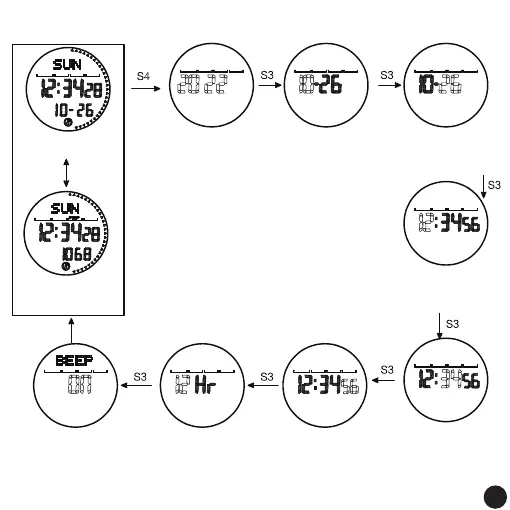
Time Setting
The year flashes,
long press or short
press,S1 increases
in value, and S2
decreases in value.
Minute flashing,
long press or short
press,S1 increases
in value, and S2
decreases in value.
seconds flashing,
press S1 or S2,
Return to zero
for the first 30
seconds,Return
to zero after 30
seconds, add 1
to the minute
12-hour flashing;
Press S1 or S2,
Toggle between
12-hour format
and 24 hours
Default 12-hour
format
The button tone
icon flashes;
Press S1 or S2,
Toggle on or off
open by default
Long press
for 3 seconds
Press S3 to return
Remark:
1. Year range: 2000 to 2099; set year, month, day,
The week is automatically generated
2. After the setting is completed, press the S3 key to
save and return to the normal time display display
screen, then press S3 key to enter the next mode
3. No button operation. Automatically return to the
normal time display screen after 60 seconds
normal time interface
Pedometer icon on
Press S1
On the step counting
interface of the day,
step counting
is turned on
month flashing,
long press or short
press,S1 increases
in value, and S2
decreases in value.
day flashing,
long press or short
press,S1 increases
in value, and S2
decreases in value.
flashing,long press
or short press,S1
increases in value,
and S2 decreases
in value.
04
04



 To Next Page