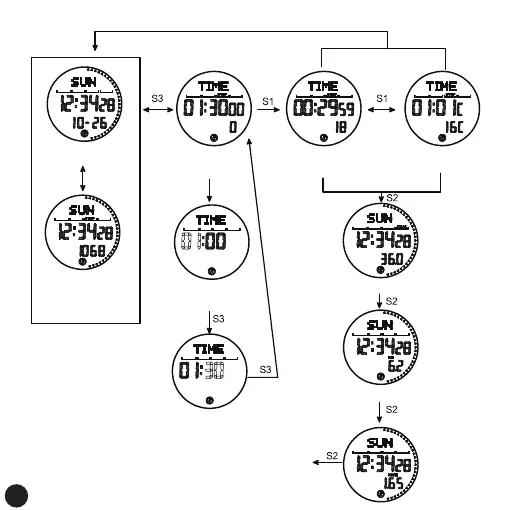
Single Step Counting Time and Remaining Time Viewing Operation
Long press
for 3 seconds
Single step counting
interfaceThe default
time is 1 hour 3 minutes
Movement target hour, digital flashing
long press or short press
S1 increases in value, S2 decreases in value
Pedometer icon
Start displaying single
exercise time
Check remaining time
Pause timing,
pedometer icon
Sports target minutes, digital flashing
long press or short press
S1 increases in value, S2 decreases in value
back to pedometer start
or the rest of the interface
calories
km
average speed
Press and hold for 3 seconds to return
normal time interface
Pedometer icon on
Press S1
On the step counting
interface of the day,
step counting
is turned on
Long press S4
for 3 seconds
11



 To Next Page