12
English
www.novasina.com
4. Screens and Functions
This chapter describes the main screens which appear on the
display of the LabTouch-aw as well as the function of the symbols.
4.1
Measurement Screen
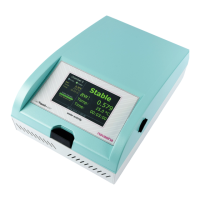
The measurement screen is displayed after the instrument has started up or if
a measurement has been started.
At most, three chambers can be displayed on this screen. Chamber 0 corre-
sponds with the internal LabTouch-aw chamber, chamber 1 and chamber 2 for
the optional, external chambers.
• The LED's (yellow or green) indicating the status of the measurement are
displayed in the fi rst line.
• If there is a fl ashing, yellow-coloured LED beside the "Analy.", a measu-
rement is on-going. If the green LED beside the "Stable" is activated,
measurement has been fi nished.
• If no measurement has been started, no LED is activated.
• The displayed temperature turn to red colour if temperature control has
been activated and the programmed temperature can not be reached.
• If a measurement has been started, the measurement time is displayed
in addition.
• The sample number is displayed as well below the measurement time if
the logging function is activated or if a protocol was stored. This allows an
allocation of the measured values to a specifi c sample.
• There is a stable indicator which changes its colour from yellow to green
and indicates the progress of the measurement. The greener the progress
bar, the closer the measurement is to be completed.
• After reaching a stable measurement value, the respective measurement
values at this point are displayed in green colour underneath the yellow,
current measurement information.
Status LED
Dynamic
CHAMBER NO
Current values
(AW and surface
temperature)
Stable RESULTS
Information bar
Status of SD card


 To Next Page
 Loading...